
This site is supported by our readers. We may earn a commission, at no cost to you, if you purchase through links.

Your basement smells musty, your guitar’s warping, and condensation keeps appearing on the bathroom mirror hours after your shower. These aren’t random annoyances—they’re symptoms of humidity swings you can’t see but definitely feel.
Small spaces magnify moisture problems because air doesn’t circulate freely, turning closets into mold factories and spare bedrooms into allergen traps.
A quality humidity gauge shows you exactly what’s happening so you can fix it before water vapor ruins your gear or your health. The right model fits where you need it, reads accurately without constant recalibration, and costs less than replacing one piece of moisture-damaged electronics.
Table Of Contents
Key Takeaways
- Small spaces magnify moisture problems because limited airflow concentrates humidity, turning closets and spare rooms into breeding grounds for mold and allergens before you notice the damage.
- Compact digital hygrometers with ±2-3% accuracy and 10-second refresh rates catch humidity spikes fast enough to prevent condensation, mold growth, and moisture damage to electronics or furniture.
- Maintaining 40-60% relative humidity protects respiratory health by keeping airways moist enough to trap pathogens while starving dust mites and preventing static discharge that fries electronics.
- Your humidity gauge loses accuracy over time—recalibrate every 6-12 months using salt solutions and replace batteries before voltage drops compromise readings.
Best Humidity Gauges for Small Spaces
You need a hygrometer that fits where you actually live—not one designed for a warehouse floor.
If you’re dealing with high humidity in a reptile enclosure or basement, a thermometer-hygrometer built for humid environments will give you readings you can actually trust.
The best units for apartments, closets, and small rooms balance accurate readings with compact footprints, usually under 4 inches across. Here are four models that deliver professional-grade monitoring without eating up your limited counter space.
1. ThermoPro Digital Hygrometer Indoor Thermometer
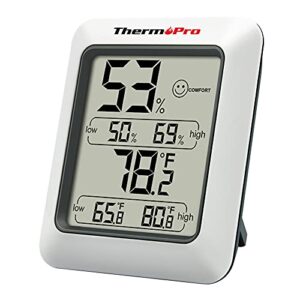
The ThermoPro digital hygrometer delivers ±2-3%RH accuracy and refreshes readings every 10 seconds—fast enough to catch humidity spikes before condensation starts.
You get a three-level comfort indicator (DRY, COMFORT, WET) that tells you at a glance when to fire up your dehumidifier. The compact 2.62H unit includes a tabletop stand and magnetic back, so you can stick it on your fridge or tuck it on a nursery shelf.
One AAA battery runs it for months, and the °F/°C selector accommodates both measurement preferences.
| Best For | Homeowners who need reliable humidity monitoring to manage indoor air quality, protect musical instruments or cigars, or decide when to run humidifiers and dehumidifiers. |
|---|---|
| Battery Type | AAA |
| Dimensions | 0.84″W x 2.62″H |
| Weight | 0.06 kg |
| Color | White |
| Brand | ThermoPro |
| Primary Use | Humidity monitoring |
| Additional Features |
|
- Updates every 10 seconds with ±2-3% humidity accuracy, catching moisture changes before mold or condensation start
- Comfort indicator shows DRY/COMFORT/WET zones at a glance—no guessing when to adjust your humidifier
- Compact magnetic back and stand let you mount it anywhere (fridge, nursery, greenhouse) on a single AAA battery
- LCD display may fail after a year, causing numbers to disappear or fade
- Not weatherproof—indoor use only, so skip it for covered patios or garages
- Battery life varies widely despite typical 12 month claims
2. AcuRite Digital Thermometer Hygrometer Monitor
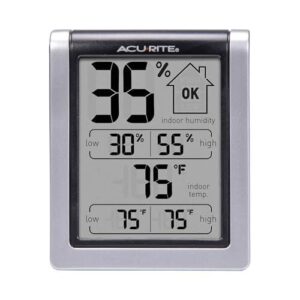
AcuRite’s model 00613B packs the same functionality into an even smaller footprint—3″ H × 2.5″ W × 1.3″ D and just 3.2 ounces. The LCD tracks current conditions plus 24-hour high/low records for both temperature (32–122 °F) and humidity (20–99% RH), so you can spot overnight swings that trigger mold.
Its magnetic backing and integrated keyhole give you three mounting choices: desk, fridge, or wall. One AA battery keeps it running, and the humidity-level icon warns you when levels drift out of the 40–60% safe zone.
| Best For | People who want a compact, affordable way to track indoor temperature and humidity without needing fancy features or smartphone connectivity. |
|---|---|
| Battery Type | AAA Lithium |
| Dimensions | 1.77″ x 1.61″ x 0.43″ |
| Weight | 1.23 oz |
| Color | Not specified |
| Brand | Not specified |
| Primary Use | Power supply |
| Additional Features |
|
- Tracks 24-hour highs and lows so you can see how conditions changed overnight or while you were out
- Multiple mounting options (magnetic, keyhole, or tabletop) make it easy to place anywhere
- Humidity icon gives you a quick visual warning when levels get too high or low
- Only stores daily records for 24 hours, so you can’t look back at last week’s data
- Magnetic backing can lose grip over time and may not stick well to all metal surfaces
- Accuracy may suffer in extreme conditions, so it’s not ideal for situations where precision really matters
3. AcuRite Wireless Temperature Humidity Sensor
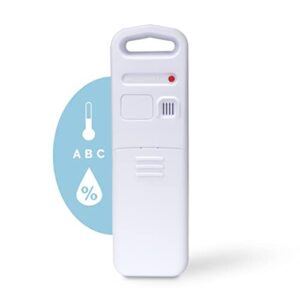
When you need to monitor separate zones without running cables, the wireless sensor does the job. It transmits readings up to 165 feet to compatible AcuRite displays, letting you track a basement crawl space or detached garage from your main living area.
At 4.8″ × 1.6″ × 0.9″ and 2.4 ounces, it mounts anywhere with the integrated hanger. Expect 3.5–6 months per battery swap using two AA cells. Verify compatibility with your display before ordering—not all AcuRite stations accept this sensor.
For reptile owners aiming to dial in their enclosure’s climate, understanding humidity needs for reptiles ensures this sensor’s accuracy translates into healthier conditions for your pet.
| Best For | Homeowners who want to monitor temperature and humidity in multiple locations—like basements, garages, or outdoor spaces—without running wires. |
|---|---|
| Battery Type | Hardwired |
| Dimensions | 5.75″D x 15″W x 15″H |
| Weight | 10.15 lbs |
| Color | Galvanized steel |
| Brand | Not specified |
| Primary Use | Ventilation |
| Additional Features |
|
- Wireless range up to 165 feet lets you track remote areas from your main display
- Small and lightweight with a built-in hanger for easy mounting anywhere
- Works with AcuRite Access for smartphone monitoring and DIY setups like Home Assistant
- Not compatible with all AcuRite stations, so you’ll need to verify before buying
- Batteries last only 3.5–6 months and aren’t included
- May struggle in extreme weather or with signal interference from other devices
4. La Crosse Weather Station
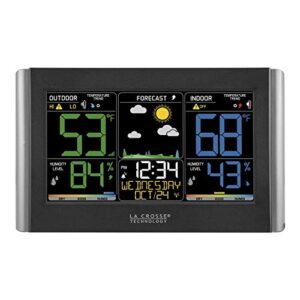
La Crosse’s C85845-INT steps up from single-room sensors with a complete backyard system: indoor/outdoor temperature, humidity, wind, and rain on one 8.98″ × 5.43″ display.
The wireless outdoor sensor reaches 300 feet and logs high/low values automatically. You get dew point, heat index, and customizable alerts—useful when your small space connects to a patio or balcony you’re monitoring.
AC-powered with three-AA backup means no mid-winter blackout data loss. Buttons labeled on the back frustrate wall-mount users, though.
| Best For | Apartment dwellers with patios or balconies who want comprehensive weather tracking both indoors and outdoors without paying for a subscription service. |
|---|---|
| Battery Type | Not specified |
| Dimensions | 7.1″ x 6.4″ x 10.2″ |
| Weight | 2.16 lb |
| Color | Not specified |
| Brand | Not specified |
| Primary Use | Humidification |
| Additional Features |
|
- Wireless outdoor sensor reaches 300 feet and tracks temperature, humidity, wind, and rain all in one system
- Records high/low values automatically with customizable alerts for temperature and humidity thresholds
- AC-powered with battery backup prevents data loss during power outages
- Button labels are printed on the back, making them hard to read when the unit is wall-mounted
- Some users report dead or weak display segments affecting readability
- No auto-dimming feature can make the backlight too bright in certain rooms
Key Features to Consider in Compact Gauges
Not all compact hygrometers are created equal, and the wrong choice wastes money while giving you false confidence in bad readings.
The features that matter most aren’t always the ones manufacturers plaster on the box—accuracy specs, power systems, and physical design affect real-world performance more than any flashy display.
Here’s what separates reliable instruments from the junk cluttering your drawer after three months.
Digital Vs. Analog Display Options
Your choice between digital clarity and analog simplicity comes down to where you’ll mount the gauge and how you read data. Digital hygrometers like the ThermoPro TP50 deliver precise humidity meters with backlit screens—perfect for dim closets or storage nooks. Analog displays require no batteries and won’t fail during power issues, though readability factors suffer in low light.
Hybrid models split the difference, pairing a traditional dial with numeric display accuracy. For a detailed look at how readability and device context factor into display choice, see this.
Accuracy and Calibration Capabilities
Precision separates a reliable monitoring tool from a wall ornament. Look for compact humidity sensors rated within ±2% relative humidity—that’s the sweet spot for accurate readings.
Most digital hygrometers ship with factory calibration certificates, but measurement uncertainty drifts over time. Manufacturers recommend recalibrating every six to twelve months using humidity standards like salt solutions to maintain sensor accuracy and verify your calibration intervals keep reliable monitoring on track.
Size, Portability, and Mounting Options
Small footprints matter when you’re working with tiny living space optimization. Compact designs measuring 2 to 4 inches fit nicely on shelves without crowding your area.
You’ll find portable solutions weighing 2 to 4 ounces that slip between rooms easily.
Mounting types include adhesive strips for wall placement, magnetic backings for metal surfaces, and brackets with 3-inch spacing for secure indoor thermometer installation in compact living solutions.
Battery Life and Power Requirements
Your compact digital hygrometer won’t help if the battery dies mid-reading. Lithium coin cells in models like the ThermoPro TP50 last 12 months with proper low power modes managing consumption.
Look for energy efficiency features—deep sleep cycles, adjustable logging intervals, and display dimming—that extend battery life without sacrificing humidity control.
Rechargeable units offer 2 to 5 years between charging cycles if you maintain proper battery types and care.
Benefits of Monitoring Humidity in Small Areas
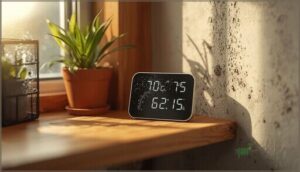
Tracking humidity in tight quarters isn’t just about comfort—it’s about protecting your space and your health. In small rooms, apartments, or closets, moisture problems escalate fast because there’s nowhere for excess humidity to go.
Here’s what proper monitoring does for you.
Preventing Mold, Mildew, and Condensation
You need indoor relative humidity between 30 and 50 percent—humidity gauges give you that precision for mold prevention and moisture management. When RH climbs above 50 percent, condensation reduction becomes critical on cold surfaces where water damage starts.
Fix leaks within 24 hours, wipe down damp spots, and use your humidity measurement data to trigger dehumidifiers before mildew takes hold. For more advanced strategies, learn about the importance of.
Improving Air Quality and Respiratory Health
Your lungs work best when relative humidity sits between 40 and 60 percent—that sweet spot keeps mucus membranes moist enough to trap pathogens while starving dust mites and mold spores.
Keep indoor humidity between 40 and 60 percent to protect your lungs and starve dust mites and mold
Humidity measurement paired with air purification cuts indoor pollution that triggers wheeze and coughing.
Track readings near your breathing zone, then adjust ventilation or run a humidistat-equipped device to dial in respiratory care for health monitoring in tight quarters.
Protecting Electronics, Furniture, and Fabrics
Maintaining 40–60 percent humidity with a humidity meter shields your gear from electrostatic protection failures and moisture control issues. High readings corrode circuit boards and warp wood—fabric preservation depends on steady indoor air quality. Low levels generate static discharge that fries hard drives.
A humidity gauge catches these swings early, extending device longevity through proper moisture management and humidity control before damage costs you hundreds.
Reducing Allergens and Moisture Damage
Beyond saving your laptop, a humidity gauge stops allergen buildup at the source. Reducing indoor humidity below 50 percent minimizes dust mite colonies—mold prevention kicks in when you catch damp spots before spores take hold.
Proper moisture management through regular humidity measurement techniques improves indoor air quality, cutting respiratory triggers while protecting walls from stains. Allergen removal starts with controlling what you can’t see.
Types of Hygrometers for Small Spaces
You’ve got four main categories to choose from when picking a hygrometer for tight quarters. Each type has specific trade-offs in accuracy, convenience, and how you’ll actually use it day-to-day.
Here’s what separates them and which situations call for each option.
Digital Hygrometers
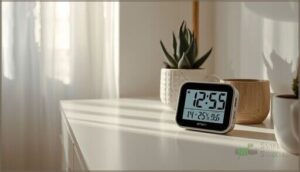
You’ll find digital hygrometers use capacitive humidity sensors paired with a microcontroller to deliver real-time readings on an LCD screen. These units shine in small spaces because they’re accurate within ±3 to ±5 percent and update every 10 to 30 seconds.
Here’s what makes them worth your money:
- Sensor technology responds instantly to moisture shifts through dielectric changes in a polymer film
- Digital accuracy beats analog models for humidity control and indoor air quality improvement
- Calibration methods let you adjust offset errors using salt solutions or factory-backed procedures
Models like the ThermoPro TP50 pack temperature displays and min-max memory into compact housings under 3 inches. Most run 6 to 12 months on AAA batteries, and backlighting helps you read humidity gauges in dim corners or closets.
Analog Hygrometers

Analog hygrometers skip the batteries and electronics entirely. A hair or synthetic filament expands when moisture rises, pulling a pointer across a calibrated dial. You’re looking at ±5 to ±10 percent accuracy—rougher than digital hygrometer readings but rock-solid reliable in dusty corners or damp basements where electronics fail.
| Analog Feature | What It Means for You |
|---|---|
| Hair-based humidity sensors | No power failures, ever |
| Mechanical components | Fewer points of breakdown |
| Manual calibration methods | Adjust with salt test kits |
| Gauge materials (brass, steel) | Decades of service life |
| Coarser analog accuracy | Good enough for most spaces |
These units need decent lighting to read the dial, and you’ll recalibrate every six months to keep humidity control tight.
Wireless and Smart-enabled Options

Wi-Fi connectivity pushes readings from wireless sensors straight to your smartphone—no walk-ins required. You’ll monitor indoor air quality from anywhere via smart home technology, set threshold alerts, and log months of data.
These smart home devices pair with Alexa or Google, trigger dehumidifiers automatically, and deliver ±2 percent sensor accuracy. Battery efficiency spans six to twenty-four months. Remote monitoring beats guesswork every time.
Wall-mounted Vs. Portable Models
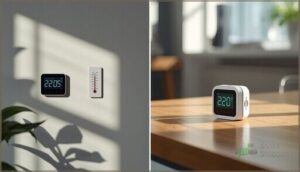
You’ll choose between wall-mounted and portable models based on how you use the space. Wall-mounted digital hygrometers deliver space savings by eliminating desk clutter, while portable gauges let you carry humidity control room to room.
Gauge placement affects display visibility and user convenience:
- Fixed mounts integrate with your indoor thermometer for permanent monitoring.
- Portable units slip into pockets for spot checks.
- Magnetic backs stick to HVAC vents for compact design.
- Tabletop stands offer flexible humidity gauges positioning.
Maintenance Tips for Accurate Humidity Readings

Your humidity gauge won’t stay accurate without proper upkeep. Most people buy these devices and forget about them until the readings drift way off target.
Here’s what you need to do to keep your gauge delivering reliable numbers year after year.
Regular Calibration and Cleaning
Your digital hygrometer won’t stay accurate forever—sensor drift is real. Recalibrate every 6 to 12 months using manufacturer-supplied salts or NIST-traceable solutions to maintain precise humidity control and monitoring.
Wipe the sensor with a lint-free cloth before each accuracy check, avoiding direct liquids that degrade membranes. High-dust environments demand cleaning every 3 months.
A humidity meter that drifts beyond ±3% needs immediate recalibration for reliable indoor climate control.
Battery Replacement and Care
Most digital hygrometers like the ThermoPro TP50 run 18 to 24 months on AAA batteries before voltage drops compromise humidity control and monitoring accuracy. Replace batteries when your indoor thermometer display dims or updates slow beyond 60 seconds.
Clean terminals with a dry cloth during swaps—corrosion prevention keeps humidity gauges reading true.
Store spare batteries in cool, dry locations to preserve charging cycles and extend battery health.
Troubleshooting Common Issues
When your digital hygrometer shows erratic humidity levels or display errors, start with fresh batteries—low voltage triggers false readings and sensor drift. If numbers freeze or jump unexpectedly, move your humidity gauges three feet from heaters and electronics to eliminate interference problems.
Recalibrate against a known reference at 40% and 75% humidity. Most calibration tips in your manual correct indoor humidity control issues within minutes.
Proper Storage When Not in Use
Pull batteries from your digital hygrometer before storage beyond four months—leakage destroys contacts and sensor longevity permanently.
Store the humidity meter in a clean, dry indoor drawer away from windows and heaters; stable environmental factors preserve calibration maintenance within factory ±2% accuracy.
Device protection means keeping it from dust, chemical vapors, and temperature swings that compromise moisture management and prevention in your indoor humidity control setup.
Frequently Asked Questions (FAQs)
What is the best humidity level for a small bedroom?
Your small bedroom needs 40 to 60 percent relative humidity for ideal sleep quality and respiratory health. Winter months sit better at 40–50 percent to prevent condensation while maintaining indoor air quality monitoring.
Can humidity gauges work in closets or bathrooms?
Moisture in the mix? Absolutely—most digital hygrometers handle closets and bathrooms well. Choose moisture-resistant housings with compact designs. Battery-powered models avoid cords. Calibration maintains accuracy despite humidity levels fluctuating from steam or condensation.
Do hygrometers measure temperature alongside humidity readings?
Most digital hygrometer models include integrated temperature sensors, displaying ambient readings alongside relative humidity.
The ThermoPro TP50 and similar indoor thermometer units pair these readings on one screen for complete monitoring accuracy.
How often should I calibrate my humidity gauge?
Calibrate every six to twelve months for most digital hygrometers and quarterly for analog models.
Harsh environments or critical applications demand checks every three to six months to maintain sensor accuracy and reliable readings.
Are smart hygrometers compatible with voice assistants?
Yes. Most smart hygrometers with Wi-Fi connectivity integrate with Alexa and Google Assistant, letting you ask for readings through voice control. The companion app bridges data to enable smart home automation and routines.
Conclusion
How much damage will another month of guesswork cost you? Humidity gauges for small spaces give you the hard data to stop moisture problems before they escalate.
Pick a model with proven accuracy, mount it where vapor collects, and check readings weekly. Your lungs, your gear, and your wallet all benefit when you control what you can measure.
Don’t wait for warped wood or visible mold—track it now.