
This site is supported by our readers. We may earn a commission, at no cost to you, if you purchase through links.

Most people set their thermostat and forget about it, assuming the number on the wall tells the whole story. It doesn’t.
Temperature alone misses half the picture—humidity is what determines whether 72°F feels like a breezy spring afternoon or a sticky, suffocating afternoon in August.
Worse, when indoor humidity creeps above 60%, mold can establish itself within 24 to 48 hours, often in spots you won’t notice until the damage is done.
Knowing how to check humidity and temperature accurately gives you real control over your home’s air quality, comfort, and long‑term health.
The tools are simple, the process is straightforward, and the difference it makes is immediate.
Table Of Contents
- Key Takeaways
- Why Accurate Humidity and Temperature Matter
- Essential Tools for Accurate Measurement
- Step-by-Step: Checking Humidity and Temperature
- Calibrating and Maintaining Measurement Devices
- Alternative Methods Without a Hygrometer
- Common Mistakes and How to Avoid Them
- Frequently Asked Questions (FAQs)
- How do I check the humidity in my home?
- Can a hygrometer measure humidity?
- How do you measure relative humidity?
- How do you test humidity without tools?
- What humidity level is bad for COPD?
- Can my phone check the humidity in my house?
- What is the best humidity for dry sinuses?
- How often should I replace my hygrometer?
- Can humidity levels affect snake shedding cycles?
- What humidity range suits different snake species?
- Conclusion
Key Takeaways
- Humidity above 60% can trigger mold growth within 24–48 hours, making it just as critical to monitor as temperature.
- A digital hygrometer placed at eye level, away from vents and heat sources, gives you the most reliable indoor readings.
- Calibrate your device every 6–12 months using the salt test method, and swap batteries annually to avoid readings drifting off by up to 10%.
- The sweet spot for healthy indoor air is 30–50% relative humidity and 68–75°F — staying in that range protects both your health and your home’s structure.
Why Accurate Humidity and Temperature Matter
air in your home affects how you feel, sleep, and breathe — more than most people realize. Getting the numbers right on humidity and temperature isn’t just about comfort; it’s about protecting your health and your space.
For tips on choosing the right humidity gauge for your living area, check out this guide to humidity gauges for small spaces.
Here’s why those readings actually matter.
Effects on Health and Comfort
When your home’s relative humidity drifts out of range, your body notices fast. Poor indoor air quality affects sleep quality, mood impact, and even energy efficiency.
- Skin dryness worsens below 30% humidity
- Thermal comfort drops above 60%
- Allergy triggers spike with dust mites
- Temperature tracking reveals comfort patterns
- Health and wellness at home improves with 30–50% relative humidity
Preventing Mold and Respiratory Issues
Beyond comfort, there’s a real health risk hiding in damp air.
Mold growth kicks in once relative humidity climbs past 60%, releasing spores that trigger coughing, throat irritation, and breathing problems.
That’s where smart hygrometer data and proper dehumidifier settings work together.
Pair those readings with solid leak detection, airflow management, and ventilation strategies, and you keep indoor air quality genuinely clean.
Maintaining proper humidity helps prevent respiratory issues.
Impact on Indoor Environments
Humidity doesn’t just affect how you feel — it quietly works on everything around you. Poor indoor climate control puts your home’s structure, air, and energy bills under real strain.
Natural light benefits health.
- Air Quality drops when damp air suspends pollutants and feeds microbial growth through your HVAC system.
- Material Durability suffers as wood warps, paint peels, and furniture joints loosen from moisture swings.
- HVAC Load increases because uncontrolled indoor humidity forces cooling systems to work harder, raising energy costs.
A digital hygrometer makes indoor air quality monitoring simple — and keeps Comfort Perception and Energy Efficiency both firmly in your control.
Essential Tools for Accurate Measurement
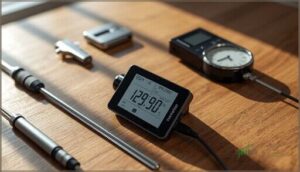
Getting accurate readings starts with having the right tools in your corner. Not everything on the market is built the same, and picking the wrong device can leave you guessing instead of knowing.
Here’s what you should be working with.
Digital Vs. Analog Hygrometers
Picking the right tool makes all the difference. A digital hygrometer reads relative humidity within ±1–3%, updates in real time, and offers data connectivity via Bluetooth or Wi‑Fi.
For a deeper look at how placement affects accuracy, ball python habitat humidity control walks you through setting up sensors on both warm and cool sides.
Analog models cost less but drift to ±5% and need frequent calibration methods like salt tests. For accurate humidity measurement, digital wins — better sensor technology, built‑in alerts, and reliable battery life make it worth the investment.
Thermometers and Smart Sensors
Smart sensors take temperature tracking and humidity measurement further than a standalone digital hygrometer ever could.
Wireless data integration lets readings sync automatically to your phone, while battery life optimization means months of uninterrupted monitoring.
Sensor fusion techniques and environmental compensation algorithms work quietly in the background, and AI-driven calibration keeps your smart hygrometer accurate without manual intervention — giving you reliable data, effortlessly.
Choosing High-Precision Devices
Not all devices are built equal. A high-precision digital hygrometer with 24–32 bit sensor resolution gives you accurate readings you can actually trust.
Look for models with built-in data logging, ISO-compliant calibration standards, and solid material durability for long‑term use. Power stability matters too — noisy power supplies skew results. The right smart hygrometer turns humidity and temperature measurement from guesswork into certainty.
Step-by-Step: Checking Humidity and Temperature
accurate readings isn’t just about owning the right device — it’s about using it correctly.
A few simple steps can make the difference between reliable data and numbers you can’t trust.
Here’s what you need to do.
Proper Device Placement
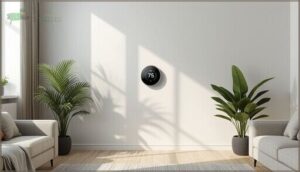
Where you put your smart hygrometer matters as much as which one you buy. Bad placement means bad data — and bad data leads to bad decisions.
For accurate environmental monitoring and measuring indoor humidity, follow these placement rules:
- Mount at eye level, 3–6 feet high, on an interior wall
- Avoid heat sources, drafts, and windows within 3 feet
- Maintain airflow clearance of 1.5 feet around the device
Central room location gives your thermometer and smart home sensors the most representative readings.
Taking and Interpreting Readings
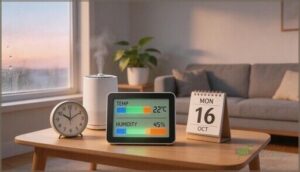
Once your sensor is placed, reading it right is what separates guesswork from real control.
Check at the same time daily — consistent timing turns scattered numbers into useful patterns.
Aim for 30–50% relative humidity and 68–75°F indoors.
| Reading | What It Means |
|---|---|
| Below 30% RH | Air is too dry |
| 30–50% RH | Comfortable, healthy range |
| Above 60% RH | Mold risk increases |
| Rapid RH shift | Check for drafts or moisture sources |
Tracking Data Over Time

One reading tells you nothing — a week of readings tells you everything.
Log your humidity and temperature daily using a smart home sensor with data logging, and patterns emerge fast. You’ll spot seasonal patterns, catch anomalies before they become mold problems, and fine-tune your indoor climate control with confidence.
Consistent data granularity and temporal alignment turn raw numbers into real environmental monitoring insight.
Calibrating and Maintaining Measurement Devices
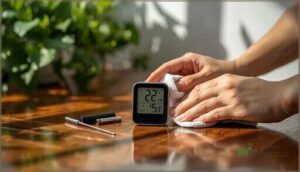
Even the best hygrometer loses its edge over time if you don’t take care of it.
A little routine maintenance goes a long way toward keeping your readings accurate and trustworthy. Here’s what you need to know to keep your device in top shape.
How to Calibrate Hygrometers
Calibrating your hygrometer is easier than you’d think.
Salt Test Procedure is the reference method — seal damp salt with your device in an airtight bag for 4–12 hours, and expect a 75% relative humidity reading.
Ice Water Method targets near 0°C instead.
Two‑Point Calibration uses both references together for greater accuracy.
Digital units have a dedicated Digital Calibration Button; analog models use an Analog Adjustment Screw.
Cleaning and Maintenance Tips
Once your hygrometer is calibrated, keeping it accurate comes down to consistent upkeep. Dust alone can throw readings off by 5% or more — which matters when you’re troubleshooting humidity issues or maintaining indoor air quality.
- Sensor Surface Cleaning: Wipe sensors with a microfiber cloth every 2–4 weeks.
- Battery Replacement Schedule: Swap batteries annually — low voltage causes up to 10% humidity error.
- Moisture Protection: Keep devices 30 cm from water sources or humidifiers.
- Airflow Management: Avoid vents and fans that cause ±5% fluctuation swings.
Install software updates when available — they quietly improve data precision.
When to Replace Devices
Even with regular care, devices don’t last forever. If your hygrometer shows battery degradation affecting readings, performance lag in response times, or rising repair costs that outweigh its value, it’s time to replace it.
Most digital units last 3–5 years before end-of-life support ends and accuracy slips. Don’t let a worn-out device compromise your measuring humidity levels data.
Alternative Methods Without a Hygrometer

You don’t always need a hygrometer to get a sense of what’s happening with your indoor air. A few simple methods can give you useful clues using tools you likely already have at home.
Here are three ways to check humidity without any specialized equipment.
The Ice Cube Condensation Test
No hygrometer nearby? The ice cube condensation test gives you a quick read on indoor humidity.
Place two or three ice cubes on a dry, non-absorbent plate away from vents — airflow influence can skew your visual interpretation. Then watch for surface moisture patterns:
- Condensation within 2–3 minutes signals high humidity
- Slow condensation timing suggests drier air
- No moisture after 5 minutes indicates low indoor humidity
- Dripping water points toward humidity above 60%
- Uneven patterns may reflect temperature sensitivity near walls
It won’t give you dew point data or replace a hygrometer, but it’s a reliable first signal for humidity control checks.
Wet and Dry Bulb Thermometers
A psychrometer takes humidity and temperature measurement a step further than the ice cube test. It uses two thermometers side by side — one dry, one with a moisture reservoir keeping the bulb wet. Evaporation cooling drops the wet bulb reading. You compare both on a psychrometric chart to find relative humidity. Watch out for draft effects; moving air skews results quickly.
| Step | What to Do |
|---|---|
| 1 | Wet the gauze, let it stabilize for 3–5 minutes |
| 2 | Record both dry and wet bulb temperatures |
| 3 | Find the difference and check your psychrometric chart |
| 4 | Replenish the moisture reservoir before each use |
DIY Visual Indicators (Pros & Cons)
Color-changing indicators can give you a quick visual snapshot of Relative Humidity without a Hygrometer. They’re cheap — solid wins for Cost Efficiency and Installation Ease.
- Color Accuracy fades within 1–2 years, raising Longevity Concerns
- Temperature swings affect dye response
- Material Safety matters — choose non‑toxic pigments
- No substitute for Thermometers or calibrating and maintaining equipment properly
Common Mistakes and How to Avoid Them
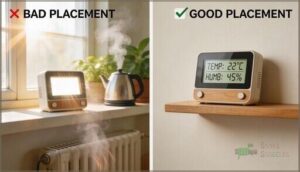
Even the best hygrometer won’t help much if you’re using it the wrong way. Small mistakes in placement, upkeep, and setup can quietly throw off every reading you take.
Here are the most common errors people make and how to fix them.
Incorrect Sensor Placement
Where you put your sensor matters more than which sensor you buy.
Heat source bias, sunlight exposure, and airflow blockage quietly corrupt your readings before you even glance at them.
| Mistake | Why It Happens | Fix |
|---|---|---|
| Height misalignment | Sensor placed at floor level | Mount at 1.1–1.5m |
| Heat source bias | Too close to vents or radiators | Keep 0.5m+ away |
| Multi‑sensor interference | Devices within 0.5m of each other | Space at least 1m apart |
Environmental monitoring only works when your environmental sensors are positioned right.
Ignoring Calibration Needs
Skipping calibration is like trusting a scale that’s never been zeroed — your numbers look fine, but they’re quietly lying to you. Sensor drift can push humidity readings off by 5% RH or more, turning data inaccuracy into health misdiagnosis, energy waste, and even compliance risks.
Skipping calibration is like trusting a scale that’s never been zeroed—your readings look right, but they’re quietly misleading you
Keep readings trustworthy by addressing:
- Sensor drift building up over weeks
- RH offsets from aging components
- Temperature deviations of 0.5–2°C
- Mold risk masked by false low readings
- Calibrating humidity measurement tools every 6–12 months
Environmental Factors Affecting Accuracy
Your environment quietly fights your sensor every day. Temperature Drift, EMI Interference, Dust Contamination, and Humidity Condensation each chip away at accuracy — no warning, no alarm.
The following factors and their mitigations are summarized below:
| Factor | What Happens | Fix It |
|---|---|---|
| Temperature Drift | Readings shift 0.1–0.5°C | Shield from heat sources |
| Dust Contamination | Slows sensor response | Clean ports regularly |
| Pressure Altitude | Baseline offsets increase | Recalibrate after moving |
Frequently Asked Questions (FAQs)
How do I check the humidity in my home?
The easiest way is with a digital hygrometer.
It measures relative humidity and temperature in real time, giving you the moisture levels you need to make smart decisions about your indoor air.
Can a hygrometer measure humidity?
Yes — a hygrometer measures relative humidity using a capacitive sensor principle, usually within ±2–5% accuracy limits.
Smart integration allows data logging over time, making it essential for accurate readings in any space.
How do you measure relative humidity?
You measure relative humidity using a hygrometer — either a capacitive sensor-based digital model or a hair hygrometer.
Sophisticated options include the dew point method, a psychrometric chart with wet/dry bulb thermometers, or salt solution calibration checks.
How do you test humidity without tools?
You don’t need a device to get a rough read.
Try the Condensation on Glass test, watch for Foggy Windows, or use the Dew Point Can method for quick Alternative Measurement Methods.
What humidity level is bad for COPD?
For COPD, indoor humidity above 50–60% raises mold trigger risk and dust mite exposure, while low humidity can dry airways.
Aim for a Relative Humidity of 40–50% using a Hygrometer for better Health and Wellness at Home.
Can my phone check the humidity in my house?
Sometimes your phone acts more like a weather detective than a scientist.
Sensor availability is rare, so most rely on AI estimation apps, barometer limitations, or camera fog tests.
For true accuracy, Bluetooth hygrometer integration beats phone tricks.
What is the best humidity for dry sinuses?
The ideal humidity range for dry sinuses is 40–50% relative humidity.
This promotes sinus moisture balance, helps with mucus thinning, and aids allergy mitigation.
Use a hygrometer to track indoor humidity and make seasonal humidity adjustments for health and wellness.
How often should I replace my hygrometer?
Most quality digital hygrometers last years— even decades.
Replace yours if you notice sensor drift, inaccurate readings despite calibration, physical damage, or if newer technology upgrades offer features your current device can’t match.
Can humidity levels affect snake shedding cycles?
humidity directly affects snake shedding.
Maintaining the right Shedding Humidity Range for Species‑Specific Needs — with a Pre‑Shed Boost to 70–80% — prevents Moisture‑Related Complications like retained skin or incomplete sheds.
What humidity range suits different snake species?
Tropical Snake Humidity ranges from 50–90%, while Desert Snake Tolerance sits at 10–30%. Temperate Snake Moisture needs fall between 30–60%. Arboreal Snake Needs spike to 80–90%, and Semi-Aquatic Snake Levels hover at 60–80%.
Conclusion
Most homeowners spend thousands fixing mold damage, structural rot, and respiratory problems—all because a $20 device sat unused in a drawer.
Now you know how to check humidity and temperature accurately, where to place your sensors, and what the numbers actually mean.
That knowledge isn’t passive—it’s a daily shield for your home and everyone in it.
Check your readings this week.
Small, consistent awareness today prevents the kind of damage that takes years to undo.
- https://stacks.cdc.gov/view/cdc/151648/cdc_151648_DS1.pdf
- https://www.nhlbi.nih.gov/sleep-research-plan/health-disease-factors
- https://www.cdc.gov/mold-health/about/index.html
- http://mrsdlovesscience.com/realtivehumidity/realativehumidity.html
- https://www.cooltoday.com/blog/home-humidity-levels-chart-understanding-the-humidity-and-temperature-in-your-home