
This site is supported by our readers. We may earn a commission, at no cost to you, if you purchase through links.

Swapping out a thermostat sounds simple—until you remember you’re renting. Suddenly a 20-minute upgrade turns into a lease question, an email to the landlord, and a nagging worry about security deposits. The frustrating part? Most renters don’t realize how many thermostats are designed exactly for their situation.
These models offer damage-free mounting, eliminate C-wire headaches, and allow easy reversal before move-out. The right pick can quietly trim utility bills by 10–15% while giving you real control over comfort—without touching a single wall stud.
Whether your building uses vintage baseboard heat or a modern heat pump, these ten thermostats for renters make energy efficiency achievable.
Table Of Contents
- Key Takeaways
- Top 10 Thermostats for Renters
- 1. Honeywell WiFi Thermostat Controller
- 2. Google Nest Learning Thermostat
- 3. Emerson Sensi Touch Smart Thermostat
- 4. Amazon Alexa Smart Thermostat
- 5. Honeywell Home X2P Programmable Thermostat
- 6. Honeywell Home Manual Heat Only Thermostat
- 7. Honeywell Round Heat Thermostat
- 8. Emerson Sensi WiFi Smart Thermostat
- 9. Riseem Non Programmable Thermostat
- 10. Honeywell Home Non Programmable Thermostat
- Renter-Friendly Features to Compare
- Lease Rules and Landlord Approval
- Installation and Compatibility Basics
- Energy Savings and Daily Convenience
- Frequently Asked Questions (FAQs)
- Can a renter change the thermostat?
- Are smart thermostats renter friendly?
- Does Ecobee work with Amana?
- What is the best thermostat for a rental property?
- Can renters change their thermostat?
- Can I put a smart thermostat in my rental?
- Can a landlord tell you what to set your thermostat at?
- Do smart thermostats work without Wi-Fi?
- Can I take my thermostat when I move?
- What happens if the thermostat breaks?
- Conclusion
Key Takeaways
- Renter-friendly thermostats like the Emerson Sensi WiFi and Amazon Alexa Smart Thermostat install in under 30 minutes with no C-wire, no drilling, and no damage to walls—making move-out cleanup stress-free.
- Smart thermostats can cut your heating and cooling bills by 10–15% through features like geofencing, learning schedules, and auto-away modes, often paying for themselves within a year or two.
- Before swapping any thermostat, check your lease’s alteration clause and get written landlord approval—skipping this step can cost you your security deposit or trigger liability.
- Whether your budget is $18 or $260, there’s a solid option on this list for your setup, from no-frills mechanical dials to AI-powered learning models with full smart home integration.
Top 10 Thermostats for Renters
Finding the right thermostat as a renter comes down to three things: easy installation, damage-free removal, and real energy savings. These ten picks cover everything from budget-friendly basics to smart models with geofencing and app control. Here’s what made the cut for 2026.
If you’re working with limited square footage, these thermostats for small apartments offer the same smart features without overwhelming a compact space.
1. Honeywell WiFi Thermostat Controller
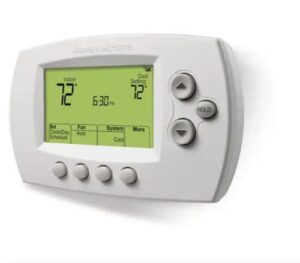
The Honeywell RTH6580WF1001 is a solid pick for reliable remote control at $109.99. It offers a 7-day programmable schedule, Smart Response learning, and dual-app control via Total Connect Comfort or the Honeywell Home app.
Adjusting your heat remotely takes seconds, thanks to its 2.4 GHz Wi-Fi compatibility. However, it requires a C-wire, so verify your existing wiring before purchasing.
| Best For | Homeowners with an existing C-wire who want reliable remote temperature control and smart home integration without breaking the bank. |
|---|---|
| Price | $109.99 |
| C-Wire Required | Yes |
| Wi-Fi / Smart | Wi-Fi 2.4GHz |
| Power Source | C-wire 24VAC |
| HVAC Compatibility | Forced air, heat pump, hot water |
| Programmable | 7-day |
| Additional Features |
|
- Control your thermostat from anywhere — great for checking in on your home while traveling
- The 7-day programmable schedule plus Smart Response learning helps cut energy costs over time
- Works with Alexa, Google Assistant, and other voice platforms for hands-free adjustments
- No C-wire means no install — you’ll need extra wiring or an adapter before it’ll work
- Only connects to 2.4 GHz Wi-Fi, which can be a hassle if your router only broadcasts 5 GHz
- No battery backup, so a power outage leaves you with zero thermostat control until it’s restored
2. Google Nest Learning Thermostat
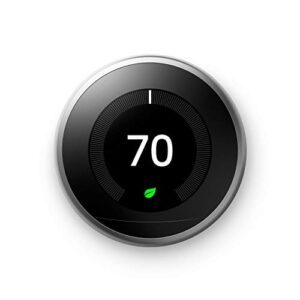
The Google Nest Learning Thermostat ($259.95) is worth the extra investment for those seeking an upgrade from basic remote controls. It intelligently builds a schedule by learning your habits over time and automatically adjusts using Home/Away Assist when you leave.
Pair it with reliable humidity gauges for basements to monitor moisture levels and protect your home from mold.
The 4th-gen model introduces significant enhancements, including a 60% larger display, Adaptive Eco, and Natural Heating and Cooling to minimize energy waste. These features collectively optimize efficiency while maintaining comfort.
Independent studies validate its performance, showing average savings of 12% on heating and 15% on cooling. This data strengthens the case for justifying its upfront cost through long-term energy reductions.
| Best For | Homeowners who want a set-it-and-forget-it thermostat that learns their routine and pays for itself over time through real energy savings. |
|---|---|
| Price | $259.95 |
| C-Wire Required | No |
| Wi-Fi / Smart | Wi-Fi |
| Power Source | Built-in battery |
| HVAC Compatibility | AC, heat pump, furnace, radiant |
| Programmable | Auto-learning |
| Additional Features |
|
- Learns your schedule automatically and adjusts on its own — no manual programming needed
- Home/Away Assist cuts heating and cooling when you’re out, and you can tweak things from anywhere via the app
- Independent studies back up real savings: around 12% on heating and 15% on cooling
- At $259.95, it’s a steep upfront cost compared to a basic programmable thermostat
- The learning period can be a bit rough at first — expect to fine-tune the schedule manually for a few weeks
- All the smart features depend on a solid Wi-Fi connection, so if your internet goes down, so does most of the functionality
3. Emerson Sensi Touch Smart Thermostat
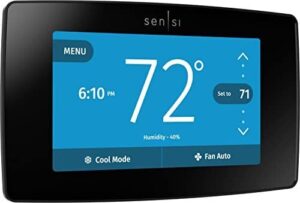
The Emerson Sensi Touch is a budget-friendly alternative to the Nest, priced at $123.19 while delivering a genuinely smart experience. It features a 4.3-inch color touchscreen, flexible scheduling, geofencing, and remote app control via iOS or Android.
Its ENERGY STAR certification highlights efficiency, potentially reducing HVAC costs by up to 23%. However, it requires a C-wire, so verify your wiring before purchasing.
For pet-focused guidance, explore ENERGY STAR thermostats for pet owners that balance air-quality monitoring with efficient climate control.
For Apple users, built-in HomeKit support makes it a seamless addition to existing ecosystems.
| Best For | Apple ecosystem users and budget-conscious homeowners who want solid smart thermostat features without paying Nest prices. |
|---|---|
| Price | $123.19 |
| C-Wire Required | Yes |
| Wi-Fi / Smart | Wi-Fi 2.4GHz |
| Power Source | C-wire 24VAC |
| HVAC Compatibility | AC, boiler, furnace, heat pump |
| Programmable | Flexible scheduling |
| Additional Features |
|
- Attractive 4.3-inch color touchscreen with a clean, easy-to-use interface
- ENERGY STAR certified with potential to cut HVAC costs by up to 23%
- Native Apple HomeKit support makes Siri and smart home integration a breeze
- Requires a C-wire, which not every home has — you may need an electrician
- Only works on 2.4 GHz Wi-Fi, and finicky router settings can make setup frustrating
- Limited to U.S. and Canada, so it’s a no-go for anyone outside North America
4. Amazon Alexa Smart Thermostat
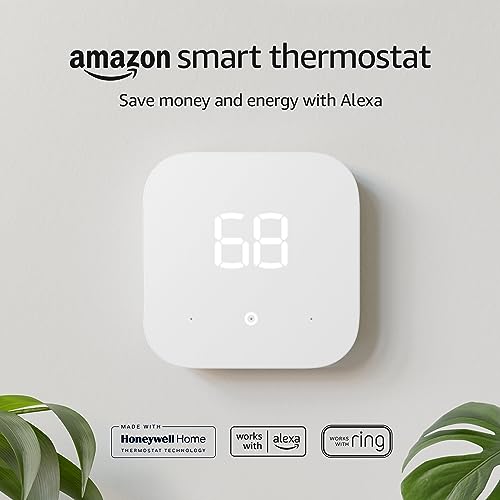
If you’re deep in the Amazon ecosystem, the Amazon Alexa Smart Thermostat at $79.99 is hard to beat. It’s ENERGY STAR certified, guides you through installation via the Alexa app, and lets you adjust temps by voice or remotely from anywhere.
Presence detection from your Echo devices keeps the home comfortable without wasting energy. The EPA estimates about $50 in annual savings.
Just confirm your system has a C-wire before buying.
| Best For | Anyone already plugged into the Amazon ecosystem who wants an affordable, voice-controlled thermostat with easy DIY setup. |
|---|---|
| Price | $79.99 |
| C-Wire Required | Yes/Transformer |
| Wi-Fi / Smart | Wi-Fi 2.4GHz |
| Power Source | C-wire/transformer |
| HVAC Compatibility | Forced air, heat pump |
| Programmable | 4 preset modes |
| Additional Features |
|
- At $79.99, it’s budget-friendly — and utility rebates can bring the cost down even further.
- Setup is guided step-by-step through the Alexa app, so you don’t need to hire anyone.
- Presence detection from Echo devices automatically adjusts temps so you’re not heating or cooling an empty house.
- You’ll need a C-wire (or an external transformer) — worth checking before you buy.
- Wi-Fi can drop after a power outage and sometimes needs a manual reset to reconnect.
- Scheduling is limited to four preset modes, so if you want more granular control, it’ll feel restrictive.
5. Honeywell Home X2P Programmable Thermostat
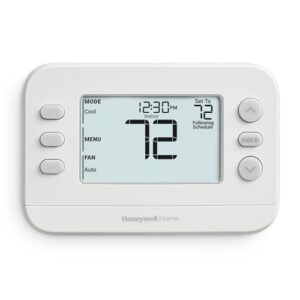
The Honeywell Home X2P offers reliable scheduling for renters who don’t need advanced features like Wi-Fi or voice control. Its 7-day programming with four daily periods adapts to most weekly routines, while the early start feature ensures comfort upon arrival.
Installation is straightforward, taking about 20 minutes, and the backlit display enhances readability. The thermostat is compatible with most single-stage heating and cooling systems commonly found in rental properties, prioritizing simplicity and functionality.
| Best For | Renters or homeowners who want a simple, no-fuss programmable thermostat without paying for smart features they’ll never use. |
|---|---|
| Price | $34.90 |
| C-Wire Required | No |
| Wi-Fi / Smart | None |
| Power Source | 2 AA batteries |
| HVAC Compatibility | Forced air, hot water, heat pump |
| Programmable | 5-2 day |
| Additional Features |
|
- Easy DIY install that takes about 20 minutes — no electrician needed
- Filter-change reminders help you stay on top of HVAC maintenance without thinking about it
- Large backlit display makes it easy to read and adjust at a glance
- No Wi-Fi or smart home integration, so you can’t control it remotely
- Not compatible with electric baseboard heat or multi-stage systems
- Small terminal labels can be tricky to navigate if you’ve never wired a thermostat before
6. Honeywell Home Manual Heat Only Thermostat
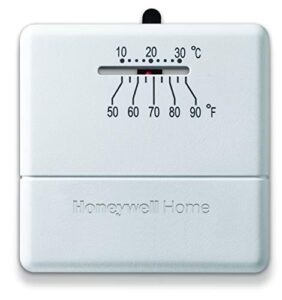
The Honeywell Home Manual Heat Only Thermostat (CT30A1005) is a no-frills mechanical unit priced at just $18.04, making it one of the most affordable replacements available. It operates using two wires—red and white—with no C-wire required, ensuring installation takes minutes.
For older adults or anyone who just wants simple and reliable temperature control, this fits right in with the best thermostats for seniors that prioritize ease of use over flashy features.
This thermostat is ideal for garages, small cabins, or auxiliary spaces with single-stage heating systems. Its simplicity suits environments where basic temperature control suffices.
However, it lacks advanced features: no scheduling, no display, and no true off position. Users must manually adjust settings, and the system cycles between heating and fan-only modes rather than fully shutting down.
| Best For | Anyone who needs a dead-simple, budget-friendly thermostat for a garage, cabin, or secondary space with a basic single-stage heating system. |
|---|---|
| Price | $18.04 |
| C-Wire Required | No |
| Wi-Fi / Smart | None |
| Power Source | Furnace 24V |
| HVAC Compatibility | Furnace heat-only |
| Programmable | No |
| Additional Features |
|
- Super affordable at just $18 — hard to beat for a no-fuss replacement
- Two-wire installation means most people can swap it in within minutes, no electrician needed
- Mercury-free design makes it a solid upgrade from older mechanical thermostats
- No true off switch — it can still kick on heat around 40°F even at the lowest setting
- No display means you’re guessing at the actual room temperature
- Some users have reported short-cycling and unreliable temperature sensing over time
7. Honeywell Round Heat Thermostat
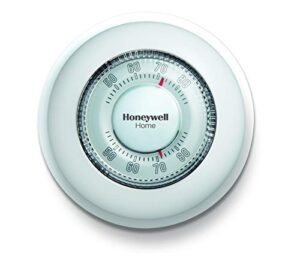
The Honeywell Round Heat Thermostat (CT87K1004) remains a classic choice, thanks to its iconic circular dial that has reliably controlled home temperatures for decades. Priced at just $29.98, it offers mercury-free operation, ±1°F precision, and a clean white cover that conceals old wall marks—a practical feature for rentals.
Its simplicity extends to installation, requiring only a 2-wire setup with no C-wire needed. This makes it an accessible option for straightforward heating systems.
However, it is heat-only and non-programmable, meaning advanced features like scheduling or remote control are unavailable. Despite this, its enduring design and affordability ensure it remains a solid choice for basic temperature regulation.
| Best For | Homeowners or renters with a simple gas furnace who want a no-fuss, affordable thermostat without any tech complications. |
|---|---|
| Price | $29.98 |
| C-Wire Required | No |
| Wi-Fi / Smart | None |
| Power Source | 3V battery + 24VAC |
| HVAC Compatibility | Furnace heat-only |
| Programmable | No |
| Additional Features |
|
- At $29.98, it’s one of the most budget-friendly thermostats out there — and it does its job well.
- The 2-wire setup means installation is quick and easy, no C-wire or extra tools required.
- The round cover hides old wall marks, which is a nice bonus in older homes or rentals.
- Heat only — if you have AC or a multi-stage system, this won’t work for you.
- No scheduling, no app, no smart home integration — what you see is what you get.
- The temperature sensor can run slightly warm, leaving rooms about 2°F above the set point.
8. Emerson Sensi WiFi Smart Thermostat
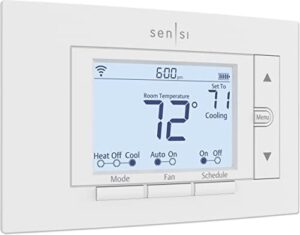
The Emerson Sensi WiFi Smart Thermostat punches well above its $82.97 price tag, delivering ENERGY STAR certification, flexible scheduling, and remote access through a clean mobile app—all without needing a C-wire in most setups.
Installation takes under 30 minutes with step-by-step app guidance, making it genuinely DIY-friendly. It seamlessly integrates with Alexa, Google Assistant, and SmartThings, while usage reports help you spot energy waste.
Battery-powered operation ensures simplicity, though boiler systems may experience a short heating delay.
| Best For | Homeowners who want an affordable, easy-to-install smart thermostat without dealing with complex wiring or hiring an electrician. |
|---|---|
| Price | $82.97 |
| C-Wire Required | No |
| Wi-Fi / Smart | Wi-Fi |
| Power Source | 2 AA batteries |
| HVAC Compatibility | AC, boiler, furnace, heat pump |
| Programmable | Flexible scheduling |
| Additional Features |
|
- DIY-friendly setup with step-by-step app guidance—most people are done in under 30 minutes
- ENERGY STAR certified with remote access and scheduling that can cut energy bills by around 23%
- Works with Alexa, Google Assistant, and SmartThings right out of the box
- Some HVAC setups still need a C-wire, so compatibility check before buying is a must
- Boiler systems can have a 20–25 second lag between adjusting the thermostat and actually feeling heat
- Usage reports only show total daily run time, so detailed energy tracking isn’t really possible
9. Riseem Non Programmable Thermostat
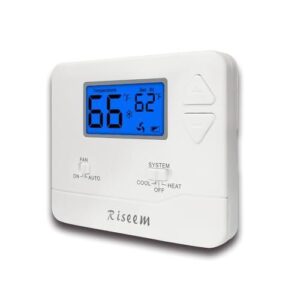
At just $20.51, the Riseem STN601-Blue proves you don’t need to spend big to get reliable temperature control. It works with most forced-air, heat-only, and single-stage systems, making it a versatile choice for various setups.
Installation is straightforward, requiring under 30 minutes and no C-wire, while the backlit LCD clearly displays your setpoint and room temperature at a glance.
There’s no scheduling or app—just a straightforward dial-style experience. If your rental needs simple, no-fuss climate control, this thermostat quietly delivers.
| Best For | Renters, landlords, or homeowners with older forced-air or heat-only systems who just want simple, no-fuss temperature control without a smartphone or schedule. |
|---|---|
| Price | $20.51 |
| C-Wire Required | No |
| Wi-Fi / Smart | None |
| Power Source | 24VAC or 2 AAA |
| HVAC Compatibility | Forced air, heat pump, millivolt |
| Programmable | No |
| Additional Features |
|
- At $20.51, it’s one of the most affordable thermostats you can buy—and it actually works well.
- No C-wire needed, so swapping out an old thermostat takes under 30 minutes.
- The adjustable temperature swing helps cut down on short-cycling, which saves a bit on your energy bill over time.
- No scheduling at all—if you want setback temperatures overnight or while you’re at work, look elsewhere.
- The backlight only kicks on when you press a button, so a quick glance in a dark hallway won’t tell you much.
- Doesn’t play nice with heat pumps using aux/emergency heat, mini-splits, or electric baseboard—compatibility is pretty limited.
10. Honeywell Home Non Programmable Thermostat
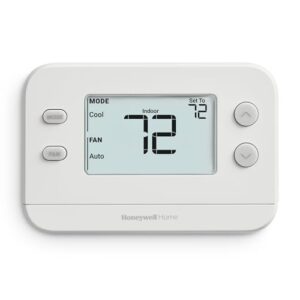
At $34.98, the RTH11B is the no-nonsense option for renters seeking reliable heat and cool without app dependencies. Its large backlit display ensures clarity from a distance, while simple button controls eliminate any learning curve.
The thermostat operates on two AA batteries, installs in under 15 minutes, and is compatible with most standard 24-volt forced-air systems.
It prioritizes steady, dependable comfort, forgoing features like scheduling or Wi-Fi to deliver straightforward functionality when simplicity is paramount.
| Best For | Renters, seniors, or anyone who just wants a simple, reliable thermostat without the hassle of apps, Wi-Fi, or complicated settings. |
|---|---|
| Price | $34.98 |
| C-Wire Required | No |
| Wi-Fi / Smart | None |
| Power Source | 2 AA batteries |
| HVAC Compatibility | Forced air, hot water, single-stage |
| Programmable | No |
| Additional Features |
|
- Big backlit display is easy to read from across the room
- Installs in under 15 minutes — no electrician needed
- At $34.98, it’s an affordable, no-fuss replacement for older units
- No scheduling, Wi-Fi, or smart features of any kind
- Runs on AA batteries only — no hardwired power option
- Won’t work with electric baseboard heat or multi-stage/heat-pump systems
Renter-Friendly Features to Compare
Not every thermostat works for renters, and the wrong pick can cost you more than just comfort.
Before you buy, there are a few key features worth checking off your list. Here’s what to look for.
Easy Installation Without Permanent Modifications
Most renter-friendly thermostats are built with DIY installation in mind — no contractor needed. Clip Mounting Kits, Adhesive Tape Solutions, Magnetic Mount Options, Tension Rod Shelving, and No-Drill Brackets all let you install without touching drywall.
Many models also include a No C-Wire option or adapter, so older wiring isn’t a dealbreaker. A typical DIY setup wraps up in under 30 minutes.
They also support plug-and-play smart thermostats for remote temperature control, without any drilling.
Reversible Setup and Damage-Free Removal
Getting out cleanly matters just as much as getting in. Magnetic Mounting and Adhesive Strips let you secure most units without screws, while Reversible Backplates enable swapping without destruction. These features ensure installations remain non-damaging and adaptable.
Quick Release Brackets simplify wiring access without compromising walls, and Noninvasive Wiring paired with the No C-Wire Option guarantees DIY installation stays lease-safe. Together, these solutions address the critical considerations for rental property thermostats, prioritizing preservation and ease of use.
Wi-Fi Connectivity and Remote Control
Once your thermostat is mounted cleanly, WiFi connectivity puts remote control right in your pocket. Most models support dual-band optimization across 2.4 and 5 GHz networks, improving reliability throughout your space.
Remote temperature control via iOS or Android apps lets you adjust settings from anywhere.
Signal strength monitoring and remote diagnostics flag issues early, while guest network segmentation and regular firmware update management keep your connection secure.
Compatibility With Standard 24-Volt HVAC Systems
Smart thermostat compatibility with HVAC systems is rarely a dealbreaker, as most apartments use standard 24-volt systems with familiar R, C, Y, W, and G terminals. While heat pump O/B wiring, multi-stage wiring, and transformer sizing require attention, many modern models handle these complexities automatically.
Renter-friendly designs simplify setup, particularly for older systems. No C-wire options and DIY installation without C-wire requirements accommodate tighter wire gauge tolerances, ensuring accessibility even in less-updated environments.
Energy Tracking and Cost Savings Tools
Knowing where your money goes is half the battle. Smart thermostats provide real-time analytics, cost projections, and monthly summaries directly in the app, empowering users to track energy expenditure effortlessly.
Usage reports proactively flag spikes before they hit your wallet, while baseline comparisons reveal whether your habits are improving over time. These tools transform abstract data into actionable insights, fostering awareness of consumption patterns.
Savings recommendations dynamically adapt as your routines evolve, converting energy analytics into tangible results. This personalized approach drives actual utility bill savings and sustains meaningful energy cost reduction long-term.
Scheduling, Geofencing, and Vacation Modes
Smart scheduling puts you in charge of your comfort without the guesswork. Granular time slots let you build a routine down to 15-minute increments, while seasonal schedule templates adapt to changing weather.
Radius-based geofencing capabilities trigger eco-mode the moment you leave.
Remote vacation alerts keep you informed during long trips, and cross-platform sync ensures your settings follow you everywhere.
Voice Assistant and Smart Home Integration
Voice control transforms your thermostat into a hands-free tool, integrating seamlessly with ecosystems like Alexa, Google Assistant, and Apple HomeKit. These platforms support essential commands, such as setting temperatures or switching modes, ensuring effortless interaction with your device.
Room Grouping ensures the correct unit responds to commands, while Matter Standard Benefits guarantee Cross-Platform Compatibility across apps—no device replacements needed. This standardization simplifies smart home management, maintaining consistency regardless of your preferred ecosystem.
Routine Automation, voice assistants, and smart home integration work together seamlessly. Just ask your device to activate personalized routines, merging convenience with advanced functionality for a cohesive user experience.
Lease Rules and Landlord Approval

Before you swap out that thermostat, it’s worth knowing where you actually stand as a renter. Your lease and your landlord have more say in this than you might think.
Here’s what you need to know before you touch a single wire.
Can a Renter Change The Thermostat?
Technically, you can adjust the temperature — but swapping out hardware is a different story. Most leases include alteration clauses that require landlord permission and lease considerations before any installation occurs. Ignoring these requirements can trigger tenant liability, warranty voidance, or compliance issues tied to utility billing agreements.
Before purchasing anything, check your lease and ask in writing:
- Whether installation considerations for rental thermostats are addressed in your alteration clause
- If unauthorized changes affect your insurance coverage or damage deposit
- Whether your landlord can lock a thermostat to limit your control range
- What tenant rights to heat apply in your state or municipality
Are Smart Thermostats Renter Friendly?
Most smart thermostats offer DIY installation without C-wire requirements, removable mounting plates, and battery power options, ensuring a truly non-invasive setup.
They enhance tenant satisfaction through cost savings via occupancy detection and protection against temperature extremes. These features align with renters’ needs for comfort and efficiency.
Landlords benefit by positioning smart home features as rental amenities, attracting tech-savvy tenants. Additionally, smart thermostat incentives can help offset upfront costs, improving ROI on property upgrades.
Before purchasing, remain mindful of renters’ data privacy and potential insurance implications tied to smart device usage. Addressing these ensures a seamless integration into rental properties.
Understanding Your Lease Agreement
Your lease agreement is the rulebook for everything — including your thermostat. Before swapping anything out, check your lease agreement clauses carefully. Look for sections covering tenant responsibilities for heating and cooling costs, early termination penalties, and security deposit return conditions.
Lease term length and renewal notice periods also matter. Rent increase limits and landlord-tenant regulations vary by location and could affect your plans.
Getting Landlord Permission
Once you’ve reviewed your lease, the next step is a simple written request to your landlord. Keep it professional and specific — outline the model, installation plan, and your commitment to reversibility. Most landlords respond within 7–14 days.
To strengthen your case, cover these bases:
- Include model details and compatibility proof
- Attach a documentation checklist with wiring diagrams
- Highlight benefits of smart thermostats for landlords, like energy savings and remote monitoring
- Ask about conditional consent terms upfront
Clear landlord communication makes approval far more likely.
Temporary Mounting Options
Once you have landlord approval in hand, the next question is how to mount the thermostat without touching a drill.
| Mount Type | Weight Limit | Key Advantage |
|---|---|---|
| Clip Mount | 2 lbs | No holes, clean removal |
| Adhesive Tab | 5 lbs | Damage-free on drywall |
| Portable Bracket | 3 lbs | Moves between rooms easily |
Clip mounts offer zero wall damage, while adhesive tabs require only a quick isopropyl wipe for prep. Suction cup mounts work effectively on tile or glass, and portable brackets allow tool-free repositioning—smart solutions for renter satisfaction and DIY installation without C-wire requirements.
Restoring The Original Thermostat Before Move-Out
Before handing over the keys, include restoring the original thermostat on your Lease Handover Checklist. A solid Wiring Photo Log—taken before disconnecting anything—makes reconnection straightforward. Keep these three steps in mind:
- Original Model Verification – Confirm the exact unit to be reinstalled on the wall.
- Mounting Plate Retention – Save every screw and bracket.
- Post‑Move System Test – Power up the HVAC and verify it responds correctly.
Installation and Compatibility Basics
Before you touch a single wire, it helps to know what you’re actually working with. Getting the installation right comes down to a few key factors — your wiring setup, your HVAC system type, and how comfortable you are with basic tools.
Here’s what to check before you get started: your wiring setup, your HVAC system type, and how comfortable you are with basic tools.
Here’s what to check before you get started.
What Do You Need to Install a Smart Thermostat?
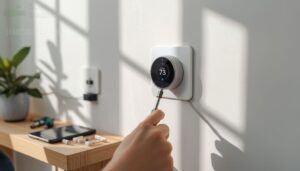
Installing a smart thermostat is simpler than most people expect. You’ll need a screwdriver, your phone for mobile app setup, and wire labels to track existing connections before disconnecting anything.
Check whether your system has a C‑wire adapter or a no C‑wire option available. Level mounting matters more than you’d think—a crooked base plate causes long‑term fit issues.
Most DIY installation without C‑wire requirements takes under thirty minutes.
Checking C-Wire and Power Requirements

Before checking your system, verify if it has a C-wire — the continuous 24-volt return path essential for powering your smart thermostat. Use a multimeter to test the C-wire voltage: a healthy reading falls between 24 and 30 volts AC.
If no C-wire is present, don’t panic. Many thermostat models offer no C-wire solutions or include an adapter kit to resolve the issue.
Wire color can aid identification — blue typically indicates the C-wire — but always confirm this at the furnace control board to avoid errors.
Matching Thermostats to HVAC System Types

Not every smart thermostat plays nice with every HVAC system, so matching them correctly matters.
Single‑Stage Matching works for basic furnaces, while Multi‑Stage Integration suits variable-output systems needing W1/W2 or Y1/Y2 terminals.
Heat‑Pump Compatibility requires reversing valve support, and Geothermal System Alignment demands precise staging control.
Mini‑Split Controller Pairing often needs a compatibility check before buying.
Confirm your system type first.
Step-by-Step Replacement Process

Before you touch anything, flip the circuit breaker off — safety first. Snap a photo of your existing wires for wiring labeling tips you’ll thank yourself for later.
Old thermostat removal is straightforward: unscrew, detach, and done. Align the new mounting plate carefully, then connect the wires according to the diagram. Restore power afterward.
No C-wire option? Many models include adapters.
Finish with final documentation steps: date, model, and photos logged.
When to Call a Professional Installer

DIY is great — until it isn’t. Knowing when to call a Rental Property HVAC Technician can save you money, your lease, and your safety. Hand it off to a pro when you hit any of these:
- Multi-zone wiring or heat pump systems require precise relay configurations beyond basic swaps.
- Gas line safety near your furnace means licensed hands only.
- Warranty requirements or permit compliance — some jurisdictions and manufacturers demand professional sign-off.
High-voltage adapters and complex HVAC system compatibility issues also tip the scale toward professional versus DIY installation of smart thermostats.
Avoiding Wiring and Setup Mistakes

One wrong wire can fry your HVAC board — so slow down before you start. Always cut power at the breaker and use a non-contact voltage tester for power-off safety. Snap a photo of your old wiring for wire labeling reference, and never push wires past the required terminal depth.
| Mistake | How to Avoid It |
|---|---|
| Skipping C-wire verification | Test for stable 24V with a multimeter first |
| Missing No C-Wire Option | Use an approved add-a-wire kit instead |
| Ignoring draft shielding | Install the backplate to protect sensor accuracy |
| Wrong HVAC match | Confirm smart thermostat compatibility with HVAC systems beforehand |
| DIY on complex systems | Know when professional vs DIY installation of smart thermostats applies |
Confirm smart thermostat compatibility with HVAC systems beforehand, and know when professional vs DIY installation applies to avoid overwhelming complexity.
Energy Savings and Daily Convenience

A good thermostat does more than just hold a temperature — it quietly works around your schedule and trims your energy bill without any extra effort on your part.
Whether you’re at work, asleep, or halfway across town, the right setup keeps your home comfortable and your costs in check.
Here’s what you can expect from smart thermostats: saving money and making daily life a little easier.
Average Utility Bill Savings for Renters
Switching to a smart thermostat can trim your utility bill by 10 to 15 percent — real money when you’re watching every dollar. Climate-based savings vary, but renters in colder regions often see seasonal savings rates of 8 to 12 percent on heating alone.
Smart thermostats can trim your utility bill by 10 to 15 percent — real savings when every dollar counts
Energy usage analytics help with consumption benchmarking and tenant budget impact planning, enabling users to track and optimize their energy use effectively.
Some utility providers further enhance the value by offering rebate incentives, making the transition to smart thermostats even more financially attractive.
Scheduling Based on Your Routine
Beyond saving money, a smart thermostat lets you shape comfort around your actual life. Weekday/Weekend Profiles keep the heat low while you’re at work and warming before you return. Adaptive Ramp Scheduling and Smart Wake-Up Boost gradually shift temperatures 30 minutes ahead, so you’re never jolted awake by a cold apartment.
Seasonal Routine Shifts handle the rest automatically.
Learning Features and Automatic Adjustments
Scheduling gets even smarter once learning features kick in. AI learning algorithms track your adjustments over time, building Adaptive Setpoints that match your actual comfort preferences — not guesses.
Pattern Recognition maps your routine automatically, while Predictive Pre-heating warms your space before you arrive. Energy Forecast Modeling and Learning Curve Visualization round out the system’s capabilities, ensuring efficiency aligns with your habits.
This adaptive intelligence automatically adjusts for:
- Occupancy detection shifts temperatures when rooms sit empty
- Seasonal pattern shifts occur without manual reprogramming
- Recent adjustments carry more weight than older habits
Geofencing for Away-from-Home Efficiency
Geofence-driven scheduling enhances efficiency by automatically switching your thermostat to eco-mode when your phone crosses a virtual boundary, eliminating the need for manual adjustments. Multi-User Boundaries enable personalized triggers for roommates, while Radius Optimization tailors boundary sizes to specific locations.
Cloud Processing manages the system’s rules, and built-in Privacy Controls safeguard location data. Together, these geofencing capabilities can reduce HVAC runtime by up to 15 percent, combining convenience with energy savings.
Remote App Alerts and Temperature Control
Once geofencing kicks in, your app becomes the control center. Real-time push notifications handle remote alerts for extreme temperatures, while Custom Threshold Settings let you decide what’s worth a ping—no Alert Fatigue Management headaches.
A Real-Time Status Dashboard instantly displays the current mode and setpoint, ensuring transparency at a glance.
Multi-Device Sync keeps your phone and tablet seamlessly aligned, while Temperature Change Auditing logs every adjustment for streamlined remote thermostat management.
Choosing Between Smart and Basic Models
Smart thermostats run $80–$250 upfront, but the long-term ROI is real — energy savings of 10–15% on heating and cooling usually offset the cost within a year or two.
Manual thermostats keep things simple, with no learning curve, no data privacy concerns, and easy DIY installation without C-wire requirements.
If tenant satisfaction and future-proofing matter to you, smart wins. Otherwise, basic works fine.
Frequently Asked Questions (FAQs)
Can a renter change the thermostat?
Yes, but only with written consent from your landlord. Changing it without permission can trigger tenant liability, void warranties, and affect energy incentive eligibility — so always ask first.
Are smart thermostats renter friendly?
Think of a smart thermostat as a houseguest that pulls its own weight. For most renters, the answer is yes — installation is reversible, DIY-friendly, and rarely requires a C-wire.
Does Ecobee work with Amana?
Ecobee works with most standard Amana systems, but ComfortNet Limitations apply if your unit uses proprietary communication.
Non-communicating Amana models pair well, supporting Two‑Stage Support and remote scheduling without issues.
What is the best thermostat for a rental property?
The Google Nest Learning Thermostat stands out for rental properties, balancing tenant comfort and utility savings.
Its compatibility with smart hub compatibility and strong ROI analysis through remote temperature control ensures efficient management.
This results in reliable energy savings year-round, optimizing both tenant satisfaction and operational costs.
Can renters change their thermostat?
Most renters can’t swap out a thermostat without written landlord consent — it’s legally considered a fixture. Check your lease first, then ask. Permission protects you both.
Can I put a smart thermostat in my rental?
Yes, but ask first. Most leases require landlord approval before any changes. Get written permission, outline your installation plan, and propose restoring the original unit at move-out.
Can a landlord tell you what to set your thermostat at?
In most places, no. Tenant Control Rights are protected under Local Housing Ordinances, and lease agreement regulations must spell out any temperature setpoint limits clearly before you sign.
Do smart thermostats work without Wi-Fi?
Like a phone that still tells time when offline, a smart thermostat maintains basic functions running without WiFi.
Manual override capability and pre-set schedules stay active, though cloud-dependent features won’t work.
Can I take my thermostat when I move?
In most cases, you can take your thermostat when you move — but removal permission from your landlord is the first step.
Or you risk deposit implications that aren’t worth the hassle.
What happens if the thermostat breaks?
A broken thermostat can trigger system shutdown, temperature drift, and even HVAC damage over time.
Remote alerts catch problems early, while reset procedures often fix minor issues.
Knowing your tenants’ responsibilities for heating and cooling costs keeps repair surprises to a minimum.
Conclusion
Measure twice, cut once"—and the same care applies here. Choosing the right thermostats for renters means thinking ahead: picking a model you can install cleanly, run efficiently, and remove without a trace when it’s time to move.
The ten options in this guide cover every setup, budget, and lease situation. Your landlord stays happy, your energy bill drops, and you stay comfortable. That’s a win worth every bit of research.