
This site is supported by our readers. We may earn a commission, at no cost to you, if you purchase through links.

Your vacation home sits empty for weeks at a time, and you’re heating or cooling it like someone’s living there full-time. That’s money evaporating into thin air—often hundreds of dollars per season.
The good news? Modern thermostats for vacation homes let you drop temperatures to 55°F when the property’s vacant, then warm things up remotely two hours before guests arrive. You’ll protect your pipes, prevent mold growth, and slash utility bills without sacrificing comfort.
The right thermostat becomes your 24/7 property manager, sending alerts when temperatures spike or drop unexpectedly and tracking exactly how much energy each booking actually costs you.
Table Of Contents
- Key Takeaways
- Best Thermostats for Vacation Homes
- 1. Google Nest Learning Thermostat
- 2. Ecobee Smart Thermostat Premium
- 3. Amazon Smart Thermostat with Alexa
- 4. Honeywell Smart Thermostat System
- 5. Honeywell Smart Color Thermostat
- 6. Google Nest Smart Thermostat
- 7. Sensi Smart Wi-Fi Thermostat
- 8. Meross Smart Home Thermostat
- 9. Honeywell Programmable Thermostat
- 10. Ecobee Smart Wifi Thermostat
- Essential Thermostat Features for Rentals
- Energy Efficiency and Cost Savings
- Remote Access and Property Management
- Compatibility With HVAC Systems
- Enhancing Guest Experience
- Smart Home Integration Options
- Indoor Air Quality and Maintenance Alerts
- Installation Tips for Vacation Homes
- Frequently Asked Questions (FAQs)
- What is the best temperature for your house while on vacation?
- Is there a thermostat that can control from anywhere?
- How do thermostats handle power outages remotely?
- Can guests accidentally lock out property managers?
- Do smart thermostats work without internet connection?
- How long do smart thermostat batteries last?
- Can thermostats detect frozen pipes in winter?
- Conclusion
Key Takeaways
- Smart thermostats for vacation homes can cut heating and cooling costs by 10-26% annually through remote temperature control, automated scheduling, and occupancy detection that prevents wasting energy when properties sit empty.
- Essential features for rental properties include remote access via smartphone apps, geofencing that adjusts temperatures when you leave or return, real-time alerts for temperature spikes or system failures, and integration with voice assistants like Alexa and Google Assistant.
- Most modern smart thermostats require a C-wire for installation to provide continuous 24-volt power, though some models offer power extender kits or battery-powered alternatives for homes without this wiring.
- Beyond temperature control, premium models now include air quality monitoring, humidity sensors to prevent mold growth, filter change reminders, and multi-zone support that lets you heat or cool only occupied areas of larger properties.
Best Thermostats for Vacation Homes
Managing a vacation home from afar means you need a thermostat that works as hard as you do.
A smart thermostat designed for ease of use lets you monitor and adjust temperatures remotely, giving you peace of mind whether you’re home or away.
The right smart thermostat gives you complete control over temperature settings, energy costs, and guest comfort—all from your phone. Here are the top 10 thermostats that deliver reliable remote access and real savings for vacation property owners.
1. Google Nest Learning Thermostat
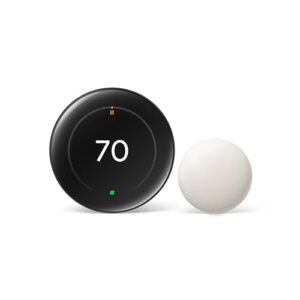
The Google Nest Learning Thermostat (4th Gen) stands out with its intelligent automation that actually learns your heating and cooling preferences. You’ll appreciate the 60% larger display and built-in temperature sensor that controls hot and cold spots throughout your property.
It saves an average of 12% on heating and 15% on cooling bills, while the Google Home app gives you full remote control from anywhere. At $252, you’re getting sophisticated scheduling, auto-away detection, and effortless integration with Alexa and Google Assistant.
| Best For | Homeowners who want to cut energy costs without thinking about it, especially if you have uneven temperatures in different rooms or forget to adjust your thermostat when you leave. |
|---|---|
| Smart Control | Google Home app |
| Price | $252.00 |
| Display Type | 60% larger touchscreen |
| Energy Savings | 12% heating, 15% cooling |
| Programming | Auto-scheduling |
| C-Wire Required | Not required (most homes) |
| Additional Features |
|
- Learns your schedule and temperature preferences automatically, so you don’t have to program anything
- Saves real money on energy bills (12% heating, 15% cooling on average)
- Includes a temperature sensor to fix hot and cold spots in your home
- Not available in the UK
- Requires a 24V system (though it works with most homes)
- Privacy concerns since it learns your habits and connects to your smart home network
2. Ecobee Smart Thermostat Premium
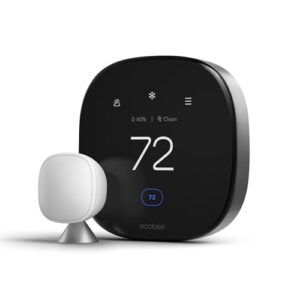
The Ecobee Smart Thermostat Premium takes a different approach with its radar occupancy sensing and built-in air quality monitor. You’ll get alerts when CO2 levels or volatile compounds spike, plus filter change reminders that keep your HVAC running efficiently.
It saves up to 26% annually on heating and cooling costs while the included SmartSensor eliminates hot and cold spots in different rooms. The zinc alloy finish looks sharp, and you’ll control everything remotely through Alexa, Google Assistant, or Siri integration.
| Best For | Homeowners who want energy savings combined with air quality monitoring and multi-room temperature control. |
|---|---|
| Smart Control | Alexa, HomeKit, Google |
| Price | Premium tier |
| Display Type | Touchscreen |
| Energy Savings | Up to 26% annually |
| Programming | Smart scheduling |
| C-Wire Required | Yes (or PEK) |
| Additional Features |
|
- Saves up to 26% yearly on heating and cooling while the SmartSensor fixes hot and cold spots throughout your home
- Built-in air quality monitor alerts you to CO2 spikes and filter changes so your system stays efficient
- Works with Alexa, Google Assistant, and Siri, plus doubles as a smart speaker for music and podcasts
- You’ll need a C-wire or the Power Extender Kit to install it, which adds a step to setup
- Not all HVAC systems work with it, so check compatibility before buying
- Some features like Siri control require extra devices like a HomePod
3. Amazon Smart Thermostat with Alexa
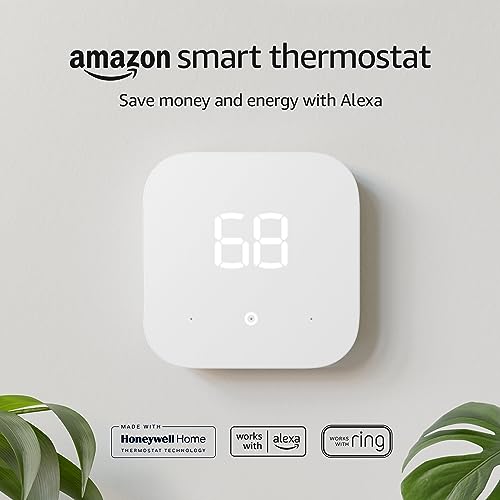
If you’re working with Amazon’s ecosystem, the Amazon Smart Thermostat with Alexa offers effortless voice control at $79.99. You’ll save an average of $50 yearly on energy bills with its ENERGY STAR certification and automatic temperature adjustments based on presence detection.
Control everything through the Alexa app whether you’re home or miles away, setting schedules and monitoring energy usage through the dashboard. Just note that you’ll need a C-wire for installation, which might require adding a 24-volt transformer to your setup.
| Best For | Amazon ecosystem users who want an affordable smart thermostat with voice control and automatic energy-saving features. |
|---|---|
| Smart Control | Alexa, Ring |
| Price | $79.99 |
| Display Type | Basic display |
| Energy Savings | $50/year average |
| Programming | Alexa scheduling |
| C-Wire Required | Yes |
| Additional Features |
|
- Saves an average of $50 per year on energy bills with ENERGY STAR certification
- Seamless integration with Alexa for voice control and automatic temperature adjustments based on presence
- Budget-friendly at $79.99 with on-the-go control through the Alexa app
- Requires a C-wire for installation, which may need additional hardware like a 24-volt transformer
- Android users may experience issues with the scheduling feature
- Installation instructions could be clearer for beginners
4. Honeywell Smart Thermostat System
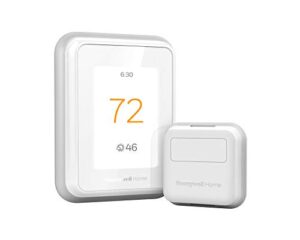
The Honeywell Smart Thermostat System (model RCHT9610WFSW2003 T9) takes a different approach with optional Smart Room Sensors that let you prioritize specific areas—perfect when guests are only using certain spaces.
You’ll control everything via Wi-Fi from your smartphone, with voice commands through Alexa, Google Assistant, or Apple HomeKit. The system works with most 24V heating and cooling setups, though you’ll need either a C-wire or the included power adapter.
Energy reports help track consumption, and geofencing automatically adjusts temperatures when your property’s vacant.
| Best For | Property managers or hosts who want detailed control over temperatures in different rooms or zones, especially in larger spaces where some areas get more use than others. |
|---|---|
| Smart Control | Alexa, HomeKit, Google |
| Price | Mid-range |
| Display Type | Touchscreen |
| Energy Savings | ENERGY STAR certified |
| Programming | 7-day scheduling |
| C-Wire Required | No (adapter included) |
| Additional Features |
|
- Smart room sensors let you focus heating or cooling on occupied spaces instead of wasting energy on empty rooms
- Works with all the major voice assistants (Alexa, Google, HomeKit) for hands-free control
- Energy monitoring shows where you’re spending and helps identify savings opportunities
- Setup can be tricky if your system lacks a C-wire, even with the included adapter
- Only connects to 2.4GHz WiFi, which some users report as finicky
- The app and manual are pretty bare-bones—you might need to hunt online for troubleshooting help
5. Honeywell Smart Color Thermostat
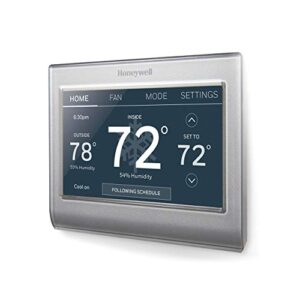
For vacation properties where guest comfort meets style, the Honeywell RTH9585WF1004/W stands out with its customizable color touchscreen—you can match it to your rental’s decor.
This Energy Star certified model offers 7-day programming and Wi-Fi control through your smartphone, letting you adjust temperatures remotely and receive filter change alerts. It works with Alexa and most forced air, hot water, and heat pump systems.
You’ll need a C-wire for installation, and it won’t auto-switch between heating and cooling modes.
| Best For | Vacation rental owners who want remote temperature control and a stylish, customizable touchscreen that matches their property’s aesthetic. |
|---|---|
| Smart Control | Alexa |
| Price | Budget-friendly |
| Display Type | Color touchscreen |
| Energy Savings | ENERGY STAR certified |
| Programming | 7-day programmable |
| C-Wire Required | Yes |
| Additional Features |
|
- Customize the color touchscreen to complement your rental’s interior design
- Control and monitor temperatures remotely through your smartphone, perfect for managing properties between guests
- Energy Star certified with intelligent alerts for filter changes, helping reduce maintenance costs
- Requires a C-wire for installation, which may need professional help if your system lacks one
- No automatic switching between heating and cooling modes in some models
- Lacks advanced features like adaptive learning or occupancy detection found in premium smart thermostats
6. Google Nest Smart Thermostat
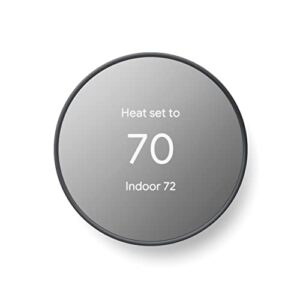
If budget matters but performance doesn’t have to suffer, the Google Nest Smart Thermostat (GA02081-CA) delivers solid remote control through the Google Home app and HVAC monitoring alerts that flag potential issues before they become costly repairs.
If you’re heating or cooling a bigger space, check out thermostats built for large homes to ensure even temperature control across multiple zones.
This Energy Star certified model works with most heat pump systems and installs without a C-wire in many homes. You’ll save energy with its Savings Finder feature and automated scheduling, though you won’t get live support from Google if installation troubles arise.
| Best For | Budget-conscious homeowners who want smart home integration and energy savings without spending premium thermostat prices. |
|---|---|
| Smart Control | Google Home app |
| Price | Affordable |
| Display Type | 2-inch screen |
| Energy Savings | ENERGY STAR certified |
| Programming | Programmable |
| C-Wire Required | Not required (most homes) |
| Additional Features |
|
- Saves energy automatically with scheduling and Savings Finder optimization
- HVAC monitoring alerts catch potential system issues early
- Installs without a C-wire in most homes, making setup easier
- No live customer support from Google if you run into problems
- Won’t work with all HVAC systems, especially older or non-US configurations
- Some users report frustrating installation experiences despite the no-C-wire claim
7. Sensi Smart Wi-Fi Thermostat
The Sensi Smart WiFi Thermostat (ST55) gives you remote control through Android and iOS apps, plus voice commands via Alexa or Google Assistant.
You’ll appreciate its flexible 7-day scheduling and geofencing features that adjust temperatures when you leave or return, cutting energy costs without lifting a finger.
Energy Star certified and compatible with most HVAC systems, this model installs easily without a C-wire in many applications.
Setup can require patience with multiple WiFi connection attempts, but once running, it delivers reliable climate control and maintenance alerts.
| Best For | Homeowners who want straightforward remote temperature control and energy savings without dealing with complex smart home ecosystems or expensive professional installation. |
|---|---|
| Smart Control | Alexa |
| Price | Budget-friendly |
| Display Type | 5-inch screen |
| Energy Savings | ENERGY STAR certified |
| Programming | Programmable |
| C-Wire Required | Not required (most) |
| Additional Features |
|
- Works with most HVAC systems without needing a C-wire, making DIY installation actually doable for regular people
- Geofencing automatically adjusts your temperature when you leave or come home, so you’re not heating or cooling an empty house
- Energy Star certified with scheduling options that genuinely cut down your utility bills over time
- Initial WiFi setup can be frustrating and often takes several tries to connect properly
- Daily energy reports aren’t as detailed as some competing models, giving you less insight into usage patterns
- Settings changes sometimes take longer than expected to actually kick in
8. Meross Smart Home Thermostat
The Meross Smart Home Thermostat works with Apple HomeKit, Alexa, Google Assistant, and SmartThings, letting you control temps from anywhere through the iOS or Android app. You’ll get 7×24 scheduling to program weekly routines, plus smart alerts for filter changes and system issues.
This compact, glass-paneled unit controls heat pumps, furnaces, and AC systems, though it won’t work with electric baseboard heaters or millivolt setups. Most installations need a C-wire, so check your wiring before ordering.
| Best For | Smart home enthusiasts who want multi-platform compatibility and detailed scheduling control for their HVAC system. |
|---|---|
| Smart Control | Matter, Alexa, Apple, Google |
| Price | Budget-friendly |
| Display Type | Glass panel touchscreen |
| Energy Savings | Automated adjustments |
| Programming | 7x24h scheduling |
| C-Wire Required | Yes (some configs) |
| Additional Features |
|
- Works seamlessly with Apple HomeKit, Alexa, Google Assistant, and SmartThings for flexible voice control
- 7×24 scheduling lets you create detailed weekly routines for every day and time slot
- Smart alerts keep you informed about filter replacements and system problems before they become major issues
- Won’t work with electric baseboard heaters, millivolt systems, or two-wire setups
- Requires a C-wire for installation, which many older homes don’t have without upgrades
- Relies on WiFi for remote features, so internet outages mean you lose app control
9. Honeywell Programmable Thermostat
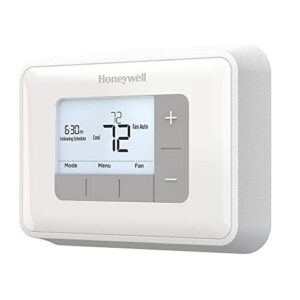
The Honeywell Home RTH6360D1002 strips away the Wi-Fi complexity while keeping solid energy-saving features. You’ll program 5-2-Day or 1-Week schedules, and its Smart Response Technology learns how long your system needs to hit target temps.
The backlit LCD shows current and set-point temperatures side-by-side, while auto changeover manages heat-to-cool transitions without manual switching. It runs on 2 AA batteries or an optional C-wire connection, and you’ll get reminders for low batteries and filter changes to keep things running smoothly.
| Best For | Homeowners who want straightforward scheduling and energy savings without the learning curve or connectivity headaches of a smart thermostat. |
|---|---|
| Smart Control | Push Button |
| Price | Budget-friendly |
| Display Type | Backlit LCD |
| Energy Savings | Smart Response Tech |
| Programming | 5-2 or 1-week |
| C-Wire Required | Optional |
| Additional Features |
|
- Smart Response Technology learns your system’s timing to reach target temps exactly when you want them
- Backlit display shows both current and target temperature at a glance, making adjustments simple
- Runs on batteries or hardwired C-wire, giving you flexibility with installation
- Some units arrive with defective fan controls that require replacement
- No trim ring included, so old screw holes from your previous thermostat may show
- Takes a few days to calibrate and deliver accurate temperature readings in your home
10. Ecobee Smart Wifi Thermostat
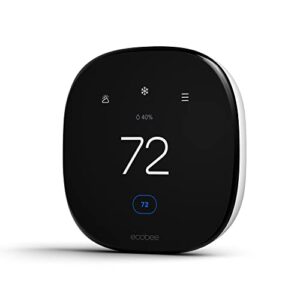
Radar occupancy sensing sets this Ecobee model apart from basic Wi-Fi thermostats. You’ll get automatic temperature adjustments when the system detects you’re home or away, cutting heating and cooling costs up to 26% annually.
The 3.5-inch touchscreen shows real-time temp, humidity, and weather forecasts, while Eco+ mode learns your routine and fine-tunes settings automatically. It works with Alexa, Google Assistant, and Apple HomeKit for voice control, though you’ll need a C-wire or the included Power Extender Kit for installation.
| Best For | Homeowners who want to cut energy bills through smart automation and don’t mind a slightly more complex installation. |
|---|---|
| Smart Control | Apple, Alexa, Google |
| Price | Mid-range |
| Display Type | Basic display |
| Energy Savings | Up to 26% annually |
| Programming | Auto-scheduling |
| C-Wire Required | Yes (or PEK) |
| Additional Features |
|
- Radar occupancy sensing automatically adjusts temps when you leave or return home, potentially saving up to 26% on energy costs
- Works with all major smart home platforms (Alexa, Google Assistant, Apple HomeKit) for easy voice control
- Learns your schedule over time and optimizes heating and cooling without constant manual adjustments
- Requires a C-wire for power, which may mean hiring an electrician if your current setup doesn’t have one
- No fan circulation settings, limiting airflow control options
- Some users report compatibility issues or defects, so double-check your HVAC system before buying
Essential Thermostat Features for Rentals

When you’re managing a vacation rental from miles away, your thermostat becomes your first line of defense against energy waste and guest complaints.
The right features transform a simple temperature controller into a powerful property management tool that saves you money and keeps guests comfortable. Here are the must-have capabilities you’ll want in any rental property thermostat.
Remote Temperature Control
Remote Access gives you complete Temperature Control from anywhere through WiFi Thermostat technology. Smart Thermostats connect to Thermostat Apps on your phone, letting you adjust settings miles away using Remote Monitoring.
Temperature Sensors in multiple zones feed real-time data to your Smart Home system, triggering Automated Cooling based on occupancy and weather conditions—protecting your property while cutting energy waste.
For more on the underlying IoT technology, see how cloud-based remote adjustments work with smart temperature systems.
Smart Scheduling Capabilities
Beyond Manual Adjustments, Auto Scheduling learns your rental patterns and pre-conditions rooms before guest arrival. Smart Thermostats with Occupancy Detection automatically shift Temperature Control based on movement, while Weather Forecasting integration adjusts heating cycles ahead of cold snaps.
You’ll reap serious Energy Savings through:
- Seasonal presets that update setpoints at predefined dates
- Remote Overrides from your phone without system restarts
- Time-of-use alignment that avoids peak utility rates
Energy Optimization runs on autopilot across all your Smart Home Devices.
Energy Usage Reports
Once scheduling takes hold, Energy Monitoring shows where dollars vanish.
Most Smart Thermostats export monthly Consumption Tracking in CSV or PDF formats—spot HVAC spikes against baseline periods, then drill into hourly Data Insights that correlate guest turnover with Utility Optimization gaps.
Report Analysis highlights real energy versus total draw per zone, so you steer Energy Efficiency improvements with hard numbers, not guesswork.
Occupancy Detection and Automation
Watching consumption patterns is one thing—automation that reacts to presence is another. Motion Sensing paired with Occupancy Tracking lets your thermostat adjust setpoints when guests arrive or leave, shaving unnecessary runtime.
Sensor Calibration fine-tunes detection thresholds, while Automation Rules trigger Energy Optimization schedules based on real occupancy.
Smart Thermostat Benefits stack when you marry these Thermostat Features and Functions with Smart Home Devices for true Remote Control efficiency. For added reliability, many systems now utilize multi-sensor fusion techniques to combine data sources and improve occupancy detection accuracy.
Voice Control and App Integration
Tapping into Voice Commands through Alexa, Google Assistant, or Siri puts instant Remote Control at your fingertips—or voice box.
App Connectivity via WiFi Enabled platforms lets you check temperatures from anywhere, while Smart Home Device Integration ties your Google Nest or other Smart Thermostat into unified ecosystems.
Voice Assistants and Remote Access simplify guest comfort without requiring you to walk property managers through complex menus.
Energy Efficiency and Cost Savings

Smart thermostats can slash your vacation home’s energy bills by up to 26% through intelligent temperature management and automated scheduling.
Smart thermostats can cut vacation home energy bills up to 26% through automated scheduling and intelligent temperature control
The real savings come from features that prevent heating or cooling an empty property while maintaining comfort when guests arrive. Here’s how the right thermostat puts money back in your pocket while keeping your rental competitive.
Programmable Temperature Settings
You get serious control over your HVAC costs when you use programmable temperature settings. These thermostat features and functions let you define temperature ranges for different times—say 68°F mornings and 62°F nights—without lifting a finger after setup.
- Set four daily periods: morning, day, evening, and night
- Program weekday and weekend schedules separately
- Lock temperatures with hold mode when needed
- Copy weekday programs to weekends quickly
- Maintain settings even during power outages
Smart scheduling through automated controls means your programmable thermostat adjusts temperatures before you arrive, keeping comfort high and waste low. Energy reports show exactly where you’re saving, while thermostat algorithms fine-tune performance over time. Temperature control becomes straightforward, and your utility bills reflect the difference—studies show 10 to 15 percent lower annual HVAC energy use in many homes with these smart thermostat controls.
Vacation-ready Energy-saving Modes
Your smart thermostat switches into vacation mode the moment you leave, raising cooling setpoints or lowering heating targets to slash energy waste without risking system damage.
Remote monitoring lets you tweak auto adjustments from anywhere, and seasonal optimization ensures your vacation rentals stay protected during extreme weather. These smart modes deliver real energy savings—often double-digit percentage drops—while keeping remote control simple and energy efficiency automatic.
Energy Star Certification Benefits
Energy Star certification proves your smart thermostat cuts energy use by up to 35 percent compared to standard models—real energy savings that boost building value and net operating income.
You’ll lower greenhouse gas emissions while meeting sustainability compliance requirements that federal leases increasingly demand. This certification process validates thermostat technology performance, helping you attract quality tenants and justify premium rates through transparent energy efficiency data.
Long-term Utility Bill Reduction
You’ll cut heating and cooling costs by up to 10 percent annually with programmable and smart thermostat efficiency—that’s real cost reduction compounding month after month.
Energy savings from optimized temperature control and utility management grow when combined with other efficiency upgrades, lowering your long-term bills while improving bill optimization. Proper thermostat installation ensures you capture these benefits from day one.
Remote Access and Property Management

Managing a vacation home from miles away used to mean crossing your fingers and hoping the heat didn’t fail while you were gone.
Smart thermostats change that equation completely, putting full climate control in your pocket no matter where you’re.
Here’s how remote access transforms the way you run your property.
Smartphone and Web-based Control
You’ll manage your vacation home from anywhere with smartphone apps and web portals that deliver real-time temperature control. Smart WiFi thermostats like the Google Nest Thermostat connect through cloud connectivity, letting you adjust settings via mobile app features or browser-based access.
Remote control means you can activate automated scheduling before guests arrive, switch to vacation mode during gaps, and monitor your wireless thermostat without being onsite.
Multiple User Access for Managers
You can assign multiple user roles through access control features built into most smart thermostats.
Property managers benefit from permission settings that let you grant different levels of remote control—admins handle full configuration, while cleaners or maintenance staff get view-only access. This role management keeps your vacation rental secure without sacrificing the flexibility you need for smooth remote management across your team.
Integration With Property Management Platforms
Beyond access roles, you can connect thermostats to property management platforms through API integration for effortless data syncing. Automated alerts create maintenance tickets when sensors fail, while secure authentication protects your remote control access.
This vacation rental management setup links energy efficiency data to tenant records, triggers budget warnings on unusual usage, and logs all remote management activity—giving you complete oversight through smart home technology without manual tracking.
Compatibility With HVAC Systems

Before you invest in a smart thermostat for your vacation home, you need to know if it’ll actually work with your heating and cooling setup. Not all thermostats play nice with every HVAC system, and the last thing you want is to discover compatibility issues after installation.
Here’s what you need to check to make certain your chosen thermostat integrates smoothly with your existing equipment.
Identifying System Requirements
Before you buy a smart thermostat for your vacation property, you’ll need to gather stakeholder inputs and run thorough compatibility checks on your existing HVAC setup. System analysis helps prevent costly mistakes down the road.
- Check your current heating and cooling equipment type (forced air, heat pump, radiant)
- Verify voltage requirements and available wiring connections
- Confirm your system is compatible with remote control and energy efficiency features
C-wire and Installation Needs
Once you’ve confirmed compatibility, the next hurdle is wiring. Most smart thermostats need a C-wire to deliver continuous 24-volt power for Wi-Fi and sensors. If your setup lacks one, you can run a new wire—usually 18 to 22 AWG over distances up to 100 feet—or use a power extender kit.
Here’s what you should know:
| Solution | Best For | Typical Cost |
|---|---|---|
| Dedicated C-wire installation | New builds or accessible wire runs | $150–$300 professional install |
| Power extender kit (PEK) | Existing systems without a fifth conductor | $20–$50 plus setup time |
| Wireless thermostat options | Rentals with complex wiring or older HVAC | $100–$200 for battery-powered models |
| C-wire adapter at furnace | DIY-friendly upgrades | $15–$40 for adapter hardware |
| Professional HVAC assessment | Uncertain compatibility or safety concerns | $75–$150 diagnostic visit |
Always power down your furnace before you touch any wires. Incorrect connections can fry your thermostat or damage the control board, so if you’re not confident, bring in a pro to handle the install.
Multi-zone and Multi-system Support
Vacation homes with multiple levels or separate wings benefit from zone control systems that coordinate independent thermostats and automated damper control across each area. Smart zoning profiles help you avoid heating empty spaces, while multi-system integration ensures your central hub balances competing demands from different zones.
Here’s how to enhance energy efficiency optimization:
- Install independent thermostats in each zone for precise remote control.
- Deploy occupancy sensors to trigger automatic adjustments when rooms are vacant.
- Use a central controller to coordinate heating and cooling across all zones.
- Choose dampers that modulate airflow to match each zone’s target temperature.
- Enable smart thermostat learning algorithms to fine-tune schedules over time.
Most systems require a common control board with dedicated zone cables, though wireless options reduce installation complexity in retrofits. Check that your existing HVAC equipment can handle zoned operation—undersized units struggle to deliver comfort when multiple zones call for conditioning simultaneously. A professional HVAC assessment confirms compatibility and prevents costly mistakes during your thermostat installation guide process.
Enhancing Guest Experience

A thermostat that confuses your guests won’t do you any favors, no matter how many features it packs.
The best vacation home thermostats balance smart technology with easy-to-use controls that anyone can figure out in seconds. Here’s what makes a thermostat genuinely guest-friendly.
User-friendly Thermostat Interfaces
When guests walk into your vacation home, they shouldn’t need a manual to adjust the temperature. Logical design matters—smart wifi thermostats with touchscreen navigation let users make quick changes without frustration.
Look for intelligent thermostat options that offer voice commands and visual feedback through simple menus. Thermostat reviews consistently highlight how menu simplification transforms the guest experience, making remote control features accessible to everyone.
Clear Temperature Display and Controls
Large, bold digits make temperature readability a breeze from across any room. Smart thermostat display settings with high-contrast screens guarantee your guests see current and target temps at a glance, even in bright sunlight.
Control interfaces featuring tactile dials or labeled buttons deliver instant visual feedback—no guesswork required. Thermostat reviews confirm that clear temperature control transforms user experience, letting visitors adjust comfort without hunting through menus or reaching for remote control apps.
Pre-set Comfort Modes for Guests
Guest preferences vary widely, so pre-configured comfort settings let you balance satisfaction with energy savings before check-in. Smart thermostat mode customization gives vacation rental management three powerful levers:
- Guest preset modes lock temperature ranges between 68–72°F to prevent extreme adjustments
- Seasonal comfort settings auto-switch heating and cooling based on ambient weather
- Energy optimization presets reduce HVAC cycling during unoccupied periods
Guest reviews consistently praise properties offering easy-to-use temperature control without sacrificing efficiency.
Smart Home Integration Options
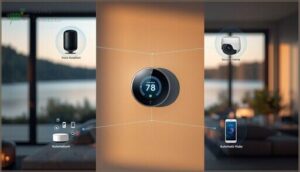
Your vacation home thermostat doesn’t have to work alone. Most modern smart thermostats connect seamlessly with popular voice assistants, security systems, and automation platforms you’re already using.
Here’s how these integration options can simplify your property management and give you complete control from anywhere.
Connectivity With Alexa, Google, and Apple
Most smart thermostats work seamlessly with Alexa, Google Assistant, and Apple HomeKit, giving you voice control and remote access through your preferred ecosystem. Whether you’re using Google Nest, Ecobee, or another smart thermostat, you’ll get device compatibility across platforms.
These ecosystems let you adjust temperature, set schedules, and create routines through companion apps, ensuring wireless connectivity and ecosystem integration that fits your existing smart home setup.
Linking to Security and Automation Systems
Your smart thermostat can connect directly to security systems and home automation platforms through secure system interfaces, creating powerful automation rules that protect your property. Data encryption ensures wireless connectivity stays safe while you monitor climate and security together.
Key integration benefits include:
- Smart alerts notify you when motion sensors detect activity and adjust temperature
- Automated arming synchronizes security modes with energy-saving settings when you’re away
- Emergency response pauses HVAC during fire or alarm triggers
- Centralized monitoring combines temperature data with security dashboards for complete oversight
Unified Control Through Smart Home Hubs
A hub acts as your command center, translating between Zigbee, Z-Wave, and Wi-Fi protocols so your smart thermostat, sensors, and security devices work as one system.
Cross-platform compatibility lets you control everything through a single app—whether you prefer Alexa, Google, or Apple HomeKit. Automation rules execute locally on the hub, speeding up responses and keeping your vacation home running smoothly even when the internet goes down.
Indoor Air Quality and Maintenance Alerts

Your smart thermostat can do more than control temperature—it helps protect your vacation home’s air quality and HVAC system when you’re not there.
Many models now include sensors that monitor humidity levels and alert you when filters need changing, preventing costly damage from neglected maintenance. Here’s how these features keep your property running smoothly between visits.
Filter Change Reminders
Most modern smart thermostats include filter alerts that protect your HVAC investment when you’re away. These notification systems track runtime and send reminder timers straight to your phone, ensuring maintenance schedules never slip through the cracks.
- Built-in thermostat alerts appear on your device screen and companion app
- Push notifications arrive within seconds on iOS and Android devices
- Email reminders can be scheduled for specific days that work for you
Air filter reminders usually trigger every 90 days, though you can customize intervals based on your property’s needs. This feature promotes energy efficiency by preventing clogged filters from forcing your system to work harder, which drives up utility costs and reduces equipment lifespan.
Humidity and Air Quality Sensors
Beyond reminders, humidity monitors and air quality sensors in premium smart thermostats track conditions you can’t see. These devices measure relative humidity levels to prevent mold growth and monitor indoor pollution like CO2 and volatile organic compounds.
You’ll get real-time alerts when sensor calibration detects poor indoor air quality, triggering smart ventilation adjustments that protect your property and boost energy efficiency while maintaining comfort.
Maintenance Scheduling for Optimal Performance
Once sensors flag issues, a solid maintenance routine keeps your smart thermostat running smoothly year-round. Seasonal calibration checks verify temperature regulation accuracy, while firmware updates twice yearly add new features and patch bugs. Error code logging helps you spot patterns before small glitches turn into costly repairs.
- Set automated reminders every six months for battery checks and connectivity tests
- Schedule quarterly inspections following your thermostat installation guide recommendations
- Try power cycling during routine maintenance to clear memory glitches and refresh schedules
Regular upkeep protects your energy efficiency gains and extends your programmable thermostat’s lifespan.
Installation Tips for Vacation Homes
Getting your smart thermostat up and running in a vacation home doesn’t have to be complicated, but you’ll want to make the right call on installation approach.
Whether you tackle it yourself or bring in a pro depends on your HVAC setup and comfort level with electrical work.
Let’s walk through what you need to know to get your thermostat installed correctly and configured for remote property management.
DIY Vs. Professional Installation

You’ll face a choice between DIY and professional smart thermostat installation, each with distinct trade-offs. DIY works for simple single-stage systems and saves labor fees, but improper wiring can void warranties or trigger errors.
Professional installation ensures compatibility checks and proper setup, especially for programmable thermostats requiring C-wire connections.
| DIY Installation | Professional Installation |
|---|---|
| Saves on labor fees | Adds installation costs |
| Requires basic electrical skills | Technician verifies compatibility |
| May void warranty if errors occur | Maintains warranty validity |
| Completed in under an hour | Includes testing and calibration |
Step-by-step Installation Process

Turn off your HVAC breaker before removing the old thermostat, then label each wire by terminal. Mount the new smart thermostat base level, thread wires through, and match terminals using the diagram.
Secure connections, attach the faceplate, and restore power. Run a quick system test—heat and cool cycles—to verify your programmable thermostat responds correctly. Proper mounting techniques and wiring considerations prevent future headaches.
Initial Setup and Configuration

Once the programmable thermostat is wired, launch the setup wizard to configure network connectivity and user authentication.
Create a dedicated vacation home profile, connect to your property Wi-Fi, and identify your HVAC type—forced air, heat pump, or boiler.
Run system testing on heating and cooling cycles, then perform thermostat calibration by setting your preferred temperature range for energy-efficient smart thermostat operation.
Frequently Asked Questions (FAQs)
What is the best temperature for your house while on vacation?
Set your winter thermostat to 55–60°F to prevent frozen pipes.
While summer calls for 78–85°F to balance energy conservation and heat protection. Smart thermostat controls let you adjust remotely if conditions change.
Is there a thermostat that can control from anywhere?
Yes, most modern smart thermostats let you control your home’s temperature remotely through smartphone apps.
Google Nest, Honeywell Home RTH9585WF, and Sensi Smart Thermostat all offer location services and automated adjustments from anywhere.
How do thermostats handle power outages remotely?
Most smart thermostats use backup batteries to preserve settings during power outages.
Once power returns, they automatically reconnect to Wi-Fi and resume remote control while sending alerts about the interruption through their app.
Can guests accidentally lock out property managers?
Most modern smart thermostat systems prevent guest lockouts through layered access control. You retain administrator privileges while guests receive limited access, ensuring backup entry methods and remote control security protect your vacation rental management authority.
Do smart thermostats work without internet connection?
Most smart thermostats maintain local control during internet outages, letting you adjust temperature on-device or via Bluetooth.
Remote access and firmware updates won’t work offline, but basic heating and cooling continue normally.
How long do smart thermostat batteries last?
Most thermostats powered by two AA batteries run 6 months to 2 years, depending on display brightness and wireless activity.
Rechargeable models need periodic charging, while battery-free options connect directly to your HVAC system.
Can thermostats detect frozen pipes in winter?
While thermostats don’t detect frozen pipes directly, some models with smart sensors can monitor ambient temperatures and send freeze alerts when conditions drop below critical thresholds—helping you prevent costly plumbing damage remotely.
Conclusion
The emptier your vacation home sits, the more it costs to maintain—unless you install the right thermostat. Thermostats for vacation homes transform wasted energy into measurable savings while protecting your investment from temperature extremes.
You’ll monitor conditions from anywhere, adjust settings between guests, and prevent costly damage before it starts. Your property runs smarter when nobody’s there, keeping pipes safe and utility bills low.
Control what happens when you’re away, and your vacation home pays you back.
- https://help.hospitable.com/en/articles/10126338-thermostats-overview
- https://www.ecobee.com/en-ca/smart-thermostats/
- https://cielowigle.com/blog/temperature-to-keep-house-while-on-vacation/
- https://www.airfiltersdelivered.com/blogs/helpful-tips/what-temperature-to-leave-a-vacant-house
- https://www.delair.com/blog/what-temperature-should-i-set-my-ac-to-while-away-on-vacation/