
This site is supported by our readers. We may earn a commission, at no cost to you, if you purchase through links.

Managing temperature across a large home isn’t just inconvenient — it’s expensive. The upstairs bakes while the basement stays frigid, the guest wing sits empty but still costs you money to condition, and your standard thermostat treats a 4,000-square-foot house like a studio apartment.
Thermostats for large homes work differently. They use remote sensors, multi-zone coordination, and occupancy-based scheduling to tackle the real problem: your home has microclimates, not one uniform temperature.
The right pick depends on your HVAC setup, square footage, and how much control you want. Here’s what actually works.
Table Of Contents
- Key Takeaways
- Top 10 Thermostats for Large Homes
- 1. Sensi Touch Smart Thermostat
- 2. Honeywell WiFi Touch Screen Thermostat
- 3. Riseem Non Programmable S3001 Thermostat
- 4. Emerson Programmable Thermostat
- 5. Ecobee Smart Thermostat Essential
- 6. Ecobee Smart Thermostat Premium
- 7. Amazon Smart Thermostat with Alexa
- 8. Sensi Smart Thermostat Controller
- 9. Ecobee Smart Wifi Thermostat
- 10. Google Nest Smart Thermostat
- Large-Home Temperature Challenges
- Multi-Zone Control Essentials
- Remote Sensors and Room Coverage
- HVAC Compatibility Requirements
- Energy Savings for Big Homes
- Smart Home Integration Features
- Installation and Setup Considerations
- Choosing Your Best Thermostat
- Frequently Asked Questions (FAQs)
- Is there a difference between commercial and residential thermostats?
- How often should smart thermostats be updated?
- Can smart thermostats work during internet outages?
- Whats the average lifespan of these devices?
- Do smart thermostats require regular maintenance or cleaning?
- Are there subscription fees for advanced features?
- Can smart thermostats work with radiant floor heating?
- How do extreme outdoor temperatures affect thermostat accuracy?
- What happens to settings during a power outage?
- Do smart thermostats work with older ductwork systems?
- Conclusion
Key Takeaways
- Smart thermostats with remote sensors solve the real problem in large homes — uneven temperatures across rooms and floors — far better than any single-unit thermostat can.
- Multi-zone control with motorized dampers and coordinated scheduling cuts energy waste by directing heating and cooling only where people actually are, not everywhere at once.
- Before buying, check your wiring for a C-wire and confirm your HVAC type, since heat pumps, multi-stage systems, and line-voltage heaters each have different compatibility requirements.
- The best thermostat for your home depends on your priorities — energy savings, voice control, air quality monitoring, or simple reliable scheduling — not on which model has the most features.
Top 10 Thermostats for Large Homes
Finding the right thermostat for a large home isn’t a one-size-fits-all situation — the wrong pick leaves some rooms freezing while others bake. These 10 models stood out for their ability to handle the demands of bigger spaces, from multi-zone control to smart scheduling. Here’s what made the cut.
Before diving into the list, brushing up on thermostat buying basics for beginners can help you weigh your options with confidence.
1. Sensi Touch Smart Thermostat
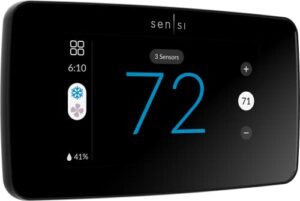
The Sensi Touch Smart Thermostat punches above its weight for large homes. Its color touchscreen keeps controls easy to use, and support for up to 15 room sensors means you’re not guessing which wing of the house is too cold. Room sensors are sold separately, but the payoff in balanced comfort is worth it.
Geofencing controls the away-mode automatically, and energy savings hover around 23%. It needs a C-wire to power up, so check your wiring before ordering.
| Best For | Homeowners with large or multi-room homes who want hands-on climate control and are comfortable with a straightforward DIY install. |
|---|---|
| Display Type | Touchscreen |
| C-Wire Required | Yes |
| HVAC Compatibility | Standard 24VAC systems |
| Connectivity | WiFi + Bluetooth |
| Installation Type | DIY |
| Voice Control | Alexa, Google Assistant, SmartThings |
| Additional Features |
|
- Color touchscreen makes day-to-day adjustments quick and intuitive
- Supports up to 15 room sensors for even comfort across a large home
- Geofencing automatically adjusts temperature when you leave or return, saving energy without any manual input
- Requires a C-wire, which not all homes have — worth checking before you buy
- Room sensors are sold separately, so balancing a larger home adds to the cost
- Some users run into Wi-Fi connectivity hiccups during initial setup
2. Honeywell WiFi Touch Screen Thermostat
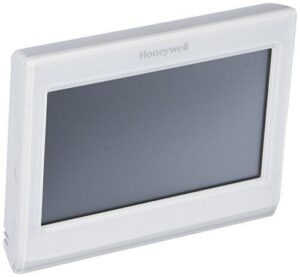
Honeywell’s WiFi Touch Screen Thermostat is a solid step up if you want remote control without complexity. The 3.5-inch color touchscreen is clean and easy to read, and the Total Connect Comfort app lets you adjust temperatures from anywhere.
Smart Response Technology learns how long your system takes to hit the target temp — so rooms are comfortable when you need them, not after. Just know it requires a C-wire connection, and professional installation keeps that 5-year warranty intact.
| Best For | Homeowners who want straightforward remote climate control with a clean interface and don’t need a thermostat that "learns" on its own. |
|---|---|
| Display Type | 3.5″ Color Touchscreen |
| C-Wire Required | Yes |
| HVAC Compatibility | Radiant and standard systems |
| Connectivity | WiFi |
| Installation Type | Professional recommended |
| Voice Control | Amazon Alexa |
| Additional Features |
|
- Control your home’s temperature from anywhere using the Total Connect Comfort app or Alexa voice commands
- The 7-day programmable schedule with multiple daily stages gives you precise, predictable temperature management
- Real-time indoor and outdoor temperature and humidity data keeps you fully informed about your home’s climate
- Requires a C-wire connection, which not all homes have pre-installed
- Professional installation is recommended to keep the 5-year warranty valid, adding to upfront costs
- Some user data may be shared with third parties for advertising purposes, which could be a privacy concern
3. Riseem Non Programmable S3001 Thermostat
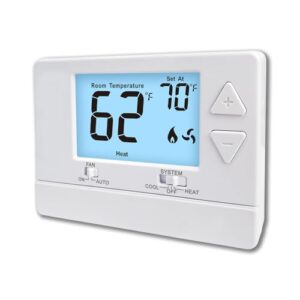
Not every large home needs a smart thermostat. If you’ve got a straightforward single-stage system — one heat, one cool — the Riseem S3001 keeps things simple without sacrificing reliability.
The backlit LCD display shows current and set temperatures clearly, and push-button controls make adjustments easy for anyone. It runs on 24VAC or 2 AA batteries, so power interruptions won’t catch you off guard. Setup usually takes under 30 minutes.
Just know upfront: no Wi-Fi, no scheduling, no multi-zone support.
| Best For | Homeowners with a simple single-stage heating and cooling system who want a no-fuss, easy-to-use thermostat without the complexity of smart features. |
|---|---|
| Display Type | Backlit LCD |
| C-Wire Required | Yes (heat/cool only) |
| HVAC Compatibility | Single-stage gas, oil, electric |
| Connectivity | None |
| Installation Type | DIY |
| Voice Control | None |
| Additional Features |
|
- Clear backlit LCD display with large numbers makes it easy to read and adjust at a glance
- Flexible dual power supply (24VAC or 2 AA batteries) keeps it running even during power interruptions
- Quick DIY installation — most setups wrap up in under 30 minutes
- No programmable scheduling, Wi-Fi, or smart home integration
- Incompatible with heat pumps, multi-stage systems, mini-splits, and several other system types
- Requires a C-wire for heat-only or cool-only setups, which not all homes have
4. Emerson Programmable Thermostat
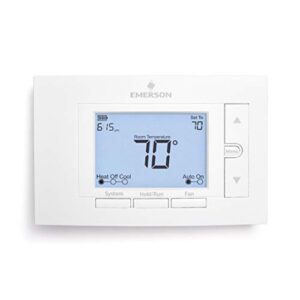
If you want one step up from the Riseem without jumping into full smart-home territory, the Emerson Programmable Thermostat hits that middle ground well.
7-day scheduling lets you set different temperatures for each day, so your system isn’t running hard when the house is empty. Adaptive recovery starts your HVAC early enough to hit your target temperature right on time — not after.
It works with most 24V gas, electric, and heat pump systems, and the backlit display keeps everything readable at a glance.
| Best For | Anyone who wants reliable programmable temperature control without WiFi or smart home features — great for privacy-conscious homeowners and confident DIYers alike. |
|---|---|
| Display Type | 5″ Backlit LCD |
| C-Wire Required | No |
| HVAC Compatibility | AC, Boiler, Furnace, Heat Pump |
| Connectivity | None |
| Installation Type | DIY |
| Voice Control | None |
| Additional Features |
|
- Flexible 7-day, 5-1-1, or off scheduling options let you match your exact weekly routine
- Large 5-inch backlit display is easy to read in any lighting, and doubles as a subtle hallway nightlight
- Works with a wide range of systems — gas, electric, heat pump, and boiler — with no extra sensors needed for dual fuel
- No WiFi or smart home integration, so remote control and app-based adjustments aren’t an option
- Programming a full 7-day schedule may require digging into installer-level instructions
- Side-entry terminals can make installation tricky if your home has older cloth-insulated wiring
5. Ecobee Smart Thermostat Essential
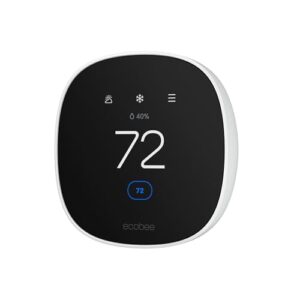
The Ecobee Essential punches above its price point for large homes. It brings smart scheduling and geofencing together, so your HVAC isn’t heating an empty house all day. Smart Recovery learns how long your system takes to warm up and starts early — you walk in to comfort, not a cold entry.
It works with most 24V systems and connects to Alexa, Google Assistant, and Siri. No remote sensors are in the box, but the basic package covers the essentials cleanly.
| Best For | Homeowners who want an easy DIY setup with smart scheduling and voice control to cut energy costs without a lot of extras. |
|---|---|
| Display Type | 3.74″ Color Touchscreen |
| C-Wire Required | Optional (PEK available) |
| HVAC Compatibility | Most 24VAC systems |
| Connectivity | WiFi |
| Installation Type | DIY |
| Voice Control | Alexa, Google Assistant, Apple HomeKit |
| Additional Features |
|
- Smart scheduling and geofencing keep your HVAC from running when no one’s home, saving up to 23% on energy annually
- Works with Alexa, Google Assistant, and Apple HomeKit for hands-free control
- Built-in leveling tools and step-by-step app guidance make installation straightforward for DIYers
- Remote sensors and air quality monitors aren’t included in the base package
- Homes without a C-Wire need a separate Power Extender Kit, adding cost and complexity
- Remote app features require a stable Wi-Fi connection, which can be a limitation in spotty-signal areas
6. Ecobee Smart Thermostat Premium
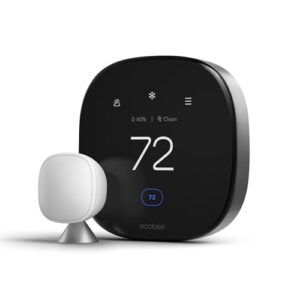
Step up from the Essential and you get a lot more capability. The Premium adds built-in air quality monitoring — tracking VOCs and particulates in real time, then alerting you when something’s off. Radar-based occupancy sensing means it knows when rooms are actually in use, not just guessing.
It also doubles as a smart speaker with Alexa built in. Energy savings reach up to 26% annually, and the included PEK controls homes without a C-wire cleanly.
| Best For | Homeowners who want premium air quality awareness, smart speaker convenience, and serious energy savings all in one device. |
|---|---|
| Display Type | Large Vibrant Display |
| C-Wire Required | Optional (PEK included) |
| HVAC Compatibility | Most 24VAC systems |
| Connectivity | WiFi |
| Installation Type | DIY |
| Voice Control | Alexa, Siri, Google Assistant |
| Additional Features |
|
- Real-time air quality monitoring with health alerts keeps you informed about VOCs and particulates without needing a separate device
- Radar-based occupancy sensing accurately detects room usage, so you’re not heating or cooling empty spaces
- Built-in Alexa makes it a true smart home hub, handling voice commands and doubling as a speaker right from your wall
- Siri support requires a separate Apple home hub, adding cost and setup steps for Apple users
- Outdoor temperature readings pull from internet weather stations, which can be inaccurate in rural or remote areas
- Installation can get tricky with older wiring or uncommon HVAC setups, even with the included PEK
7. Amazon Smart Thermostat with Alexa
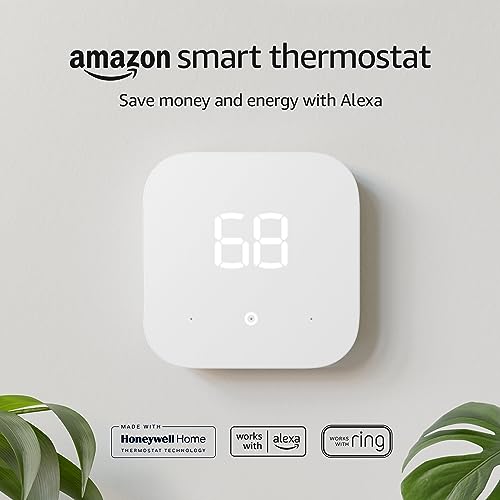
If budget is your first filter, this one earns a serious look. The Amazon Smart Thermostat is ENERGY STAR certified and works with most 24V HVAC systems — forced air, heat pumps, the usual. Alexa takes care of voice commands, and the app tracks daily energy usage so you can spot waste fast.
For households with animals, checking out thermostats designed with pet owners in mind can help you keep temperatures stable and comfortable even when you’re away.
It does require a C-wire, so check your wiring first. Scheduling is limited to four profiles, but for a no-fuss, affordable smart upgrade, it delivers solid value.
| Best For | Budget-conscious homeowners with a basic Alexa setup who want a simple, no-frills smart thermostat without paying a premium. |
|---|---|
| Display Type | Touch-Sensitive Buttons |
| C-Wire Required | Yes |
| HVAC Compatibility | Select HVAC systems |
| Connectivity | WiFi |
| Installation Type | DIY |
| Voice Control | Amazon Alexa |
| Additional Features |
|
- ENERGY STAR certified with an average of $50 in yearly energy savings
- Easy DIY installation guided by the Alexa app, with a wall plate included to hide existing wall imperfections
- Seamless Alexa voice control and a built-in energy dashboard to track and reduce waste
- Requires a C-wire, which not all homes have — older systems may need an additional transformer
- Scheduling is limited to just four fixed profiles, so customization options are minimal
- Some users have reported short-cycling issues with older HVAC systems, and certain features like fan circulation require app control rather than voice commands
8. Sensi Smart Thermostat Controller
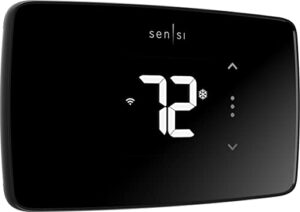
The Sensi Smart Thermostat Controller punches above its price point. 7-day flexible scheduling, geofencing, and remote app access cover the basics — and cover them well. It’s Energy Star certified, plays nicely with Alexa and Google Assistant, and reports heating and cooling runtimes so you can see exactly where energy is going.
One catch: you’ll need a C-wire for most setups. Check your wiring panel before ordering. For straightforward residential control without overcomplicating things, it’s a dependable pick.
| Best For | Homeowners who want a straightforward, app-connected thermostat with solid energy-saving features without paying a premium price. |
|---|---|
| Display Type | Large Digit Display |
| C-Wire Required | Varies by system |
| HVAC Compatibility | AC, Boiler, Furnace, Heat Pump |
| Connectivity | 2.4GHz WiFi |
| Installation Type | DIY |
| Voice Control | Amazon Alexa |
| Additional Features |
|
- Energy Star certified with geofencing and flexible 7-day scheduling that can cut energy use by around 23%
- Easy DIY installation with a built-in level and step-by-step guidance
- Works with Alexa and other smart home systems for voice control
- Requires a C-wire for heat pumps and some other system types — worth checking before you buy
- Only works on 2.4GHz WiFi, and some users have reported connection stability issues
- Smart features and weather data are limited outside the US and Canada
9. Ecobee Smart Wifi Thermostat
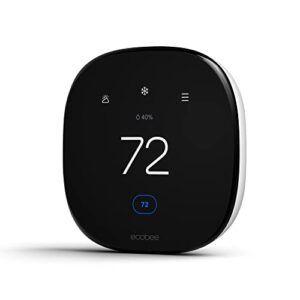
If you want smart sensing without the guesswork, this one delivers. The Ecobee Smart WiFi Thermostat pairs a 3.5-inch color touchscreen with built-in occupancy sensors that actually shift temperatures based on who’s home. Remote sensors let you balance comfort across rooms.
Its eco+ feature takes care of away and sleep adjustments automatically. Dual-band Wi-Fi, WPA3 encryption, and support for Alexa, HomeKit, and Google Assistant round things out. Up to 26% annual savings is a realistic target here.
| Best For | Homeowners who want hands-free climate control with room-by-room balancing and solid smart home integration. |
|---|---|
| Display Type | 4″ Touchscreen |
| C-Wire Required | Optional (PEK included) |
| HVAC Compatibility | Most 24VAC systems |
| Connectivity | WiFi |
| Installation Type | DIY |
| Voice Control | Alexa, Google, HomeKit, SmartThings |
| Additional Features |
|
- Built-in radar occupancy sensing and SmartSensor compatibility actively balance temperatures across rooms, eliminating hot and cold spots
- Eco technology learns your schedule and adjusts automatically, with realistic potential for up to 26% annual energy savings
- Works seamlessly with Apple HomeKit, Amazon Alexa, Google Assistant, and SmartThings, plus includes a Power Extender Kit for C-wire-free homes
- Missing a C-wire means a more complex install that may require professional help despite the DIY-friendly app guidance
- Schedule flexibility is limited to just three presets (Home, Away, and Sleep), which may feel restrictive for power users
- Removed API Key programs can create integration headaches for advanced smart home setups
10. Google Nest Smart Thermostat
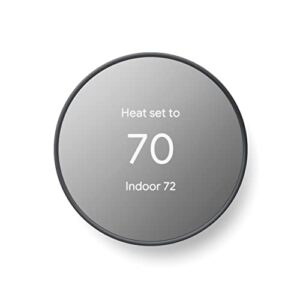
The Google Nest Smart Thermostat earns its spot by learning fast. Within a week, it reads your routines and builds a schedule on its own. AI-driven scheduling cuts heating and cooling during empty hours without you lifting a finger.
It pairs with up to six temperature sensors, works with Matter, and connects to Google Home for remote control. Energy Star certified, geofencing-ready, and compatible with 95% of HVAC systems. Simple to install, smart enough to manage itself.
| Best For | Homeowners and remote property owners who want a set-it-and-forget-it thermostat that automates energy savings without constant manual adjustments. |
|---|---|
| Display Type | 2″ Display |
| C-Wire Required | Yes |
| HVAC Compatibility | Heat pumps and standard HVAC |
| Connectivity | 2.4GHz + 5GHz WiFi + Bluetooth |
| Installation Type | DIY |
| Voice Control | Google Assistant |
| Additional Features |
|
- Automatically learns your routine and builds a schedule within a week, cutting energy use during empty hours
- Remote control via the Google Home app makes it easy to manage temperatures from anywhere — great for cabins or vacation homes
- Energy Star certified with occupancy sensing and a Savings Finder tool that actively looks for ways to lower your energy bill
- Requires a C-wire for most setups, which can complicate installation if your system doesn’t have one
- Can’t handle 2-stage heating and 2-stage cooling at the same time, limiting compatibility with some advanced HVAC configurations
- Depends on a stable Wi-Fi connection to function properly, and has known compatibility issues outside the US
Large-Home Temperature Challenges

Large homes come with temperature headaches that smaller spaces never deal with. A single thermostat just can’t keep up with the demands of sprawling layouts, sun-soaked rooms, or that one hallway that’s always freezing. Here are the five biggest challenges you’ll want your thermostat to handle.
Long Hallways and Wings
Long hallways act like linear airflow channels, pushing conditioned air toward wing ends before it ever reaches the rooms that need it. Walls and doors between wings create thermal stratification — pockets of warm or cool air that your main thermostat can’t detect.
That’s where remote room sensors earn their place, catching those temperature swings where your ductwork can’t keep up.
Upstairs-downstairs Temperature Gaps
Hallways steal airflow horizontally, but physics works against you vertically too. Warm air rises naturally, so upper floors routinely run 3–5°C hotter than the main level — and stairwells act like chimneys, channeling that heat straight up.
Addressing common air leakage can further help stabilize these temperature differences.
Remote sensors on both floors give your smart thermostat real data to act on, rather than guessing from one fixed location.
Drafty Rooms and Sun Exposure
Vertical heat isn’t your only problem. Window sealing gaps can account for up to 30% of heat loss, and south- or west-facing rooms gain 2–4°F per hour of strong sun. Airflow convection currents near poorly sealed frames pull cool air toward warm glass constantly.
Window film cuts that heat gain by up to 50%, while thermal curtains trim cooling loads noticeably.
Rarely Used Living Areas
Sun-soaked rooms aren’t the only spaces quietly draining your system. Guest bedrooms, hobby nooks, basement workshops, attic lofts, and covered patios sit empty for months — yet your HVAC conditions them around the clock anyway.
Occupancy-based sensors let smart thermostats detect when a room goes unused and scale back automatically, saving real energy where it matters most.
Reptile Room Temperature Stability
Reptile rooms demand a level of climate control most rooms never require. Your snake or lizard needs a thermal gradient design — a basking zone at 90–95°F on one end, a cool retreat around 75–85°F on the other.
Three things smart thermostats handle here:
- Consistent nighttime temperature drops of 5–15°F
- Species-specific setpoints made for desert or tropical needs
- Remote sensors with sensor calibration protocols for accurate readings
Multi-Zone Control Essentials
Multi-zone control is what separates a truly comfortable large home from one that’s always fighting itself. Getting it right means understanding a few key pieces that work together — not just swapping out a thermostat. Here’s what you need to know before choosing your setup.
Zoned setups also make it easier to keep a dedicated reptile room stable, which matters when following a green tree python care sheet that calls for consistent temperatures.
Independent Room Temperature Control

Think of a large home as a collection of microclimates — the bedroom stays cool while the kitchen runs warm. Zone-based thermostats fix this by giving each room its own sensor and schedule.
Occupancy-driven adjustments cut heating and cooling to empty spaces automatically. A typical large home runs 3 to 8 active zones, each responding independently to real-time conditions.
Motorized Damper Compatibility

Dampers are the muscle behind zone control — they open and close inside your ductwork to direct airflow where it’s needed. Most residential systems use 24V AC actuators, so your thermostat must support that voltage.
- Blade edge seals prevent air leakage in closed zones
- Round and flange duct connections need proper gaskets
- BACnet or proportional control allows for precise airflow balancing
Tight seals keep zones honest.
Multiple Thermostat Coordination

Running multiple thermostats without centralized controller logic is like ten conductors fighting for one baton. A coordinator takes inputs from all sensors, computes zone priorities, and sends synchronized commands to actuators.
| Issue | Fix |
|---|---|
| Competing zones | Zone priority computing |
| Overloaded equipment | Load balancing |
| Sensor drift | Calibration cycles |
| Network delays | Low-latency protocols |
Automated damper synchronization keeps your multizone heating and cooling balanced.
Zone-specific Schedules

Every zone in your home has its own rhythm. Zone-specific schedules let you assign distinct time blocks — 15-minute intervals on most systems — so the guest wing stays cool while the kitchen heats up at 6 a.m.
Local schedule storage means the thermostat executes commands even if Wi-Fi drops. Weekends, seasonal shifts, and temperature bands are all configurable independently per zone.
Whole-home Comfort Balancing

Balancing a large home means every zone pulls its weight. Duct damper automation and variable speed airflow work together to eliminate hot and cold pockets.
Key systems that keep comfort consistent:
- Return air pathways prevent pressure imbalances
- Motorized dampers regulate zone-by-zone delivery
- Humidity variance control reduces stuffiness
- Multizone sensor support flags problem areas fast
- Airflow balance evaluation catches duct leaks early
Remote Sensors and Room Coverage

Remote sensors are what turn a single thermostat into a whole-home comfort system. The right placement and sensor count make all the difference, especially in a large house where temperatures can swing wildly from room to room. Here’s what to know before you buy.
Sensor Count by Square Footage
Three sensors can cover a 3,000–5,000 sq ft home comfortably, but layout matters. Open floor plans allow one sensor per 2,000–3,000 square feet. Dense, multi-room layouts drop that to 800–1,500 square feet per unit.
High ceilings shrink coverage further — sometimes down to 600–1,000 square feet. Partitions and heavy furniture cut accuracy by another 15–30%. Count your zones before you count your sensors.
Occupancy-based Comfort Settings
Knowing how many sensors you need is only half the job — what they do with that data matters just as much.
Occupancy-based setpoints tighten the comfort range when a room is active and relax it when vacant, cutting energy use by up to 30%. Predictive preconditioning takes it further, warming or cooling a room before you arrive so comfort is never reactive.
Smart occupancy setpoints cut energy use up to 30% and predictive preconditioning ensures comfort greets you before you arrive
Best Sensor Placement Areas
Where you mount sensors matters as much as how many you use. Aim for 4 to 5 feet high — that’s the average breathing zone, giving you real occupant-level readings.
- Place in central living areas, away from sunlit windows
- Mount at hallway intersections to catch transitional temperatures
- Keep 1.5 meters from radiators, lamps, or appliances
- Position near doorway thresholds at zone boundaries
- Avoid corners blocked by furniture or curtains
Avoiding False Temperature Readings
Even perfect placement can’t save you if the sensor itself is drifting. Calibrate every sensor within 0.5°C of a reference thermometer at installation, then recheck annually.
| Issue | Cause | Fix |
|---|---|---|
| High readings | Sunlight exposure | Reflective shielding |
| Low readings | Airflow obstruction | 12-inch clearance |
| Drifting data | Age or humidity | Annual recalibration |
Replace any sensor showing drift beyond 1.0°C between checks.
Monitoring Snake Enclosure Rooms
Snake rooms demand microclimate gradient mapping across warm and cool zones — usually 88–92°F and 75–80°F. Place sensors at snake eye level, away from vents.
Automated alarm alerts trigger if readings drift beyond 3°F. Pair thermal data logging with your smart home system for 24-hour trend visibility. That’s climate control working exactly as hard as your reptiles need it to.
HVAC Compatibility Requirements
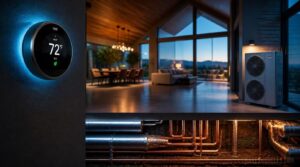
Before you fall in love with any thermostat, you need to make sure it actually works with your HVAC system. A large home often means a more complex setup — heat pumps, multi-stage systems, or line-voltage baseboard heaters all have different requirements. Here’s what to check before you buy.
C-wire Power Needs
Think of the C-wire — the common wire — as your thermostat’s lifeline. Without it, your smart thermostat resorts to power stealing, which can interfere with HVAC signals and cause erratic behavior.
Three things to verify before installation:
- Your transformer meets 40 VA capacity
- A spare conductor exists for low-voltage wiring
- A C-wire adapter is available if needed
Constant power return keeps Wi-Fi and sensors running reliably.
Heat Pump Compatibility
Heat pumps speak a different language than standard HVAC systems, so your thermostat needs to understand it fluently. You’ll want C-wire support and proper auxiliary heat management — clear indication of when backup heat kicks in keeps you from burning money unknowingly.
Choose a thermostat with multi-stage sequencing to prioritize the compressor before auxiliary heat engages, and sensor-driven regulation to avoid overworking the system.
Multi-stage System Support
Multi-stage systems run like a gear shift — your thermostat decides when to push harder. Switching logic sequences compressor output before backup heat kicks in, protecting efficiency.
Look for thermostats offering:
- Compressor speed modulation for gradual output adjustments
- Thermal load forecasting to anticipate demand spikes
- Stage-specific comfort tuning per zone
- Predictive maintenance staging to catch wear early
That’s real control over a large home’s climate.
Gas and Electric Systems
Your home might run on gas, electric, or a hybrid dual fuel setup — and your thermostat needs to speak that language fluently.
Gas furnaces need thermostats that sequence burner stages and manage combustion byproduct venting safely. Electric resistance heating responds differently, drawing full power instantly. Smart thermostats for large homes handle both, switching modes automatically to keep every zone dialed in without manual intervention.
Line-voltage Heating Limitations
Line-voltage systems — running at 120V or 240V — don’t play well with most smart thermostats for large homes. They carry full household current, so wiring mistakes mean real electrical risk. Temperature accuracy suffers too, with swings of several degrees.
They’re also single-zone only, meaning you’d need multiple units across a large property. Factor that in before assuming any smart thermostat fits your setup.
Energy Savings for Big Homes

Running a big home means your HVAC system works harder — and costs more — than you might expect. The good news is that today’s smart thermostats come packed with features built specifically to trim that waste. Here’s what makes the biggest difference.
Smart Scheduling Benefits
Smart scheduling quietly does the heavy lifting in large homes. It shifts heating and cooling to off-peak hours, cutting costs without sacrificing comfort. Occupancy-driven efficiency means empty wings stay dormant until needed. Routine synchronization keeps your daily rhythm intact — wake time, workouts, all of it.
Adaptive temperature shifts even predict your patterns over time, so your system works smarter, not harder.
Geofencing for Large Properties
Scheduling controls your routine, but geofencing controls the unexpected. When your phone crosses a polygon boundary — a precise perimeter mapped around your property — your system wakes up automatically. No manual overrides needed.
Proximity trigger alerts fire as you approach, so rooms warm before you arrive. Seasonal boundary adjustments keep those rules accurate year-round, even as access routes shift.
Runtime and Usage Reports
Geofencing takes care of the "when you’re home" part. Runtime reports take care of the "what’s actually happening" part.
Your app tracks total heating and cooling minutes daily, weekly, or monthly — broken down by zone. Spot a room running twice as long as others? That’s a red flag worth investigating. You can export data as CSV and share it with your contractor before a service call.
Utility Rebate Opportunities
Runtime data shows where your money’s going — rebates help you get some of it back.
Energy Star-certified thermostats qualify for utility rebates that cut upfront costs noticeably. In Germany, BAFA and KfW programs cover up to 40% of heat pump installation costs. Pre-approval is required before purchase, so apply early — funds run on a first-come, first-served basis.
Seasonal Efficiency Adjustments
Seasons shift, and your thermostat should shift with them. Raising cooling setpoints by 2–4°F in peak summer cuts compressor run time noticeably, while dropping heating setpoints 1–3°F overnight trims heat loss without sacrificing comfort.
Weather-based scheduling controls humidity load automatically, reducing coil strain in summer. On heat pumps, defrost cycles ease up during shoulder seasons — less energy wasted, less wear.
Smart Home Integration Features

Your thermostat doesn’t have to work alone — that’s kind of the whole point in 2026. The best models for large homes plug right into the smart systems you already use, from Alexa and Google Assistant to Apple HomeKit and the newer Matter standard. Here’s how the top options stack up across the integrations that matter most.
Alexa Voice Control
Saying "Alexa, set the living room to 72 degrees" beats walking down a long hallway. Alexa voice control lets you adjust any compatible thermostat hands-free, and with multi-user voice profiles, each family member gets responses suited to them.
You can also build voice routine automation — one command that sets temps, dims lights, and locks doors simultaneously.
Google Assistant Support
When you say "Hey Google, set the bedroom to 70," your smart thermostat responds instantly. Google Assistant also features multilingual command support, controls routine automation, and offers accessibility options like spoken feedback.
Voice Match security means only your voice triggers personal results on shared devices. Your privacy control settings let you review or delete recordings anytime.
Apple HomeKit Compatibility
Apple HomeKit turns your large home into a single, unified system. Through the Home app, you organize thermostats by room, set scenes, and let Siri handle the rest.
Three reasons HomeKit stands out:
- End-to-end encryption keeps your climate data private
- HomeKit hubs like HomePod enable remote access from anywhere
- Siri voice commands work across iPhone, iPad, and Mac instantly
Matter-enabled Device Control
Matter is the universal language your smart home has been waiting for. It lets thermostats, sensors, and other devices talk across brands — no bridges, no compatibility headaches — over a single secure fabric network.
The Meross Smart Thermostat already uses Matter for low-latency local control, meaning commands process in your home, not the cloud. Faster response, less downtime.
Multi-user App Access
A large home with multiple people means someone’s always adjusting the thermostat. Multi-user app access lets you assign admin permission roles — so family members can view without overriding your schedules.
Conflict prevention protocols stop simultaneous edits from clashing. User activity logs track every change, and secure access methods like two-factor authentication keep your smart home setup locked down tight.
Installation and Setup Considerations
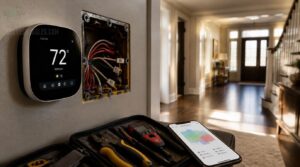
Getting a smart thermostat up and running in a large home isn’t always plug-and-play. From checking your wiring to configuring zones in the app, a few key steps can make or break the whole setup. Here’s what you need to know before you get started.
For pet owners, this guide to safe water use for corn snakes helps keep nearby habitats secure during installation.
DIY Installation Limits
DIY thermostat swaps look simple — until they aren’t. Here’s where things get complicated fast:
- C-wire missing in older large homes forces workarounds like power stealing, which causes reboot cycles
- Electrical panel risks when connecting to high-amperage circuits without proper shutoff
- Damper wiring for multi-zone systems requires relay knowledge beyond basic swap jobs
- Line-voltage systems need adapters most DIY kits don’t include
- Improper wiring can void your warranty entirely
When in doubt, call a pro.
Professional Zoning Setup
When a pro controls your zoning setup, they start with thermal load mapping — sizing each zone by square footage and sun exposure. They calibrate motorized dampers so airflow hits targets within a degree or two, then run tests to catch cross-zone bleed.
A central zoning controller ties it all together, coordinating your smart thermostats and remote sensors as one system.
Wiring and Panel Checks
Once zoning is mapped and dampers are dialed in, your wiring becomes the weak link. Check that your C-wire is present — smart thermostats need that common wire for stable 24V power.
At the panel, confirm breaker terminals are tight and show no scorching. Aluminum wiring needs anti-oxidation treatment. Keep a clear 30-inch working space around the panel.
App Configuration Steps
With wiring sorted, the app is your next hurdle. Before downloading, check platform compatibility — iOS or Android requirements vary by model.
Connect on 2.4 GHz Wi-Fi for better range. Use a strong password and enable two-factor authentication. Then set your default weekly schedule and turn on automatic firmware updates. Your smart home setup works perfectly right after.
Choosing Your Best Thermostat

Not every home needs the same thermostat, and that’s the point. Your setup — whether it’s a multi-zone system, a smart network, or a room full of reptiles — shapes the right pick. Here’s how the best options stack up across the categories that matter most.
Best for Multi-zone Homes
For large homes with multiple floors or wings, the Honeywell Home T9 smart thermostat leads in multi-zone control. It works with up to 20 remote room sensors and pairs with motorized dampers, giving you zoned control across your smart home setup.
- Occupancy-driven climate adjustment per room
- Sensor health monitoring with offline alerts
- Airflow balance testing post-calibration
- Zoned energy reporting by area
Best for Energy Savings
Cutting energy waste in a large home starts with the right thermostat. The Orbit 83521 delivers nearly 33% energy reduction through precise scheduling, while Energy Star-certified models guarantee at least 8% annual savings.
Geofencing keeps your system off when you’re out. Adaptive learning takes care of the rest — quietly trimming runtime without you lifting a finger.
Best for Simple Controls
Three taps to comfort — that’s what the best smart thermostats for large homes deliver. A high-contrast touchscreen with red-for-heat, blue-for-cool color coding means no squinting, no guessing.
Large tappable icons and font sizes above 14 points make the straightforward interface readable from across the room. No app required for basic use — just straightforward, local control that works every time.
Best for Smart Ecosystems
If your home runs on connected devices, the Ecobee Smart Thermostat Premium fits right in. It works with Matter protocol interoperability, so it works across cross-vendor device hubs without the usual compatibility headaches.
Voice routine automation lets Alexa or Google Assistant trigger climate scenes instantly. Multi-user permission settings keep everyone in control, and centralized firmware updates mean your whole smart home setup stays current automatically.
Best for Reptile Owners
Reptile rooms don’t forgive sloppy temperature control. The Honeywell Home T9 is perfect for this, supporting up to 20 remote sensors so you can track basking zone precision and ambient temps simultaneously.
Place a dedicated sensor 2–4 inches from the hotspot. Occupancy detection keeps the zone active, and push alerts fire instantly if temps drift outside your reptile’s safe range.
Frequently Asked Questions (FAQs)
Is there a difference between commercial and residential thermostats?
Yes — commercial thermostats handle multiple zones and BAS protocols like BACnet, while residential units manage a single zone on standard 24V circuits. Think simpler setup versus full building command.
How often should smart thermostats be updated?
Every 3 to 6 months is the standard cadence. Enable automatic updates so security patches land fast. A quick check each spring and fall keeps your system stable and compatible with your smart home setup.
Can smart thermostats work during internet outages?
Think of your smart thermostat like a car’s GPS — useful with signal, but still drivable without it. Local control functionality keeps basic heating and cooling running. Pre-programmed schedules execute from device memory, even fully offline.
Whats the average lifespan of these devices?
Most smart thermostats last 8 to 12 years before hardware or software obsolescence catches up. Sensors drift, touchscreens wear out, and firmware support eventually ends — plan on replacing yours within that window.
Do smart thermostats require regular maintenance or cleaning?
Like a smoke detector that saves lives only when its battery works, a smart thermostat performs only as well as the care it receives. Yes — regular maintenance matters.
Are there subscription fees for advanced features?
Most smart thermostat features are free out of the box. Extra perks — detailed energy reports, extended data history, or multi-zone cloud sync — can sit behind a paid subscription tier.
Can smart thermostats work with radiant floor heating?
Yes, smart thermostats can work with radiant floor heating — but compatibility isn’t guaranteed. Floor sensor support and correct voltage matching are essential. Hydronic systems need boiler zone coordination, while electric floors often demand line-voltage capable thermostats.
How do extreme outdoor temperatures affect thermostat accuracy?
Sensor drift is the main culprit. Sunlight baking an exterior wall can push readings up to 0°F high, while dust and condensation quietly shave off another 2–4°F of accuracy.
What happens to settings during a power outage?
Most thermostats store settings in non-volatile memory, so a brief outage won’t wipe your schedule. If no backup battery exists, the unit may reset to factory defaults once power returns.
Do smart thermostats work with older ductwork systems?
Most older forced air systems work fine with smart thermostats, as long as standard low-voltage wiring is present. Check for a C wire first — that’s your biggest hurdle.
Conclusion
A large home is a living world — every room its own climate, every wing its own rhythm. The right thermostats for large homes stop that chaos cold.
Sensors read what your walls can’t tell you. Schedules adapt before you even think to adjust them. Zone control means no dollar wasted conditioning empty space.
You’re not just buying a thermostat — you’re finally putting your home’s climate on your terms, room by room.