
This site is supported by our readers. We may earn a commission, at no cost to you, if you purchase through links.

Your basement’s moisture level can shift dramatically in just a few hours, turning a dry storage space into a breeding ground for mold without any visible warning signs. Most homeowners only discover humidity problems after damage appears—warped wood, musty odors, or black spots creeping across walls.
A reliable humidity gauge catches these issues early, giving you the data you need to act before moisture destroys your belongings or compromises your home’s structural integrity. The right monitoring tool delivers precise readings within ±2 to ±5 percent RH, tracks trends over time, and alerts you when conditions cross into the danger zone.
Table Of Contents
- Key Takeaways
- Choosing The Right Humidity Gauge for Basements
- Top 7 Humidity Gauges for Basements
- Benefits of Monitoring Basement Humidity
- Advanced Features in Modern Humidity Gauges
- Maintaining and Calibrating Your Humidity Gauge
- Frequently Asked Questions (FAQs)
- What is a good humidity level for a basement?
- How can I check the humidity in my basement?
- What humidity level prevents basement mold growth?
- How does basement humidity affect heating costs?
- Can dehumidifiers work with humidity gauges together?
- Do humidity gauges need professional installation services?
- What causes sudden humidity spikes in basements?
- Conclusion
Key Takeaways
- Keep your basement humidity between 30-50% relative humidity to prevent mold growth, protect stored items, and avoid structural damage—readings above 60% create conditions where fungi thrive and wood warps within hours.
- Choose a digital hygrometer with ±3% accuracy or better, calibrate it every 3-6 months using the salt solution method, and position it 4-6 feet above the floor away from vents, windows, and moisture sources for reliable readings.
- Smart humidity gauges with WiFi connectivity let you monitor basement conditions remotely and receive instant alerts when moisture crosses safe thresholds, giving you time to act before damage occurs.
- Pair your humidity gauge with a dehumidifier and maintain consistent monitoring—weekly checks of your readings prevent small moisture problems from turning into expensive repairs affecting your home’s foundation and your family’s respiratory health.
Choosing The Right Humidity Gauge for Basements
Your basement’s humidity level can make or break the safety of your home, so picking the right gauge isn’t something you want to guess about. The market offers dozens of options ranging from basic analog dials to WiFi-connected smart sensors, each with different accuracy levels and features.
For humid spaces like basements, a thermometer hygrometer designed for high-moisture environments can track both temperature and humidity trends to help you catch mold risks early.
Let’s break down what separates a reliable humidity gauge from one that’ll leave you second-guessing your readings.
Key Features for Basement Humidity Monitoring
Your basement monitoring setup needs humidity sensors that deliver accurate readings within ±2 to ±5 percent RH to catch moisture problems before damage starts. Look for models with real-time displays showing both humidity levels and temperature, plus calibration methods you can perform yourself using salt solutions.
Battery-powered units offer flexible placement, while alert features notify you when basement moisture exceeds safe thresholds, giving you control over air quality.
For the most thorough protection, consider the importance of that help prevent damage and maintain a healthy environment.
Digital Vs. Analog Gauges
Digital hygrometers show precise numeric humidity readings on backlit screens, often logging trends and triggering alerts when moisture crosses your set thresholds.
Analog gauges use a mechanical needle that requires no power and won’t fail during outages, though parallax error and sensor drift mean you’ll need regular bench calibration.
Digital units deliver consistent accuracy across temperature swings when firmware compensation is properly applied. For a detailed breakdown of analogue vs digital gauges features, some gauges also offer unique calibration and data collection advantages.
Accuracy and Calibration Considerations
You want accurate measurements, so look for gauges rated within ±3 percent RH across the 20–80 percent range. Sensor drift over months demands recalibration every three to six months using a salt-solution chamber or certified reference device.
Measurement accuracy depends on humidity standards traceable to recognized benchmarks, and device validation through cross-checks with a second humidity gauge confirms your readings stay reliable.
Placement Tips for Reliable Readings
Once your gauge is calibrated, placement strategies determine reading accuracy. Mount the sensor at 4 to 6 feet above the floor—this height keeps environmental factors like floor moisture from skewing relative humidity levels.
Distance the unit from windows, HVAC vents, and damp sources such as sump pits to capture true indoor air quality across your basement zones.
Top 7 Humidity Gauges for Basements
You need a humidity gauge that gives you accurate readings without the guesswork, especially in a basement where moisture problems can spiral out of control fast. The right device will help you catch humidity issues before mold takes hold or your stored belongings start deteriorating.
Here are seven reliable options that deliver the precision and features you need to keep your basement conditions in check.
1. Extech Hygro Thermometer Humidity Alert
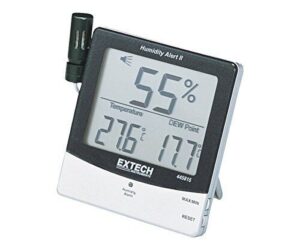
When you need three readings at once, the Extech 445815 delivers relative humidity, temperature, and dew point on a single display. You’ll appreciate the 18-inch remote probe for checking behind walls or in tight corners where moisture hides.
Set your own high and low humidity thresholds, and the unit alerts you with both visual and audible alarms before conditions get out of hand. It stores max and min readings so you can track fluctuations over time, giving you the data needed to stay ahead of mold problems.
| Best For | Homeowners, studio owners, and anyone dealing with humidity issues who needs real-time monitoring with customizable alerts to prevent mold growth. |
|---|---|
| Display Type | Triple LCD display |
| Connectivity | Wired probe |
| Weight | 6.7 ounces |
| Battery Type | Not specified |
| Mounting Options | Stand + wall bracket |
| Alert Function | Visual + audible alarm |
| Additional Features |
|
- Triple display shows humidity, temperature, and dew point simultaneously so you get the complete picture at a glance
- 18-inch remote probe lets you measure hard-to-reach spots like behind walls or in crawl spaces
- Adjustable alarms with both sound and visual alerts catch problems before they turn into expensive mold damage
- Temperature accuracy can be off by a few degrees on some units, and the calibration adjustment may not fix larger errors
- Slow temperature response since the sensor sits inside the case instead of being more exposed
- Buttons for RESET and MAX/MIN can be stiff and frustrating to press during regular use
2. ThermoPro Digital Hygrometer Thermometer
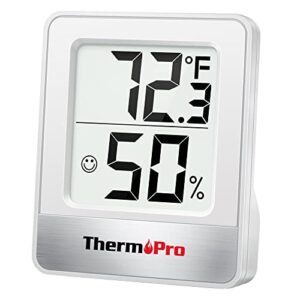
For under twenty dollars, the ThermoPro TP49 packs serious capability into a 2.6-inch frame. You get ±1°F temperature accuracy and ±2% to 3% RH precision with 10-second refresh cycles that track real-time changes.
The face icon indicator lets you see comfort levels at a glance, while large digits guarantee easy reading across the room.
Mount it on a tabletop, stick it to metal with the powerful magnet, or hang it on the wall—your choice.
| Best For | Anyone who wants an affordable, accurate way to monitor indoor climate across multiple rooms—especially helpful for nurseries, greenhouses, or anywhere you’re trying to dial in the right humidity level. |
|---|---|
| Display Type | LCD with large digits |
| Connectivity | None |
| Weight | 1.23 ounces |
| Battery Type | Alkaline |
| Mounting Options | Tabletop, magnetic, hanging |
| Alert Function | Comfort icon indicator |
| Additional Features |
|
- Super accurate sensors (±1°F and ±2-3% humidity) that refresh every 10 seconds so you’re always getting current readings
- Three mounting options (tabletop, magnet, or wall) make it easy to place anywhere you need it
- Face icon gives you instant visual feedback on comfort levels without checking the actual numbers
- Indoor use only—it won’t hold up to direct weather exposure
- Runs on alkaline batteries that you’ll need to swap out periodically
- The compact size is great for most homes but might not cut it for large commercial or industrial spaces
3. Govee Smart Thermometer Hygrometer Sensor
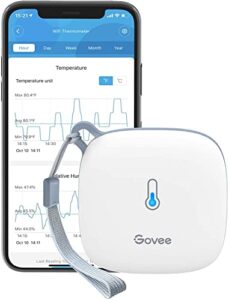
Remote monitoring makes the Govee H5179 a standout choice when you’re upstairs or traveling. You’ll connect through both WiFi and Bluetooth via the Govee Home App, receiving instant alerts when humidity or temperature drift beyond your preset ranges.
The Swiss-made sensor delivers ±3% RH accuracy with readings that refresh every few seconds. At 2.83 inches and 4.2 ounces, you can hang it by the lanyard loop or mount it wherever moisture concerns run high.
Free two-year data storage lets you track patterns and export history.
| Best For | People who need to monitor temperature and humidity remotely in spaces like greenhouses, wine cellars, or pet areas where conditions matter but you can’t always be present. |
|---|---|
| Display Type | LCD screen + app |
| Connectivity | WiFi + Bluetooth |
| Weight | 4.2 ounces |
| Battery Type | Not specified |
| Mounting Options | Lanyard loop |
| Alert Function | App alerts |
| Additional Features |
|
- Remote monitoring through WiFi and Bluetooth means you can check conditions from anywhere and get instant alerts when things go out of range
- Swiss-made sensor gives you reliable readings that update every few seconds, so you’re working with accurate data
- Free two-year data storage and export lets you spot patterns over time without paying for cloud services
- Only works with 2.4GHz WiFi networks, so you can’t use it on 5G bands
- Some users run into WiFi connectivity issues and software bugs that affect reliability
- You need Bluetooth to adjust certain settings and calibrate the device, which limits what you can do remotely through WiFi alone
4. Nest Learning Thermostat System
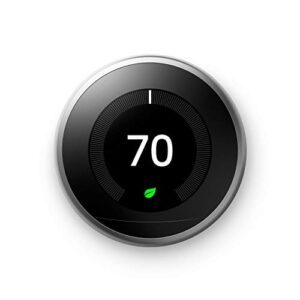
If you’re controlling temperature across multiple basement zones, the Nest Learning Thermostat (T3007ES) offers precise monitoring alongside climate management. You’ll get automatic scheduling that tailors to your routines and Home/Away Assist that adjusts when you leave.
The 2.08-inch screen displays current indoor temperature, while compatible sensors handle those stubborn cold spots. Remote control through the Google Home app lets you track conditions from anywhere, and energy history reveals usage patterns.
At 3.3 inches with stainless steel construction, it integrates seamlessly with Alexa and Google Assistant systems.
| Best For | Homeowners managing multiple basement zones who want smart automation that learns their schedule and provides remote monitoring of temperature and energy usage. |
|---|---|
| Display Type | 2.08″ touchscreen |
| Connectivity | WiFi required |
| Weight | Not specified |
| Battery Type | Hardwired |
| Mounting Options | Wall mount |
| Alert Function | Energy usage alerts |
| Additional Features |
|
- Auto-scheduling learns your routine and programs itself, while Home/Away Assist cuts heating costs when you’re out
- Remote control via Nest app lets you monitor basement temperature from anywhere and catch issues before they escalate
- Energy History and Leaf feature help you track usage patterns and identify the most efficient temperature settings
- Requires stable Wi-Fi for remote features and mobile alerts, which can be spotty in some basements
- Not compatible with all HVAC systems, and multi-zone setups may need additional zone valves at extra cost
- Energy savings aren’t guaranteed and some users report issues with temperature accuracy and Away function reliability
5. Amazon Echo Dot Smart Speaker

The Echo Dot (5th gen) gives you voice-controlled humidity checks when paired with compatible smart sensors in your basement. You’ll ask Alexa for current conditions, set humidity alerts through routines, and monitor temperature with its built-in sensor on the clock version.
At $49.99, this compact speaker connects your moisture monitoring to smart home automations—triggering dehumidifiers when levels climb too high. The 1.6-inch speaker delivers clear responses across the room, while the mic-off button protects privacy during sensitive conversations.
| Best For | Homeowners who want affordable voice-controlled basement monitoring with smart home integration for humidity and temperature alerts. |
|---|---|
| Display Type | N/A – speaker only |
| Connectivity | WiFi + Bluetooth |
| Weight | Not specified |
| Battery Type | AC powered |
| Mounting Options | Tabletop only |
| Alert Function | Voice notifications |
| Additional Features |
|
- Connects to compatible sensors for voice-activated humidity and temperature checks in your basement
- Triggers automated dehumidifiers through Alexa routines when moisture levels get too high
- Mic-off button lets you disable listening during private moments
- Sound quality isn’t ideal for larger basement spaces or high-quality audio playback
- Privacy concerns remain for users worried about always-listening devices
- Wake-word locking unavailable, which some users may want for security
6. SensorPush Smart Temperature Humidity Sensor
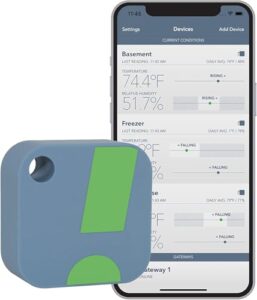
You’ll get professional-grade monitoring with the SensorPush HT1, a Bluetooth sensor that tracks basement conditions from -40°F to 140°F and 0% to 100% RH. The device stores two weeks of data locally, then syncs to your phone for detailed graphs showing humidity patterns over time.
You can set custom alert thresholds that trigger push notifications when moisture climbs too high. At typical ±0.5°F accuracy, this compact unit delivers reliable readings whether you’re monitoring stored instruments or preventing mold growth in damp corners.
| Best For | Homeowners who need reliable basement humidity monitoring with detailed historical data and mobile alerts to prevent moisture damage and mold growth. |
|---|---|
| Display Type | Bluetooth app only |
| Connectivity | Bluetooth only |
| Weight | 23 grams |
| Battery Type | Lithium |
| Mounting Options | Freestanding |
| Alert Function | App alerts |
| Additional Features |
|
- Tracks two weeks of data locally and syncs detailed graphs to your phone for spotting humidity trends over time
- Custom alert thresholds send push notifications when moisture levels get too high, so you can catch problems early
- Works in extreme conditions from -40°F to 140°F with accurate ±0.5°F readings
- Bluetooth range is limited, especially in basements with metal or concrete obstacles
- Needs a separate WiFi gateway if you want to check readings when you’re away from home
- May need occasional calibration to maintain accuracy in high-humidity environments
7. Govee Wifi Thermometer Hygrometer Monitor
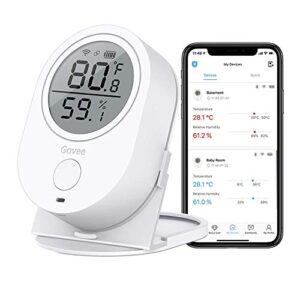
The Govee WiFi model lets you check conditions from anywhere through the Govee Home app, pairing up to three sensors per gateway for whole-basement coverage. Custom alerts notify you when humidity crosses your set thresholds, helping you catch moisture problems before mold takes hold.
You’ll see real-time updates and two years of stored data, which you can export as CSV files for detailed analysis. The Swiss-made sensor delivers accurate readings, though you may need to swap the included AAA batteries for quality replacements.
| Best For | People who need to monitor temperature and humidity remotely in basements, greenhouses, wine cellars, or reptile enclosures where conditions matter. |
|---|---|
| Display Type | N/A – compressed air |
| Connectivity | None |
| Weight | 10 ounces |
| Battery Type | N/A |
| Mounting Options | N/A |
| Alert Function | None |
| Additional Features |
|
- Remote monitoring through WiFi lets you check conditions from anywhere and get alerts when humidity levels go off track
- Swiss-made sensor gives accurate readings with two years of data storage you can export for tracking trends
- Pairs up to three sensors per gateway so you can cover larger spaces or multiple rooms
- Included batteries are low quality and usually need immediate replacement with better AAA batteries
- Only works with 2.4GHz WiFi networks, not 5G, which can limit placement options
- Limited smart home integration beyond Govee’s own ecosystem, with spotty Google Home support
Benefits of Monitoring Basement Humidity

Installing a humidity gauge in your basement isn’t just about collecting data—it’s about protecting your home and your family from the hidden dangers of excess moisture. When you monitor humidity levels consistently, you gain the control needed to prevent costly damage and create a healthier living environment.
Installing a humidity gauge protects your home and family from costly moisture damage while creating a healthier living environment
Let’s examine the three main benefits that make basement humidity monitoring essential for any homeowner.
Preventing Mold and Moisture Damage
Moisture monitoring gives you the edge over mold growth before it gains a foothold. You’ll prevent structural damage and costly repairs by catching moisture problems early, especially when paired with a dehumidifier and proper foundation drainage:
- Keep relative humidity below 60 percent year-round to inhibit colonies
- Fix leaks within 24 hours to stop ongoing dampness
- Improve air circulation with fans to dry damp basements faster
- Install vapor barriers in walls to reduce penetration
- Deploy preventative measures before visible damage appears
Protecting Health and Indoor Air Quality
Beyond mold prevention, your humidity gauge protects respiratory health and overall indoor air quality in basements where pollutants settle. Relative humidity below 50 percent reduces dust mites and airborne irritants that trigger allergies and asthma, while monitoring helps you coordinate ventilation systems with air purification strategies.
You’ll lower health risks from indoor pollution by maintaining ideal humidity levels that discourage microbial growth and improve breathing comfort.
Preserving Furniture and Stored Items
Your furniture and stored belongings face serious moisture problems when basement humidity swings outside the 60 to 80 percent range recommended for wood protection. Proper humidity control prevents warping, cracking, and mold damage through consistent moisture management that extends furniture lifespan.
Follow these storage tips for item preservation:
- Keep wood off concrete floors using rubber feet to block moisture transfer
- Refresh wax finishes before storage to prevent surface drying
- Monitor humidity levels with your gauge for early warning signs
- Maintain temperature between 60 and 75 degrees Fahrenheit for stability
Advanced Features in Modern Humidity Gauges
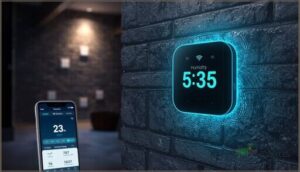
Modern humidity gauges have evolved beyond simple readout displays, offering features that give you greater control over your basement environment. These sophisticated capabilities let you monitor conditions remotely, spot humidity patterns before they become problems, and position your gauge exactly where you need it.
Here’s what today’s best models bring to the table.
Smart Connectivity and Remote Monitoring
Modern remote monitoring lets you check basement conditions from anywhere through Wi-Fi connectivity and Bluetooth-enabled remote sensors. You’ll receive cloud alerts on your phone when humidity crosses safe thresholds, while mobile dashboards display real-time readings across multiple zones.
Smart home integration connects your gauge to existing smart devices, and data analytics tools reveal patterns you might otherwise miss, giving you complete control over your basement environment.
| Feature | Benefit |
|---|---|
| Cloud Alerts | Instant notifications when humidity spikes |
| Mobile Dashboards | Monitor multiple rooms from one app |
| WiFi & Bluetooth | Effortless connectivity to your network |
Data Logging and Humidity Trend Tracking
Data logging transforms your digital hygrometers into powerful environmental monitoring tools that capture humidity readings every few minutes and build actionable records. You’ll spot gradual moisture increases before they become costly problems, track seasonal patterns with trend forecasting, and use data analytics to time dehumidifier cycles precisely.
These humidity sensors store weeks of timestamped measurements, enabling moisture mapping across your entire basement space.
Mounting and Display Options
When choosing where your humidity gauge lives, you want mounting hardware that fits your basement layout and keeps readings visible. Digital hygrometers offer flexible installation with these practical mounting options:
- Wall mounts with keyhole slots for flush vertical placement via the wallmount hole
- Retractable stand for tabletop or shelf positioning
- Magnetic backing for quick relocation on metal surfaces
- Angled display orientations reducing glare with 0 to 15 degree tilt
- Visual displays including backlit LCD screens for dim conditions
Maintaining and Calibrating Your Humidity Gauge
Your humidity gauge won’t stay accurate forever without a little attention on your part. Regular calibration keeps your readings trustworthy, while simple maintenance extends the life of your device and prevents frustrating failures when you need it most.
Let’s walk through the essential upkeep tasks that’ll keep your basement monitoring system running smoothly for years.
Calibration Frequency and Methods
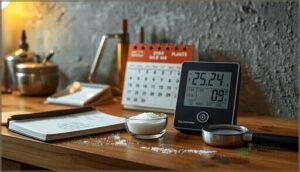
Your humidity gauge won’t stay accurate forever—sensor drift happens naturally over time. You should calibrate critical basement humidity meters every three months, while standard devices can stretch to six-month calibration intervals.
Use the salt solution method to establish a reliable 75 percent relative humidity reference point, and keep detailed calibration logs documenting each verification. Track drift patterns to fine-tune your schedule.
Cleaning and Battery Replacement
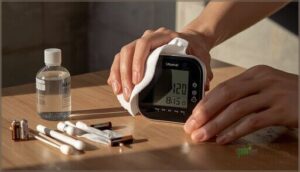
A clean sensor delivers trustworthy numbers, while neglecting basic upkeep throws your readings off target. Follow these Battery Care Tips and Cleaning Methods to keep your humidity gauge performing reliably:
- Wipe the sensor surface monthly with a soft, dry cloth to prevent dust buildup affecting accuracy.
- Replace AAA battery or coin cells per manufacturer specs—usually every 12 to 24 months for battery powered devices.
- Clean corroded terminals with baking soda solution, then dry completely before reinstalling batteries.
- Use isopropyl alcohol wipes sparingly on sticky housing residues without soaking internal components.
- Perform calibration after battery replacement to restore baseline accuracy and confirm proper function.
Troubleshooting Inaccurate Readings

When your humidity gauge starts telling tall tales, you need to act fast before minor drift becomes major error. Sensor Drift of 2 percent yearly demands fresh calibration using salt-test Calibration Methods to restore accuracy.
Check for Environmental Factors like nearby sump pumps skewing moisture levels, or Hardware Interference from motors creating noisy humidity readings that compromise your basement’s true conditions.
Frequently Asked Questions (FAQs)
What is a good humidity level for a basement?
Your basement isn’t a wine cellar from 1850—aim for 30 to 50 percent relative humidity. This range prevents basement mold, controls moisture levels, and maintains air quality without needing constant dehumidification.
How can I check the humidity in my basement?
You’ll need a hygrometer to track basement moisture levels accurately.
This humidity gauge displays relative humidity as a percentage, helping you detect dampness and maintain proper air quality before mold takes hold.
What humidity level prevents basement mold growth?
To prevent mold growth, keep your basement between 30 and 50 percent relative humidity. Staying below 60 percent minimizes fungal growth risk, controls basement moisture, and protects surfaces from condensation damage.
How does basement humidity affect heating costs?
Higher humidity levels force your heating system to work harder, raising energy costs. Moisture management stabilizes thermal comfort and reduces system cycling.
A humidity gauge facilitates precise humidity control, improving home climate control and heating efficiency.
Can dehumidifiers work with humidity gauges together?
Like a pilot using both radar and visual checks, you can pair dehumidifiers with independent humidity gauges to cross-verify readings and guarantee accurate humidity control.
This approach is especially useful when device integration and sensor accuracy differ across your basement monitoring setup.
Do humidity gauges need professional installation services?
Most humidity gauges are designed for DIY installation and don’t require professional services. You’ll mount them yourself, handle user maintenance like battery replacement, and perform basic calibration needs following manufacturer guidelines.
What causes sudden humidity spikes in basements?
Basement moisture levels surge when warm, humid air infiltrates through gaps, plumbing leaks introduce water infiltration, or poor airflow patterns trap moisture indoors.
Temperature fluctuations between floors also trigger sudden humidity cycles and spikes.
Conclusion
Your basement’s air quality hinges on the same principle that prevents water from pooling on your garage floor—consistent monitoring prevents small problems from becoming costly repairs.
Installing humidity gauges for basements transforms guesswork into data-driven protection for your home’s foundation, stored belongings, and your family’s respiratory health.
Choose a device with ±3% accuracy or better, position it away from walls and moisture sources, and check readings weekly to maintain the ideal 30-50% relative humidity range.