
This site is supported by our readers. We may earn a commission, at no cost to you, if you purchase through links.

High humidity doesn’t just make your home feel sticky—it quietly fights your HVAC system every cooling cycle. When indoor moisture climbs past 60% relative humidity, your air conditioner works harder, your energy bill creeps up, and the air still feels wrong.
A standard thermostat won’t catch this. It controls temperature, not comfort. The right thermostats for humid climates do both—monitoring moisture levels, coordinating with dehumidifiers, and adjusting fan cycles before the problem compounds.
These ten options handle the full picture.
Table Of Contents
- Key Takeaways
- Top 10 Thermostats for Humid Climates
- 1. Ecobee Smart Thermostat Alexa Compatible
- 2. Honeywell Smart WiFi Thermostat
- 3. Google Nest Learning Thermostat
- 4. Sensi Touch 2 Smart Thermostat
- 5. Emerson Sensi Smart WiFi Thermostat
- 6. Honeywell T9 Smart Thermostat
- 7. Bosch WiFi Smart Thermostat Controller
- 8. LUX Smart WiFi Thermostat
- 9. Google Nest Smart Thermostat
- 10. Govee Smart Hygrometer Thermometer
- Why Humidity Matters for Snake Homes
- Humidity Features Worth Paying For
- Choosing The Right Thermostat
- Installation and Setup Tips
- Energy Savings in Humid Climates
- Frequently Asked Questions (FAQs)
- What thermostat can control humidity?
- What should my thermostat be set at in October?
- Does humidity affect a thermostat?
- Is 70% humidity in your house too high?
- Is there a thermostat for humidity?
- Does humidity affect thermostats?
- How to set a thermostat to reduce humidity?
- Is 55 humidity too high in a house?
- How often should humidity sensors be calibrated?
- Can smart thermostats prevent condensation on windows?
- Conclusion
Key Takeaways
- A standard thermostat only controls temperature, but in humid climates you need one that also monitors and manages moisture — otherwise your AC works harder and your air still feels wrong.
- Thermostats with built-in humidity sensors, dehumidifier integration, and custom alerts give you real control before moisture problems compound into mold, high energy bills, or stuck sheds.
- Features like AUTO fan mode, geofencing, and adaptive cooling schedules can cut your HVAC energy use by 10–15% annually — paying off a mid-range thermostat in one to four years.
- Compatibility matters before anything else — check for C-wire support, HVAC system type, and smart home platform before buying, or you risk poor performance no matter how good the thermostat is.
Top 10 Thermostats for Humid Climates
Finding the right thermostat for a humid climate isn’t just about temperature — it’s about keeping moisture under control as well. The good news is that several smart models in 2026 are built with exactly that in mind.
Smart features like balanced ventilation and automated humidity adjustments — covered in depth in this guide to smart thermostat humidity control and ventilation tuning — make a real difference in consistently damp environments.
Here are ten worth a close look.
1. Ecobee Smart Thermostat Alexa Compatible
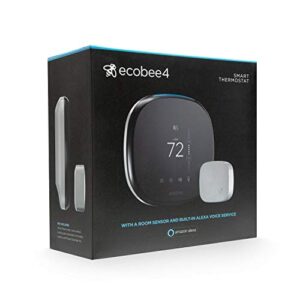
The Ecobee Smart Thermostat excels at managing humidity in snake rooms, automatically adjusting heating when indoor moisture levels exceed 60% RH—eliminating manual intervention. Its built-in Alexa enables hands-free control, while remote room sensors allow precise monitoring of specific areas beyond the main unit.
At $239.99, the device also includes geofencing, energy reports, and smart scheduling, enhancing its practicality. These features ensure efficient, tailored climate management without compromising convenience.
| Best For | Homeowners who want hands-free, app-controlled climate management across multiple rooms and are comfortable with a Wi-Fi-dependent setup. |
|---|---|
| Price | $239.99 |
| Voice Control | Alexa |
| Remote App Control | Yes |
| Connectivity | Wi-Fi |
| C-Wire Required | Yes |
| Scheduling | Yes |
| Additional Features |
|
- Alexa voice control makes adjusting the temperature effortless without touching the thermostat.
- Room sensors help even out hot and cold spots, so every space stays comfortable.
- Smart scheduling and away modes can genuinely cut down on energy bills over time.
- If your Wi-Fi drops, you lose remote access and Alexa control entirely.
- Large homes may find three sensors aren’t enough for accurate room-by-room monitoring.
- Older HVAC systems may need extra wiring work, which could mean calling in a professional.
2. Honeywell Smart WiFi Thermostat
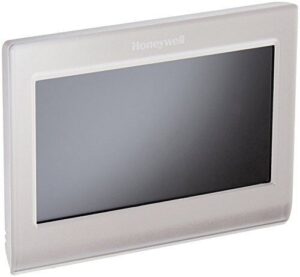
Honeywell Smart WiFi Thermostat offers hands-on control at $349.99. It enables remote control via the Total Connect Comfort app, ideal for managing your home’s climate when away.
Its Smart Response technology learns your system’s timing to prevent temperature fluctuations that disrupt indoor humidity. This ensures stable, comfortable conditions.
You’ll receive alerts for extreme conditions, helping you address issues before they escalate. Note that installation requires a C-wire, so verify your wiring compatibility beforehand.
| Best For | Homeowners, travelers, or property managers who want reliable remote temperature control and don’t mind paying a premium for a polished, app-connected setup. |
|---|---|
| Price | $349.99 |
| Voice Control | Alexa |
| Remote App Control | Yes |
| Connectivity | Wi-Fi |
| C-Wire Required | Yes |
| Scheduling | Yes |
| Additional Features |
|
- Control your thermostat from anywhere using the iOS/Android app or web portal — great if you’re away from home a lot
- Smart Response technology learns your system’s timing so temps stay steady without overshooting
- Instant alerts for extreme temps or filter changes mean you can catch problems before they turn into big ones
- Requires a C-wire to work — if your home doesn’t have one, expect extra wiring costs or adapters before you can even install it
- No habit-learning like some competitors; you have to program schedules yourself
- At $349.99, it’s a real investment, and some users report sensor drift and a frustrating warranty process if something goes wrong
3. Google Nest Learning Thermostat
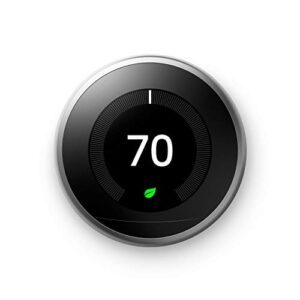
If budget is a factor, the Google Nest Learning Thermostat at $219.99 is worth a serious look. It reads your routine and builds a schedule around it — no manual programming needed.
The humidity sensor integrates with its Eco+ mode, which trims cooling demand by roughly 5% on muggy days without letting your space feel swampy.
Voice control, geofencing, and a clean app make daily adjustments easy.
For snake keepers managing room climate, that hands-off reliability counts for a lot.
| Best For | Homeowners or renters who want a set-it-and-forget-it thermostat that learns their schedule and helps cut energy costs without constant tinkering. |
|---|---|
| Price | $219.99 |
| Voice Control | Alexa, Google Assistant |
| Remote App Control | Yes |
| Connectivity | Wi-Fi |
| C-Wire Required | Optional |
| Scheduling | Auto-learning |
| Additional Features |
|
- Learns your routine and auto-builds a schedule — no manual programming required
- Can save around 10–15% on heating and cooling costs, which adds up fast
- Easy to control remotely via app, voice, or geofencing when you’re away from home
- Loses most of its features during Wi-Fi or internet outages — it’s not great offline
- Homes without a C-wire may run into power issues or need extra wiring work
- At $219.99, it’s a solid investment, but the savings aren’t guaranteed for every home setup
4. Sensi Touch 2 Smart Thermostat
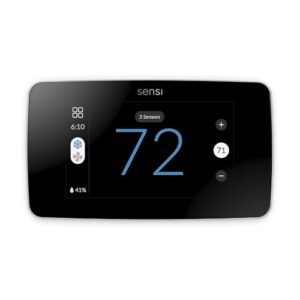
The Sensi Touch 2 lands at $147.90 — noticeably cheaper than Nest — and earns its keep. ENERGY STAR certified, it delivers an estimated 23% energy savings while managing scheduling, geofencing, and remote app control without overcomplicating things.
Room sensors track both temperature and humidity, and the ACC terminal allows direct wiring for a dehumidifier. This feature is particularly valuable for spaces like snake rooms, where moisture levels can rise rapidly.
The color touchscreen offers sharp visuals, and DIY installation is straightforward. Just confirm your system has a C-wire before setup.
| Best For | Homeowners who want an affordable, DIY-friendly smart thermostat with solid energy-saving features and don’t mind relying on the app for setup and control. |
|---|---|
| Price | $147.90 |
| Voice Control | Alexa, Google Assistant, SmartThings |
| Remote App Control | Yes |
| Connectivity | Wi-Fi + Bluetooth |
| C-Wire Required | Yes |
| Scheduling | 7-day |
| Additional Features |
|
- ENERGY STAR certified with an estimated 23% energy savings — plus geofencing and flexible 7-day scheduling make it easy to stop heating or cooling an empty house
- Works with Alexa, Google Assistant, and Samsung SmartThings, and pairs with optional room sensors to balance temps across tricky spots in your home
- At $147.90, it’s meaningfully cheaper than competitors like Nest, and the Bluetooth-guided DIY install keeps setup costs down too
- Wi-Fi connectivity can be flaky — some users deal with frequent "offline" drops or can’t even finish the initial setup
- Everything runs through the app; there’s no phone or email support if you hit a wall during installation or have an issue later
- No local API and no internet means no control, which is a real limitation if your connection goes down or you want to use home automation tools that don’t rely on the cloud
5. Emerson Sensi Smart WiFi Thermostat
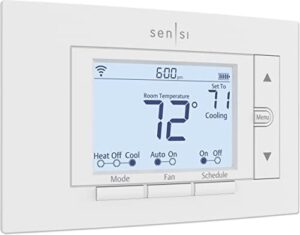
At $88.89, the Emerson Sensi WiFi Thermostat is the no-frills option that quietly delivers where it counts. It’s ENERGY STAR certified, promises up to 23% energy savings, and runs on AA batteries — no C-wire needed for most setups.
The app manages scheduling, geofencing, humidity alerts, and remote control cleanly.
It won’t wow you with a flashy display, but if your snake room needs reliable humidity monitoring and smart alerts without the premium price tag, this one holds its own.
| Best For | Homeowners who want a reliable, no-fuss smart thermostat without spending big — especially those in older homes without a C-wire. |
|---|---|
| Price | $88.89 |
| Voice Control | Alexa, Google Assistant |
| Remote App Control | Yes |
| Connectivity | Wi-Fi |
| C-Wire Required | No |
| Scheduling | Yes |
| Additional Features |
|
- No C-wire needed for most installs, so retrofitting into an older home is genuinely easy
- ENERGY STAR certified with up to 23% energy savings — the scheduling and remote access features actually pull their weight
- Works with Google Home and Alexa, plus the app handles scheduling, vacation mode, and maintenance alerts in one clean package
- Heat pump users may need to dig into manual settings the included docs don’t fully explain
- The display backlight is dim and not always on, which makes it hard to read in a dark room
- Usage reports are pretty bare-bones — you get total daily runtime, but no timestamps or detailed breakdowns
6. Honeywell T9 Smart Thermostat
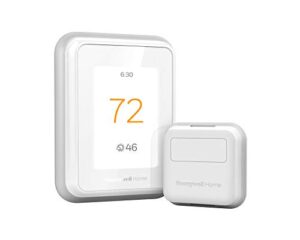
The Honeywell T9 is built for homes where humidity control actually matters. At $204.99, it’s a serious tool — not a gimmick. Its built-in humidity sensor plus wireless room sensors (up to 200 ft range) provide real-time moisture data across multiple spaces, a critical feature if areas like a snake room run warmer and wetter than the rest of the house.
Before installing, make sure your system is C-wire ready — this thermostat guide for renters walks you through checking that 24–30V AC reading with a multimeter.
The device ensures smooth daily monitoring through its full-color touchscreen, Resideo app, and voice assistant support, blending convenience with advanced functionality.
| Best For | Homeowners with multi-room comfort challenges, multi-story layouts, or specific rooms (like a reptile enclosure) that need independent temperature and humidity tracking. |
|---|---|
| Price | $204.99 |
| Voice Control | Alexa, Google Assistant, HomeKit |
| Remote App Control | Yes |
| Connectivity | Wi-Fi |
| C-Wire Required | Yes/Adapter included |
| Scheduling | Yes |
| Additional Features |
|
- Room sensors let you monitor up to 200 ft away, so you can actually balance temperatures across floors or prioritize specific spaces
- Works with Alexa, Google Assistant, and Apple HomeKit, plus the Resideo app for full remote control
- Includes a C-wire adapter, so most DIYers can install it without calling an electrician
- Wi-Fi can be finicky — many users have to manually force a 2.4 GHz connection to keep it stable
- The heating/cooling differential is fixed at ±1°F with no way to adjust it, which might frustrate people who want more control
- Honeywell handed support off to Resideo, so warranty and service expectations aren’t as straightforward as they used to be
7. Bosch WiFi Smart Thermostat Controller
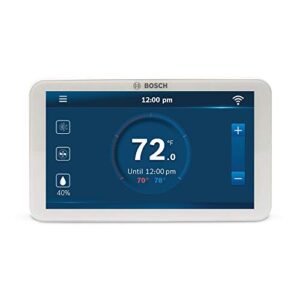
At $161.49, the Bosch BCC100 delivers impressive value for its price. It seamlessly integrates with humidifiers, dehumidifiers, and hot-gas reheat systems, offering versatile hardware compatibility that’s especially useful in humid climates.
The device features a built-in humidistat that employs "cool-to-dehumidify" algorithms, ensuring your system efficiently removes moisture without overcooling. This smart functionality prioritizes humidity control over mere temperature adjustments.
For convenience, the BCC100 supports remote operation via the Bosch app, Alexa, or Google Home, letting you manage settings from anywhere. However, it requires a C-wire for installation and only connects to 2.4 GHz Wi-Fi networks—two critical factors to confirm before purchasing.
| Best For | Homeowners with complex HVAC setups—especially dual-fuel, heat-pump, or whole-home humidity control systems—who want smart thermostat features without paying a premium price. |
|---|---|
| Price | $161.49 |
| Voice Control | Alexa, Google Home |
| Remote App Control | Yes |
| Connectivity | Wi-Fi (2.4 GHz) |
| C-Wire Required | Yes |
| Scheduling | Yes |
| Additional Features |
|
- Great humidity control built right in—handles humidifiers, dehumidifiers, and cool-to-dehumidify all from one device
- Works with Alexa, Google Home, and the Bosch app, so adjusting temps from the couch (or across the country) is easy
- Solid hardware compatibility covering heat pumps, dual-fuel setups, and hot-gas reheat systems
- Needs a C-wire to work—if your home only has two thermostat wires, you’re looking at extra installation work
- 2.4 GHz Wi-Fi only, which can cause headaches if your router runs a combined 2.4/5 GHz network
- App connectivity and firmware updates have been known to cause occasional glitches, including clock drift after power loss
8. LUX Smart WiFi Thermostat
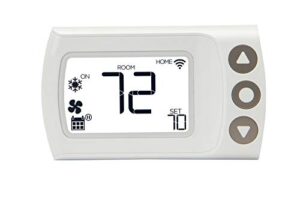
The LUX CS1 Smart WiFi Thermostat is ideal for managing multiple properties or seeking affordable remote control. It features humidity-aware modes and automatically triggers dehumidifier adjustments when moisture levels rise.
The built-in sensor transmits real-time readings directly to the LUX app, enabling remote monitoring from anywhere. This ensures users stay informed about their environment effortlessly.
Additional functionalities include geofencing, voice control via Alexa and Google Assistant, and energy reporting, enhancing convenience and efficiency.
While setup can feel unintuitive initially, the thermostat’s core functionality delivers reliable performance, making it a practical choice for users prioritizing value and capability.
| Best For | Property managers and Airbnb hosts who want affordable remote temperature control across multiple locations. |
|---|---|
| Price | N/A |
| Voice Control | Alexa, Google Assistant, IFTTT |
| Remote App Control | Yes |
| Connectivity | Wi-Fi (2.4 GHz) |
| C-Wire Required | No |
| Scheduling | Yes |
| Additional Features |
|
- Geofencing automatically adjusts temps when you leave or come home, so you’re not heating an empty house.
- Works with Alexa, Google Assistant, and IFTTT for easy hands-free control.
- Centralized app lets you manage multiple thermostats across different properties in one place.
- Setup and switching between modes can feel confusing at first—expect a learning curve.
- The app logs you out after inactivity, which gets annoying if you’re checking in frequently.
- The interface feels a bit outdated, and some users run into compatibility issues on certain phones.
9. Google Nest Smart Thermostat
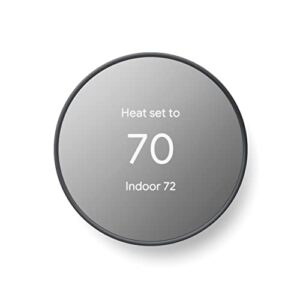
At $129.99, the Google Nest Smart Thermostat punches above its weight for humid-climate snake rooms. Its learning algorithm adjusts to your schedule automatically, eliminating constant manual adjustments. The motion sensor activates Eco mode upon departure, ensuring energy savings without compromising stability. Remote control via the Google Home app allows real-time monitoring from any location.
ENERGY STAR certified, it offers easy installation in approximately 30 minutes and compatibility with most 24V systems.
| Best For | Homeowners who want a set-it-and-forget-it thermostat that learns their routine and quietly saves money on energy bills. |
|---|---|
| Price | $129.99 |
| Voice Control | Alexa, Google Assistant |
| Remote App Control | Yes |
| Connectivity | Wi-Fi + Bluetooth |
| C-Wire Required | Optional |
| Scheduling | Auto-learning |
| Additional Features |
|
- The learning algorithm builds your schedule automatically — no programming needed after the first week or two.
- At $129.99, it’s genuinely affordable for a smart thermostat, and the $25–$35 monthly savings can pay it off fast.
- HVAC monitoring sends alerts before small issues turn into expensive repairs, which is a nice peace of mind bonus.
- Some setups (heat-only, heat pump, zone-controlled) need a C-wire or adapter, which adds cost and can make installation trickier.
- Everything fun — remote control, voice commands, HVAC alerts — depends on a solid Wi-Fi connection. Outages leave you with a basic thermostat.
- Adding a second user to the account can be surprisingly clunky and sometimes requires a full factory reset.
10. Govee Smart Hygrometer Thermometer
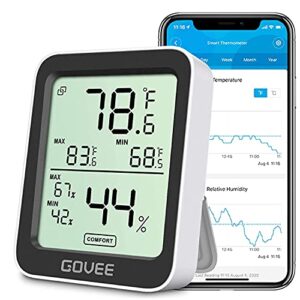
Not every humidity tool needs to control your HVAC — sometimes you just need a reliable set of eyes on your snake room. The Govee Smart Hygrometer Thermometer does exactly that.
It reads temperature and humidity every 2 seconds, displays both on a clear 3-inch LCD, and sends app alerts when levels drift past your set thresholds.
Bluetooth range reaches up to 50 meters, and the app stores up to 2 years of trend data.
It won’t run your AC, but as a dedicated monitoring companion, it’s hard to beat.
| Best For | Anyone who needs simple, reliable temperature and humidity monitoring for a snake room, baby room, wine cellar, or any other space where conditions really matter. |
|---|---|
| Price | N/A |
| Voice Control | None |
| Remote App Control | Yes |
| Connectivity | Bluetooth only |
| C-Wire Required | N/A |
| Scheduling | No |
| Additional Features |
|
- Refreshes every 2 seconds and alerts your phone the moment things go sideways
- Stores up to 2 years of trend data so you can actually spot patterns over time
- Tiny and flexible — prop it up, hang it, or screw-mount it wherever you need it
- Bluetooth only, so your phone needs to stay within range for the app to work
- No backlight on the LCD, which makes it tough to read in a dark room
- Accuracy can drift over time and needs occasional recalibration to stay spot-on
Why Humidity Matters for Snake Homes

If you keep snakes, humidity isn’t just a comfort issue — it directly affects your animals’ health, shedding, and stress levels. Your HVAC system plays a bigger role in that than most keepers realize.
For snake keepers, humidity is not a comfort preference — it is a health requirement your HVAC silently controls
Here’s what you need to know before choosing a thermostat for your snake room.
Stable Shedding Humidity
Snakes don’t forgive inconsistent humidity — especially during shedding. Maintaining indoor humidity within the 65–75% sweet spot demands strategic effort. Adhering to the recommended shedding humidity target of 65–80% RH is critical to preventing stuck sheds.
To achieve this, employ Localized Humidity Hides for micro-zone control and implement Gradual Mist Cycles instead of soaking the enclosure at once. Consistently monitor humidity gradients across basking and hide areas to ensure accuracy.
- Shedding Phase Calibration prevents stuck sheds proactively
- Temperature-Humidity Sync ensures HVAC systems don’t undermine enclosure efforts
- Consistent humidity setpoints minimize daily fluctuations
- Smart humidity monitoring detects drops before snakes are affected
Mold Prevention Near Enclosures
High humidity that helps your snake shed can quietly wreck the room around its enclosure. Mold finds a home fast on damp walls and floors.
Vapor Barrier Installation under crawl spaces, smart Drainage System Design, and Moisture-Resistant Materials around enclosures cut that risk considerably.
Pair humidity sensor alerts with dehumidifier integration, and indoor moisture management stays automatic — no mold surprises.
Room Comfort for Keepers
Your comfort matters too. Spending hours in a keeper room means airflow balance, temperature consistency, and noise reduction all affect how well you work. Smart thermostats with ergonomic controls and lighting integration make adjustments easy.
An Ecobee Room Sensor tracks indoor humidity right where you’re standing. Good humidity control isn’t just for the snakes — it keeps you comfortable doing the job.
Species-specific Moisture Needs
Not all reptiles want the same air. Ball pythons need Tropical Humidity around 60–80%, while your bearded dragon thrives in Desert Dry Zones at just 30–40%. Gradient Design helps you meet both needs in one room.
Match your substrate moisture to each species’ Molt Timing, and humidity sensors make that precision easy.
HVAC Impact on Snake Rooms
Your HVAC system is the silent gatekeeper of every snake room. Poor Airflow Balance lets stagnant air pool near enclosures, inviting mold.
Maintain Positive Pressure to block outside spores, and prioritize Condensation Drainage near electrical components.
Duct Moisture Sealing and UV‑C Disinfection cut microbial load considerably.
With smart thermostat HVAC integration, humidity control and dehumidification happen automatically — keeping indoor humidity exactly where your animals need it.
Humidity Features Worth Paying For
Not every thermostat feature is worth the extra cost — but some genuinely make a difference in humid conditions. The right ones don’t just monitor moisture; they act on it.
Here are the humidity features that actually earn their keep.
Built-in Humidity Sensors
A thermostat’s effectiveness in humidity control relies on its sensor. Built-in capacitive sensors achieve 2–5% accuracy in measuring indoor humidity, utilizing temperature compensation to maintain reliability as room temperatures fluctuate.
I2C integration enables firmware to read data quickly, with response times under 30 seconds. Sensors are calibrated at the factory, ensuring reliability from the start.
Dehumidifier Integration
Your smart thermostat becomes truly powerful when it talks directly to a dehumidifier. Look for these must-have integration features:
- Remote Humidity Sync keeps setpoints updated across all devices automatically
- Condensate Float Switch protection prevents costly overflow shutdowns
- Pint‑per‑Day Sizing matched to your room stops under- or over-cycling
Variable Speed Coordination, Duct Pressure Balancing, and smart home integration round out effortless humidity control.
Custom Humidity Alerts
One missed spike can mean a bad spread — or worse. Custom humidity alerts put you in control before problems start. Set threshold hysteresis to avoid false alarms, then layer in multi-sensor alerts across zones.
| Feature | What It Does | Why It Matters |
|---|---|---|
| Escalation Chains | Notifies backup contacts | Catches missed alerts |
| Silence Schedules | Pauses during maintenance | Reduces alert fatigue |
| API Integration | Connects external dashboards | Facilitates sophisticated humidity regulation |
Remote App Monitoring
Your phone becomes a control center with remote app monitoring. Real-time alerts ping you the moment humidity shifts, while remote diagnostics flag sensor faults before they escalate.
Here’s what solid mobile app control delivers:
- Remote temperature monitoring and energy insights in one dashboard
- Secure authentication with multi-device sync across platforms
- Remote temperature management and scheduling from anywhere
Stay ahead — not behind.
Smart Fan Control
Fan speed is your secret weapon against moisture buildup. AUTO fan mode cuts energy use by up to 40% while maintaining humidity control—eliminating the need for constant operation.
Occupancy Based Flow and Humidity Triggered Boost activate automatically when conditions change, ensuring efficient moisture management.
| Feature | What It Does | Why It Matters |
|---|---|---|
| PWM Noise Reduction | Smooth speed changes | Quieter operation |
| Adaptive Speed Algorithms | Auto-adjusts to conditions | Consistent humidity control |
| Fan Thermostat Sync | Coordinates with HVAC cycles | Prevents moisture spikes |
Smart scheduling and smart thermostat integration complete the loop, optimizing performance across your system.
Choosing The Right Thermostat

Not every thermostat works well in a humid home, and the wrong pick can leave your snake room muggy no matter what you set it to.
Before you buy, a few key factors will narrow your options fast. Here’s what to think through before making your choice.
Home Humidity Levels
Before picking a thermostat, know your baseline. Ideal RH Range for most homes sits between 45–55%. Seasonal adjustments matter too—winter calls for around 30–40%, summer closer to 50%.
Consistent humidity control protects against Wood Moisture Effects like warping and Electronic Moisture Risks due to condensation.
Sensor calibration tips help maintain accurate readings. Good humidity management starts with knowing what you’re working with.
Snake Room Size
Room size shapes every humidity control decision you’ll make. Small rooms — under 20 square feet — heat and humidify fast, so your smart thermostat needs sharp temperature and humidity sensing accuracy.
Larger rooms with higher enclosure density require wider aisle width (at least 28 inches) and a defined quarantine zone. Don’t forget ceiling clearance — it affects airflow and indoor humidity stability.
Mold prevention begins with proper floor footprint planning.
HVAC System Compatibility
Your thermostat won’t work well if it doesn’t match your HVAC system. Protocol matching matters — some units use proprietary signals that not every smart thermostat works with.
Check refrigerant compatibility, duct sizing, and power requirements before buying. These factors directly impact system efficiency and safety.
Zoning communication, airflow balancing, and humidity control all depend on seamless interaction between your system and thermostat. Incompatible setups risk poor performance or malfunctions.
Run basic HVAC system diagnostics first to identify potential issues and ensure compatibility before installation.
Smart Home Platforms
Smart home platforms tie everything together—and your thermostat should fit right in. Look for Matter Compatibility, which lets devices from different brands communicate seamlessly.
Alexa, Google Assistant, and Apple HomeKit all support Voice Ecosystem control and AI Automation routines, enabling hands-free operation and intelligent scheduling.
Edge Computing ensures automations remain fast and local, reducing reliance on cloud connectivity.
Role-Based Access allows family members to manage shared spaces without disrupting specialized settings, like those in a snake room.
Budget and Long-term Value
Budget shapes every smart home decision—and thermostats are no different. A mid-range model costs $70–$250, but total expenses include installation, subscription fees, and warranty coverage. The payback period typically falls between one and four years through energy savings.
Energy-efficient operation reduces HVAC use by 10–15% annually, while features like geofencing enhance resale value. Cost-reduction strategies, such as scheduling, lower bills by 5–12% monthly.
- Energy efficient operation cuts HVAC use 10–15% annually
- A budget-friendly thermostat with geofencing adds resale value
- Cost reduction strategies like scheduling lowers bills 5–12% monthly
Installation and Setup Tips
Getting the right thermostat is only half the battle — installing it correctly makes all the difference.
A few key decisions upfront can save you headaches and keep your humidity readings accurate. Here’s what to know before you start.
C-wire Requirements
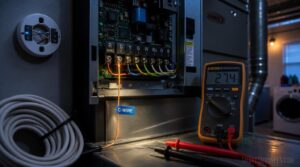
Most smart thermostats require a C-wire for continuous power — no battery workarounds or shortcuts. Without it, expect system resets and dim displays.
Check your furnace control board first: If the C terminal is empty, consider these solutions:
| Solution | Best For |
|---|---|
| Spare conductor repurpose | Existing multi-wire cable |
| Power extender kit | No spare wires available |
| Adapter kit installation | DIY installation simplicity |
| New wire run | Full HVAC system compatibility |
| Licensed technician | Complex or multi-stage systems |
Always verify wire gauge selection matches your run length. Use a multimeter to confirm 24V AC between R and C — that’s your green light for proper installation.
Best Thermostat Placement
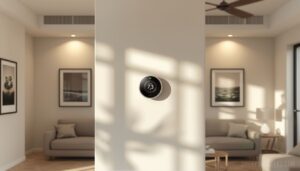
Place your thermostat on an interior wall in a Neutral Temperature Zone — away from vents, windows, and appliances that skew readings.
Mid-room positioning in your main living area gives the most accurate average reading for the whole home. Mount it at 52–60 inches for airflow clearance and easy access — no stretching required.
For DIY thermostat installation, confirm wire access behind the wall before committing to a spot. An unobstructed mount keeps your humidity control and wireless temperature sensor reading indoor humidity accurately all day.
- A bad spot means your HVAC fights ghost readings all season
- The right wall puts you in control — not the thermostat
- Installation simplicity starts with choosing the correct location first
Avoiding Moisture Hotspots

Moisture hotspots don’t announce themselves — they just quietly cause mold. Strategic Sensor Placement near entry points and water dishes gives you real visibility into your indoor humidity before problems start.
| Zone | Risk Level | Fix |
|---|---|---|
| Near water dishes | High | Raise + drain |
| Basking areas | Medium | Cross Ventilation Design |
| Entry points | High | Automated Humidity Alerts |
| Wall surfaces | Medium | Surface Insulation Techniques |
Good, effective drainage management and dehumidification process habits stop moisture removal from becoming a daily firefight.
DIY Versus Professional Setup

DIY installation saves money upfront, but it’s not always the easier path. Models like Ecobee include a Power Extender Kit to simplify setup for systems lacking a C-wire. However, wiring risks and warranty implications are real — one wrong connection can void coverage.
Complex heat pump systems usually warrant a pro, but simple setups with clear wire labels? You’ve got this.
Energy Savings in Humid Climates
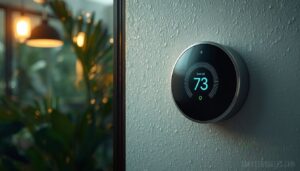
Living in a humid climate means your HVAC system works harder — and that shows up on your energy bill. The good news is that a smart thermostat can change that, and it doesn’t require any complicated setup.
Here are five features that make a real difference.
AUTO Fan Mode
AUTO fan mode is one of the easiest wins for humidity control. Instead of running constantly, the fan activates only during active cooling cycles — and that difference matters. It can lower indoor humidity by 5–10% compared to continuous mode.
With moisture sensing and adaptive speed, your smart thermostat fine-tunes cycle timing and zone balancing automatically, cutting energy use without sacrificing comfort.
Smarter Cooling Schedules
Your smart thermostat does more than react — it learns. Adaptive Learning tracks your daily patterns and refines cooling start times automatically. Weather Responsive scheduling adjusts for outdoor humidity before it becomes your problem.
Zone Optimization targets only occupied spaces, while Demand Response shifts cycles away from peak pricing.
Predictive Humidity logic ensures your system stays ahead of moisture all day.
Geofencing for Efficiency
Geofencing for HVAC takes efficiency a step further. Occupancy-Based Scheduling automatically activates when you leave home, cutting cooling cycles before energy bills climb. Geofence Preconditioning ensures your system starts minutes before your return, so comfort is ready.
Location-Triggered Dehumidification optimizes moisture control by activating dehumidifiers only when needed. Meanwhile, Smart Vent Coordination intelligently redirects airflow to occupied spaces, enhancing targeted climate control.
Geofence Energy Alerts provide real-time updates, keeping you informed about system performance and efficiency.
Usage Reports and Tracking
Knowing where your energy goes is half the battle. Daily Energy Logs show exactly when your system worked hardest — perfect for spotting humidity-driven spikes.
Exportable CSV Data lets you dig deeper offline, while Trend Visualization maps seasonal patterns at a glance.
Custom Alert Settings flag unusual activity fast.
With Role-Based Access, the right people see the right data — nothing more.
Balanced Comfort Setpoints
Setting the right temperature isn’t just about comfort — it’s about keeping humidity in check too. That’s where Adaptive Setpoint Range earns its place. Your smart thermostat’s Temp Humidity Balance logic and Delta Comfort Buffer keep conditions steady:
- Target 23–25°C with 40–60% RH
- Use Occupancy‑Driven Drift and Smart Setpoint Scheduling to reduce waste
- Sensor fusion facilitates temperature setpoint optimization across zones
Sensor fusion enables precise temperature setpoint optimization across all zones.
Frequently Asked Questions (FAQs)
What thermostat can control humidity?
Several thermostats now offer built-in humidity control. Models like Ecobee and Honeywell support humidity setpoint programming, AI dehumidification, and cloud trend analytics.
These features give you real control over indoor air quality without guesswork.
What should my thermostat be set at in October?
In October, aim for 68–72°F during the day and drop to 60–65°F at night. Keep indoor humidity at 30–50% for real comfort and energy savings.
Does humidity affect a thermostat?
Yes, humidity affects thermostats. Moisture ingress can cause electronic corrosion, temperature deviation, and sensor accuracy issues.
Humidity interference from condensation or dust skews readings, making your system work harder than it should.
Is 70% humidity in your house too high?
Absolutely — 70% indoor relative humidity is too high. At that level, you face mold growth, structural damage, and serious health impacts.
Maintaining humidity levels between 45–55% protects your air quality and comfort.
Is there a thermostat for humidity?
There’s more to modern thermostats than just temperature control. Many now include built-in humidity sensors, Moisture Setpoint Logic, and AI-Driven Dehumidification to maintain precise indoor humidity levels.
These advanced features work together to ensure your environment stays perfectly balanced, going far beyond basic temperature regulation.
Does humidity affect thermostats?
What you can’t measure, you can’t manage." Humidity absolutely affects thermostats.
Condensation interference, humidity-induced drift, and response lag can all throw off sensor calibration, causing measurement bias that makes your system work harder than it should.
How to set a thermostat to reduce humidity?
Lower your cooling setpoint slightly, activate dehumidify mode, and set your target RH range to 45–55%.
Use humidity-based scheduling and reduced fan speed to pull moisture out before it builds up.
Is 55 humidity too high in a house?
55% relative humidity sits right at the edge of the safe comfort zone. It’s not too high, but it’s close. Keep it from creeping above 60%, or mold risk climbs fast.
How often should humidity sensors be calibrated?
Sensors slip quietly out of spec. Plan on annual calibration for most homes.
In high-humidity snake rooms, seasonal checks every three to six months keep sensor drift in check and your humidity control trustworthy.
Can smart thermostats prevent condensation on windows?
Smart thermostats can’t eliminate condensation entirely, but they help.
By managing indoor humidity, surface temperature control, and ventilation scheduling, they keep dew point monitoring consistent — reducing window fogging and supporting mold prevention where it starts.
Conclusion
A homeowner in coastal Florida cut her energy bill by 18% after switching to a thermostat that managed both temperature and moisture together. Thermostats for humid climates deliver smarter control—not just cooler air—by managing humidity effectively. When systems stop fighting humidity and start regulating it, everything works better.
Your comfort improves, and your equipment lasts longer. Pick the thermostat that fits your setup, and let it do the heavy lifting.
- https://www.garyair.com/post/ac-humidity-control-essential-guide-to-indoor-comfort-and-energy-efficiency
- https://www.ecobee.com/en-us/citizen/learn-about-a-thermostat-feature-that-just-feels-good/?srsltid=AfmBOooi0BkTkF9rH2IjIUDxZhNCB-NVeR-xIVhhqxKUMERca-rH4M5i
- https://www.consumerreports.org/appliances/thermostats/best-smart-thermostats-of-the-year-a4768074255/