
This site is supported by our readers. We may earn a commission, at no cost to you, if you purchase through links.
Most people adjust their thermostat without a second thought, yet almost nobody controls indoor humidity with the same precision—even though moisture levels shape air quality, health outcomes, and how long your floors and furniture last.
Dust mites thrive above 60% relative humidity, mold growth accelerates rapidly, and respiratory irritation compounds with every percentage point outside the 40%–60% sweet spot.
Automated humidity control systems close that gap by running a continuous sensor-actuator loop that reads real-time moisture data, compares it against your target, and triggers a humidifier or dehumidifier before conditions drift into problem territory.
Understanding how these systems work—and which components actually matter—puts you in a stronger position to buy the right equipment for your space.
Table Of Contents
- Key Takeaways
- What Automated Humidity Systems Do
- Components Behind Automatic Humidity Control
- Choosing Humidifiers and Dehumidifiers
- Sizing, Placement, and Installation
- Costs, Efficiency, and Maintenance
- Top 7 Humidity Control Products
- Frequently Asked Questions (FAQs)
- Can humidity controllers be automated?
- How much does a humidity control system cost?
- Can humidity control systems integrate with smart thermostats?
- How does outdoor humidity affect indoor humidity levels?
- What certifications should a humidity control system have?
- How do humidity systems perform in extreme climates?
- Can automated humidity systems help with asthma management?
- Conclusion
Key Takeaways
- Keeping indoor humidity between 40% and 60% RH isn’t just about comfort—it directly limits dust mite survival, mold growth, and respiratory irritation that silently compound when moisture drifts out of range.
- Automated systems run a continuous sensor-actuator feedback loop, so your humidifier or dehumidifier responds before conditions become a problem; no manual adjustments needed.
- Sensing and sensor placement matter as much as the equipment itself—a unit too small for your square footage will run constantly without hitting target, and a poorly placed sensor feeds your controller bad data from the start.
- Smart humidity systems with variable-speed compressors and occupancy-linked controls can cut energy use by up to 30%, meaning the upfront cost pays itself back through lower monthly bills over time.
Pairing this range with allergy-friendly thermostat settings helps maintain steadier conditions throughout the day.
What Automated Humidity Systems Do
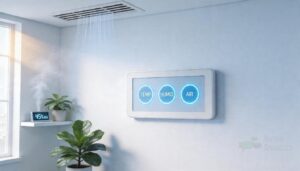
Automated humidity control systems take the guesswork out of keeping your indoor air comfortable and safe. They monitor moisture levels around the clock and respond automatically, so you’re not constantly adjusting settings by hand.
For setups like terrariums or exotic pet enclosures, pairing automated controls with reptile habitat design ideas helps you create a stable, species-appropriate environment from the start.
Here’s a closer look at what these systems actually do and why they matter.
Definition of Automated Humidity Control Systems
An automatic humidity control system is, essentially, a sensor-actuator interaction built around one job: keeping your indoor air within a healthy range without you lifting a finger.
A humidity sensor feeds real-time data to a humidistat, which triggers humidifiers or dehumidifiers through closed-loop operation.
Think of it as a smart thermostat integration — but for moisture, not temperature.
Modern electronic humidistats provide precise control and can include Wi‑Fi connectivity for remote monitoring, ensuring electronic humidistat accuracy.
How Automatic RH Regulation Works
Once the sensor reads your air, the humidistat kicks in — comparing live RH data against your setpoint through a continuous feedback loop. Deadband Optimization keeps equipment from short-cycling, so your system isn’t constantly switching on and off.
Adaptive Setpoint Algorithms and Predictive Moisture Modeling improve those decisions over time.
Proper humidity sensor placement and Sensor Calibration Frequency keep the whole automatic humidity control system honest.
Benefits of Maintaining Stable Humidity
Keeping RH between 40% and 60% does more than just feel nice. It directly enhances Respiratory Comfort, Infection Control, and Allergy Reduction — dust mites die off below 50%, and mold prevention kicks in when you stay under 60%.
Your indoor air quality improves, Home Protection extends to wood floors and furniture, and Everyday Comfort becomes the quiet norm rather than something you chase.
Manual Control Vs Automated Control
Think of manual control like checking a map every few miles versus GPS rerouting in real time. A humidistat in an automatic humidity control system runs a continuous feedback loop — no manual intervention needed.
Unlike batch human reviews, prone to Error Propagation, IoT humidity monitoring catches Rule Consistency issues instantly, eliminating Response Latency. Human Judgment matters for edge cases, but Scalability Tradeoffs favor automation for consistent daily regulation.
Common Residential and Light-commercial Applications
Automated humidity control spans more spaces than most people realize. A bathroom exhaust fan with a built-in sensor, kitchen ventilation that kicks on during cooking, or basement dehumidification running quietly overnight — each one is part of a larger automatic humidity control system strategy.
- Laundry room moisture spikes fast; automatic exhaust prevents hidden mold
- Office humidity control keeps equipment and people comfortable without daily adjustments
- Smart home and HVAC integration extends coverage across 6,000+ sq ft with minimal maintenance requirements
Energy efficiency improves when systems only run as needed.
Components Behind Automatic Humidity Control
Every automated humidity system is really just a team of parts working together, and knowing what each one does changes how you shop for them. Some components sense, some decide, and some act — and the balance between them determines how well your system performs.
Here’s a look at the key pieces that make it all run.
Humidity Sensors and Hygrometers
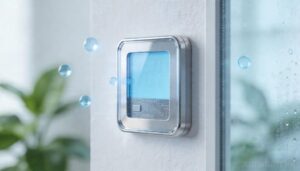
Your humidity sensor is the system’s eyes — without accurate data, nothing downstream works. Most modern systems rely on capacitive sensor basics: a polymer film response that shifts electrical properties as moisture changes.
Ceramic sensor speed beats many alternatives, while dew point measurement catches absolute moisture precisely. The Grotthuss proton transfer mechanism drives ionic ceramic conductivity.
For hygrometer usage, sensor placement and accuracy matter more than specs alone — keep sensors away from vents. Schedule sensor calibration annually; wireless sensors simplify this considerably.
Humidistats and Control Units
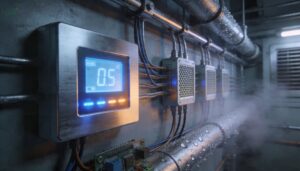
Once sensor feeds live data to a humidistat, the real decision‑making begins. The control unit compares readings against your setpoint, then triggers relay wiring to switch equipment on or off — no guesswork involved.
A automatic humidity control system manages:
- Deadband settings to prevent rapid equipment cycling
- PID tuning for smoother, more responsive control
- Alarm configuration when RH drifts out of range
- Network integration for remote monitoring via dashboard
- Dual-stage outputs for humidistats and humidistat‑controlled extractor fans simultaneously
Humidifiers as Moisture-adding Actuators
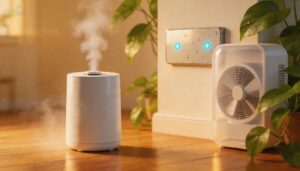
When humidistat calls for more moisture, humidifiers act as the system’s moisture-adding actuators.
Pad material selection, water quality impact, and noise level considerations all affect long-term performance.
Fan speed modulation lets your automatic humidity control system respond gradually rather than cycling at full blast.
| Humidifier Type | Key Control Factor |
|---|---|
| Evaporative | Fan speed modulation |
| Ultrasonic | Moisture sensor feedback |
| Steam | Safety shutoff mechanisms |
| Whole-home ducted | Humidistat-controlled extractor fan |
Dehumidifiers as Moisture-removing Actuators
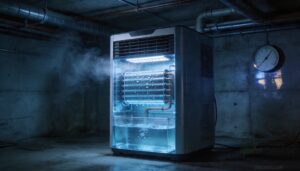
When moisture builds up, your automatic humidity control system calls in the dehumidifier. Refrigerant models condense water on cold coils, while desiccant units rely on moisture adsorption and thermal regeneration to pull vapor from the air — a key advantage in cooler spaces.
Airflow optimization keeps noise levels manageable.
Factor in lifecycle cost and dehumidification technology when selecting your humidity sensor switch.
Feedback Loops and Setpoint Adjustment

Think of your automatic humidity control system as a thermostat that never sleeps. Feedback loops in automatic climate control continuously compare live readings to your setpoint — generating an error signal, the humidity regulation algorithm uses to drive corrections.
Key control behaviors to understand:
- Error Signal Tuning shrinks corrections as humidity nears target
- PID Gain Optimization prevents overshoot and unnecessary cycling
- Variable Setpoint Scheduling shifts targets by season or occupancy
- Adaptive Bandwidth Control with Sensor Drift Compensation keeps setpoint calibration accurate long-term
Smart Apps, Dashboards, and Alerts
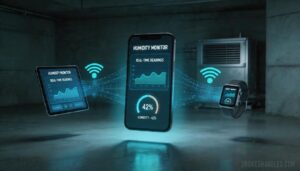
Once your feedback loop is running, smart apps and dashboards put real-time monitoring in your pocket. Humidity monitoring apps sync readings across phones and tablets through cloud data integration, so you’re never guessing what’s happening in the basement.
Custom alert rules notify you when RH drifts outside your target range. Multi-device sync and accessible widgets make app-based remote monitoring straightforward, even for complex HVAC setups.
Choosing Humidifiers and Dehumidifiers
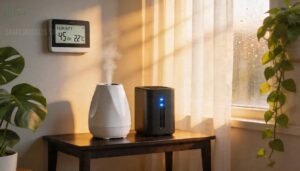
Before you buy anything, you need to know what problem you’re actually solving. The right equipment depends on whether your air runs too dry, too damp, or both — and on how much control you want over the fix.
Here’s what you need to know about each option.
How to Tell if Air is Too Dry
Your body often signals low humidity before any humidity sensor does. Dry skin that feels tight or itchy, morning throat dryness, and nose congestion without a cold all point to relative humidity below 30 percent.
Static shocks, plant leaf curl, and cracked wood confirm it.
Respiratory symptoms and skin dryness together are your clearest sign to act.
How to Tell if Air is Too Humid
High humidity leaves clues everywhere. Watch for these Condensation Indicators, Mold Growth Signs, and Physical Discomfort Cues:
- Windows fog over and surfaces sweat when RH levels exceed 60 percent
- Musty Odor Detection signals mold growth behind walls or under floors
- Skin feels sticky and air feels heavy—classic Physical Discomfort Cues
Your humidity sensor or hygrometer confirms it: readings above 60 percent demand a dehumidifier.
Evaporative Humidifier Systems
Once your air reads below 30% RH, an evaporative humidifier is your straightforward fix. Water soaks into the pad, building Media Surface Area so that your HVAC’s airflow pulls moisture naturally into the room. A Fan-Powered Design works independently of your furnace blower, giving you flexible coverage area.
| Feature | Detail |
|---|---|
| Control Method | Humidistat controlled, automatic humidity control system |
| Mineral Buildup Effects | Reduces pad efficiency; replace annually |
| Seasonal Drain Procedure | Flush reservoir before shutdown |
Control Valve Modulation keeps output steady without overshooting your humidity sensor setpoint.
Ultrasonic and Steam Humidifier Systems
When quiet operation matters, an ultrasonic humidifier breaks water into micron-sized droplets with almost no Noise Levels to speak of. Mist Particle Size stays fine enough to disperse quickly, but tap water causes white Dust Generation.
Steam humidifier systems heat water to boiling, delivering faster output—ideal for larger ducted setups—but Scale Buildup demands regular descaling.
Your automatic humidity control system, via humidistat and humidity sensor, controls both automatically.
Refrigerant and Desiccant Dehumidifiers
When choosing between a refrigeration-based dehumidifier and desiccant dehumidification, temperature is your deciding factor.
The Refrigerant Cycle cools incoming air below its dew point, condensing moisture onto a Cold Coil before Condensate Drainage carries it away — but Cold Coil Frost becomes a real problem in cool spaces.
Desiccant Wheel with Regeneration Heating works reliably in cold environments. humidistat and humidity sensor handle the rest automatically.
Single-stage Vs Dual-stage Controllers
Think of it like a thermostat with one dial versus two. Single-stage humidity controllers use one relay to flip a single device on or off when your humidity sensor crosses a threshold — simple, low-cost tradeoff, but prone to wide swings in your automatic humidity control system.
Dual-stage humidity controllers add a second relay, reducing switching frequency and control‑logic complexity:
- Stage Differential generally runs 3–15% RH between outputs
- Relay Count determines how many devices you can stage
- Smart and IoT humidity monitoring solutions often pair best with dual-stage logic for tighter setpoint control
Sizing, Placement, and Installation
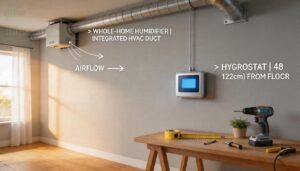
Getting the right system is only half the battle—putting it in the right place and sizing it correctly is what makes it actually work. A unit that’s too small for your space will run constantly without hitting your target, while poor sensor placement can feed your controller bad data from the start.
Here’s what you need to know before you buy or install anything.
Matching System Capacity to Coverage Area
Size your system like you’d size a crew—too small and it can’t keep up, too large and you’re wasting money.
| Coverage Area | Recommended Capacity | System Type |
|---|---|---|
| Under 1,000 sq ft | 1.5–3 gal/day | Portable unit |
| 1,000–3,000 sq ft | 3–7 gal/day | Mid-range portable |
| 3,000–6,000 sq ft | 7–10 gal/day | Whole-house entry |
| Over 6,000 sq ft | 10+ gal/day | Whole-house humidifier |
| Humid hot spots | 120 pints/day max | Whole-house dehumidifier |
Coverage area calculations using Cell Sizing Strategies and Coverage Mapping Techniques keep capacity planning metrics accurate, so your system hits every corner without interference management issues.
Room Volume and Humidity Load Calculations
Coverage area alone doesn’t tell the whole story.
Room volume drives your humidity load calculations—multiply your space’s cubic footage by the infiltration rate (0.5–1.5 air changes per hour) to estimate how hard your system works.
Factor in the outdoor moisture gap, internal moisture gains from occupants, and material moisture absorption.
air change calculations help you nail the right dehumidification capacity and humidity setpoint for reliable humidity regulation.
Best Sensor Placement for Accurate Readings
Where you mount your moisture sensor matters as much as the sensor itself. Aim for 4–6 feet above the floor—human breathing height—on an interior wall with low thermal mass.
Good airflow positioning keeps readings accurate, so avoid corners, vents, and heat sources. Heat isolation and interference avoidance prevent humidity sensor drift.
Smart sensor location and placement accuracy in humidity management depend on free air circulation around the sensing element.
Portable Units Vs Whole-house Systems
Once your humidity sensor is correctly placed, the next call is whether a portable humidifier meets your needs or a whole-house humidifier makes more sense.
Room-specific control works well for a single damp basement, but system scalability matters when moisture problems spread across multiple rooms.
Whole-house automatic humidity control systems run quieter—generally below 50 dB—while portable units, though flexible on space requirements, demand more hands-on maintenance and can affect local airflow impact noticeably.
HVAC Integration and Ducted Setups
Connecting your automatic humidity control system to existing ductwork unlocks whole-home reach without adding standalone units everywhere. Motorized dampers use Dampers Actuation Logic to direct airflow precisely, while a Humidity Sensor Network feeds live data to your Integrated Control Dashboard.
Your whole-home humidifier ties directly into the HVAC system through:
- Variable Air Volume dampers per zone
- Humidistat controlled extractor fan loops
- Duct Insulation Strategies to prevent condensation
- Sensor-triggered staging across branch ducts
- Centralized setpoint coordination via control panel
Water Supply, Drainage, and Wiring Needs
Once your ducted setup is sorted, the behind-the-scenes plumbing and electrical work keeps everything running safely.
Whole-home humidifiers need a dedicated water feed — copper or PEX piping works well, with PEX offering easier routing and fewer fittings.
Follow Pipe Sizing Guidelines (generally ¾-inch lines), install a Backwater Valve Integration for drainage protection, and use GFCI Circuit Requirements on all damp-location outlets.
DIY Installation Vs Professional Installation
With plumbing and wiring sorted, you’re facing a real fork in the road: DIY humidity solutions versus professional installation. Labor Expenses alone often decide it — pros cost more upfront but bring built-in Safety Compliance and Warranty Coverage.
Your Skill Level and Tool Investment matter too. Rushed self-installation risks code violations and voided warranties, so weigh the tradeoffs honestly before starting.
Costs, Efficiency, and Maintenance
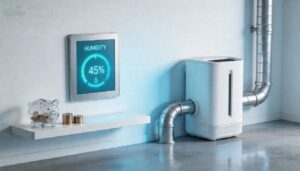
Once you’ve got the right system installed, the next question is what it actually costs to run — and keep running. Upfront prices vary widely, and ongoing maintenance is where a lot of people get caught off guard.
Here’s a clear breakdown of what to budget for and what to watch.
Typical Equipment and Installation Costs
Costs vary more than most people expect. A bypass humidifier runs $400–$800 installed, while a steam unit can push $2,500 once equipment price ranges and labor rate variability are factored in.
Dehumidifiers usually land between $1,100 and $3,500.
Ductwork modification costs and electrical upgrade expenses can add hundreds more, especially in older homes — so always get an itemized quote before committing.
Sensor and Controller Replacement Costs
When a humidistat fails, replacing it runs $30–$150 for the part alone — digital automatic controllers push toward $200. Labor Pricing adds $75–$150 per hour, plus Professional Service Fees of $100–$200 for the visit.
Voltage Compatibility matters too: mismatched 24-volt wiring means rewiring costs climb fast. Sensor Calibration and Warranty Impact both factor into the real Cost of humidity control solutions.
Energy Efficiency and Operating Savings
An automatic humidity control system quietly pays for itself over time — and the savings stack up faster than most people expect. Variable Speed Compressors alone cut energy use by up to 30% versus fixed‑speed models, while Heat Recovery systems boost efficiency by another 25% by recycling condenser heat. A Smart Humidistat with Occupancy‑Linked Controls trims runtime by 10–15% in empty rooms.
Smart humidity systems pay for themselves by cutting energy use up to 30% with variable speed and intelligent occupancy controls
Here’s where energy efficient humidity control solutions really shine:
- Energy Star Ratings — ENERGY STAR Most Efficient 2025 dehumidifiers deliver 110–240 kWh/yr in annual energy savings, over 33% above federal minimums
- Variable speed tech — 80‑pint units running 8 hours daily cost roughly $156/year to operate at $0.13/kWh
- Smart Humidistat logic — learning algorithms cut annual consumption by up to 496 kWh in zoned setups
- HVAC integration — ducted whole‑house units save ~426 kWh yearly by sharing existing blower airflow
The result? Lower energy bills month after month, with energy savings that compound as the system learns your home’s patterns.
Filter, Pad, and Reservoir Maintenance
Think of your humidifier like a coffee maker — skip the cleaning, and the output suffers.
Stick to a Pad Cleaning Schedule every 3–6 months, rinse the humidifier pad in tank water to preserve beneficial bacteria, and replace Filter Pad Replacement media when flow slows or water turns cloudy.
Reservoir Disinfection using mild vinegar removes mineral buildup.
Keep a Maintenance Log tracking cleaning dates, and pair Water Quality Monitoring with daily maintenance checks for consistent water management.
Sensor Calibration and Drift Prevention
Your humidity sensor is only as good as its last calibration. Drift Modeling tracks how readings shift over time, while Reference Standards keep your baseline honest.
Build a Calibration Scheduling routine — quarterly works for most moisture sensors.
Temperature Compensation algorithms adjust for thermal interference, and Verification Protocols confirm accuracy after each adjustment.
Proper Maintenance and Calibration of Humidity Sensors protect your automatic humidity control system from silent measurement errors.
Common Performance Problems to Watch For
Even a well-tuned system can stumble.
CPU spikes in smart controllers, slow database queries in cloud-connected dashboards, memory leaks in firmware, and network latency in Wi‑Fi sensors all reduce response accuracy.
Resource contention between HVAC zones can create air humidity imbalance.
Watch for sensor placement and accuracy drift, inconsistent coverage area performance, and filter clogs — common symptoms of improper indoor humidity that signal that maintenance requirements for humidity control equipment are overdue.
Top 7 Humidity Control Products
Finding the right humidity control product doesn’t have to feel overwhelming. The seven options below cover everything from a basic hygrometer to a whole-house humidifier, so there’s something here whether you’re managing one room or an entire home.
Here’s what made the cut.
1. JEDEW Digital Hygrometer Thermometer
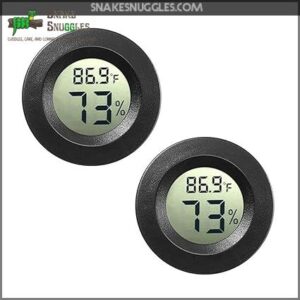
The JEDEW 2-Pack Mini Digital Hygrometer gives you real-time temperature and humidity readings without the complexity of a full sensor network. It measures 10%–99% RH with ±3% accuracy and updates every 10 seconds — fast enough to catch sudden moisture shifts.
At under two inches wide, you can tuck one into a guitar case, terrarium, or filament storage bin. The two-pack lets you monitor two separate spaces at once, which is a practical edge for multi-room setups.
| Best For | Hobbyists and home users who need reliable, no-fuss humidity and temperature tracking for terrariums, instrument cases, humidors, or filament storage. |
|---|---|
| Humidity Range | 10%–99% RH |
| Auto Shutoff | No |
| Noise Level | Silent |
| Coverage Area | Small enclosures |
| Power Source | 2x LR44 batteries |
| Installation Type | Portable |
| Additional Features |
|
- Updates every 10 seconds, so you catch moisture changes fast before they become a problem
- Tiny footprint means it fits almost anywhere — guitar cases, small enclosures, storage bins
- Two-pack gives you coverage in two spots at once without buying a second product separately
- The ±3% humidity and ±1°F temperature tolerance isn’t precise enough for scientific or professional-grade use
- No data logging or wireless connectivity, so you have to physically check the display
- Some users have received units with dead or missing batteries right out of the box
2. TOPGREENER Dual Tech Bathroom Fan Switch
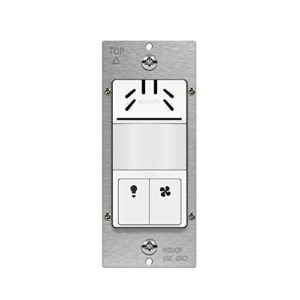
Where the JEDEW tells you what’s happening, the TOPGREENER TDHOS5 actually does something about it. This in-wall switch combines a PIR motion sensor with a humidity sensor, controlling your bathroom light and exhaust fan from a single unit.
When humidity climbs past your chosen threshold — adjustable between roughly 45% and 80% — the fan kicks on automatically.
You get four timer presets up to 30 minutes, 180° motion coverage up to 600 sq ft, and UL-listed wiring for 120 VAC.
A neutral wire is required.
| Best For | Homeowners who want a single switch to handle both bathroom light and exhaust fan automatically — especially great for families with kids or anyone tired of forgetting to turn the fan off after a shower. |
|---|---|
| Humidity Range | 45%–80% RH |
| Auto Shutoff | Yes |
| Noise Level | Silent |
| Coverage Area | Up to 600 sq ft |
| Power Source | 120 VAC hardwired |
| Installation Type | In-wall switch |
| Additional Features |
|
- Combines motion and humidity sensing in one in-wall switch, so the fan kicks on when it actually needs to — no manual fiddling
- Auto-shutoff timer keeps the fan from running all day and chips away at your energy bill
- 180° PIR coverage up to 600 sq ft means it’ll catch movement reliably in most bathrooms
- Needs a neutral wire, which older homes may not have without some rewiring
- Humidity response can be inconsistent — the fan doesn’t always trigger when moisture crosses your set threshold
- Wall plate and face covers aren’t included, and the interchangeable covers have been discontinued, so matching your décor can be a hassle
3. Homewerks Bathroom Fan 140 CFM Humidity Sensor
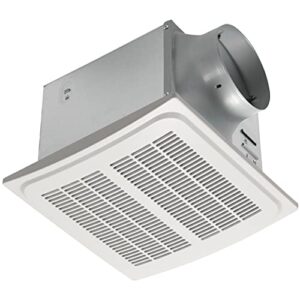
If you want something built into the ceiling rather than the wall, the Homewerks 7136-02HW steps up. It pulls 140 CFM and covers up to 140 sq ft — enough for a larger master bath or laundry room.
The built-in humidity sensor kicks the fan on automatically at 60% RH, then shuts it off once moisture drops back down.
At 1.0 sone, you won’t hear it running.
Your manual wall switch stays available when you need full control.
| Best For | Homeowners with larger bathrooms or laundry rooms who want a set-it-and-forget-it ventilation solution that runs quietly without constant manual control. |
|---|---|
| Humidity Range | Activates at ~60% RH |
| Auto Shutoff | No |
| Noise Level | 1.0 sone |
| Coverage Area | Up to 140 sq ft |
| Power Source | 120 VAC hardwired |
| Installation Type | Ceiling-mounted |
| Additional Features |
|
- Automatic humidity sensing keeps moisture in check without you having to think about it
- 140 CFM moves a good amount of air for bigger spaces, and 1.0 sone means you’ll barely notice it’s on
- Manual wall switch gives you full control when the sensor isn’t cutting it
- Installation can be a headache — it’s heavy and may need extra support in older ceilings
- The 60% RH trigger isn’t adjustable, so it might over-ventilate in winter or lag in really humid climates
- The LED indicators can be annoyingly bright in a dark bathroom
4. Aircare Valiant Digital Whole House Humidifier
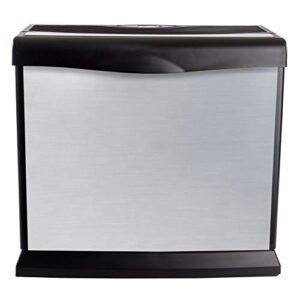
Bathroom fans handle spot ventilation, but what about the rest of your home? That’s where the Aircare Valiant earns its place.
console-style evaporative humidifier covers up to 2,000 sq ft on its own — or 4,000 sq ft when you run two units together.
built-in humidistat keeps RH between 25% and 65%, adjusting fan speed automatically.
dual removable tanks hold about 5 gallons total, giving you roughly 55 hours of runtime before a refill.
At $204.99, it’s a solid whole-house solution.
| Best For | Homeowners with medium-sized spaces (up to 2,000 sq ft) who want set-it-and-forget-it humidity control without the white dust mess of ultrasonic models. |
|---|---|
| Humidity Range | 25%–65% RH |
| Auto Shutoff | Yes |
| Noise Level | Low at low speed |
| Coverage Area | Up to 2,000 sq ft |
| Power Source | 120 VAC plug-in |
| Installation Type | Freestanding |
| Additional Features |
|
- Auto fan speed and digital humidistat keep humidity dialed in without constant fiddling
- Evaporative design means no white dust — and the filters help clean the air while it runs
- Quiet on low speed, making it easy to run in a bedroom or home office overnight
- High fan speed gets loud and can actually cool the room down noticeably
- Wick pads wear out fast — sometimes within a month if you have hard water
- Tanks need refilling every day or two in drier conditions, which gets old quickly
5. Colzer Commercial Dehumidifier With Tank
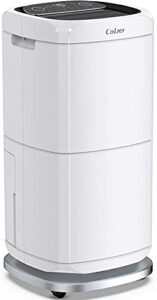
The Colzer PD582A is built for spaces where humidity isn’t just uncomfortable — it’s a real problem. Rated at 140 pints per day under peak conditions, it covers basements, warehouses, and large storage rooms up to 6,000 sq ft.
You can set your target RH anywhere between 30% and 80%, and the unit cycles automatically to hold that level.
The 6.6 ft continuous-drain hose means no manual emptying. Just connect, set it, and let it run.
| Best For | Anyone dealing with serious moisture problems in basements, warehouses, or large storage spaces who wants a set-it-and-forget-it solution. |
|---|---|
| Humidity Range | 30%–80% RH |
| Auto Shutoff | Yes |
| Noise Level | Compressor noise |
| Coverage Area | Up to ~900 sq ft |
| Power Source | 120 VAC plug-in |
| Installation Type | Portable wheeled |
| Additional Features |
|
- Pulls up to 140 pints of moisture per day — serious muscle for damp basements or commercial spaces
- Continuous-drain hose means you’re not babysitting a tank every few hours
- Adjustable humidity range (30–80% RH) with auto shut-off keeps things dialed in without constant fiddling
- Sensor failures have been reported, which can kill the auto shut-off and risk overflow
- Struggles to push below 45–50% RH in bigger or unfinished spaces, so it’s not ideal everywhere
- The hose connection feels flimsy, and at 50 lbs, getting it set up solo is a bit of a workout
6. Pro Breeze Portable Mini Dehumidifier
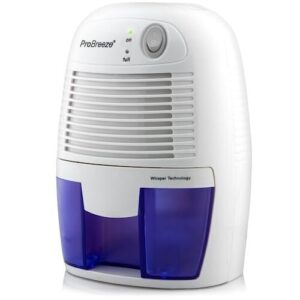
If the Colzer is a workhorse, the Pro Breeze Portable Mini Dehumidifier is the nimble tool you reach for in tighter spaces.
At just 2.4 lb and sized smaller than most microwaves, it fits comfortably in bathrooms, closets, and bedroom corners up to 215 sq ft.
Its built-in humidity sensor lets you dial in a target between 30% and 80%, and it shuts off automatically when that level is reached.
Quiet at 39 dB and drawing only 23 W, it won’t disrupt your sleep or spike your electricity bill.
| Best For | Anyone who needs a quiet, low-cost way to manage humidity in a small space like a bathroom, closet, or bedroom corner. |
|---|---|
| Humidity Range | No sensor |
| Auto Shutoff | Yes |
| Noise Level | 23W whisper-quiet |
| Coverage Area | Up to ~215 sq ft |
| Power Source | 23W plug-in |
| Installation Type | Portable |
| Additional Features |
|
- Whisper-quiet at 23 W, so it runs day and night without bothering anyone
- Lightweight and compact enough to move between rooms or tuck away when not needed
- Auto-shutoff with LED indicator means you’re not babysitting it constantly
- Only works in spaces up to around 215 sq ft — bigger rooms won’t see much difference
- No built-in humidity sensor, so you can’t set a target level and walk away
- Some users report it giving out after 2–3 years, which is worth keeping in mind for long-term use
7. Fancii Mini Travel Humidifier
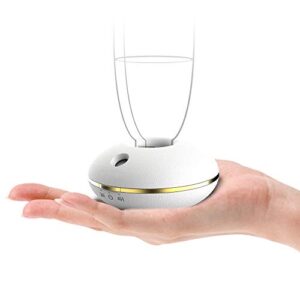
Think of the Fancii Mini Travel Humidifier as your personal humidity fix that fits in a jacket pocket. It clamps onto any standard water bottle under 20 oz, uses ultrasonic PureMist technology at under 15 dB, and runs up to eight hours on USB or three AA batteries.
At 3.6 oz, it won’t weigh down your bag. It’s best for a desk, bedside table, or hotel room—not a whole room—but for dry-air relief on the go, it delivers exactly what it promises.
| Best For | Travelers, commuters, and light sleepers who want quick, portable dry-air relief without hauling a full-size humidifier. |
|---|---|
| Humidity Range | No sensor |
| Auto Shutoff | Yes |
| Noise Level | ≤15 dB |
| Coverage Area | Immediate area only |
| Power Source | 3x AA or USB |
| Installation Type | Portable |
| Additional Features |
|
- Whisper-quiet at under 15 dB—you won’t even notice it’s running
- Clips right onto a standard water bottle, so no separate tank to fill or lug around
- Flexible power options (USB or AA batteries) mean it works basically anywhere
- Only humidifies the air right around you—don’t expect it to help a whole room
- The LED can be annoyingly bright if you’re trying to sleep in a dark hotel room
- Certain mineral-heavy waters can clog the misting port, which means extra cleanup
Frequently Asked Questions (FAQs)
Can humidity controllers be automated?
Yes, they can — and it’s simpler than you’d expect.
Modern humidity controllers use sensors to read RH levels continuously, then automatically switch humidifiers or dehumidifiers on and off to hit your target range.
How much does a humidity control system cost?
Costs range from $30 for a basic portable humidifier to $3,000 or more for a whole-house system with professional installation. Most homeowners spend between $400 and $1,400 total.
Can humidity control systems integrate with smart thermostats?
Absolutely — most modern smart thermostats like ecobee, Google Nest, and Honeywell’s T10 have dedicated terminals that directly control whole-house humidifiers and dehumidifiers, eliminating the need for a separate humidistat entirely.
How does outdoor humidity affect indoor humidity levels?
Outdoor air sneaks indoors through gaps, vents, and open windows, carrying its moisture with it. In summer, that means higher indoor RH; in winter, drier outdoor air pulls moisture out.
What certifications should a humidity control system have?
Look for CE marking, UL 60335-2-40, and NIST-traceable sensor calibration. AHRI certification confirms rated performance. RoHS compliance ensures restricted substances are absent from electronic components.
How do humidity systems perform in extreme climates?
Extreme climates push humidity systems hardest.
In hot deserts, desiccant-evaporative hybrids cut indoor RH by up to 40 percentage points.
In cold, dry regions, steam humidifiers maintain 30–45% RH where evaporative units fail.
Can automated humidity systems help with asthma management?
Yes, automated humidity systems can help manage asthma by keeping indoor air between 30% and 50% RH — the range that limits mold growth, dust mites, and airway irritation that commonly trigger symptoms.
Conclusion
Think of humidity like pressure in a tire—let it drift too far in either direction, and the damage compounds silently until something fails.
Automated humidity control systems take that guesswork off your plate entirely, running a constant feedback loop so your air stays in the 40%–60% range of your health and home demand.
Match the right sensor, controller, and actuator to your space, and you’re not just buying equipment—you’re buying reliable, invisible protection.
- https://chinaheimayi.com/building-automation-101-integrating-room-temperature-controllers/
- https://web.archive.org/web/20120905121014/http:/www.sensorsmag.com/sensors/humidity-moisture/choosing-a-humidity-sensor-a-review-three-technologies-840
- https://mycond.eu/blog/control-and-automation-systems-dehumidifiers-sensors-controllers-and-control-strategies