
This site is supported by our readers. We may earn a commission, at no cost to you, if you purchase through links.

Corn snakes don’t regulate their own body temperature—they steal it from their environment. Get that wrong, and digestion stalls, immunity drops, and a snake that should live 20 years starts declining fast.
A heat mat is the simplest fix, but "plug it in and slide it under" isn’t quite the whole story. Mat size, placement, substrate depth, and a thermostat all work together. Miss one piece, and you’re either roasting your snake or wasting money on a mat that barely warms the glass.
The good news: getting it right takes about 20 minutes and a little know-how.
Table Of Contents
Key Takeaways
- Cover only one-third of the enclosure floor with your heat mat, leaving a cool zone (75–80°F) so your snake can self-regulate between warm (85–90°F) and cool sides. For help picking a safe, reliable mat sized to your enclosure, check out this guide to the best reptile heat mats for young snake keepers. Mounting the mat outside the enclosure prevents burns, and breeders with multiple tanks can compare options in this guide to heating pads for breeding setups.
- Always pair your heat mat with a digital thermostat and probe — without one, temperatures can spike above 95°F and become life‑threatening.
- Keep substrate above the mat at 1 inch or less; thick bedding blocks heat transfer and can drop surface temps by up to 12°F.
- Match mat size to tank size (e.g., 8×12 in/16W for 30–40 gallon), and replace the mat every 2–3 years or sooner if you spot cracks or uneven heat.
A properly sized corn snake kit for hobbyist breeders helps maintain both temperature zones with a reliable thermostat.
If you’re unsure what size to buy, this snake heating pad size guide breaks down the right dimensions for your enclosure.
Choose The Right Heat Mat
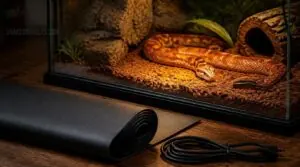
Not every heat mat works for every setup, and picking the wrong one is one of the most common mistakes new corn snake owners make. The right mat depends on your enclosure size, material, and how you want to divide the warm and cool zones. Here’s what to look for before you buy.
Your enclosure size plays a bigger role than most people expect, so it’s worth reviewing heating pad setup for corn snake terrariums before committing to a mat.
Match Mat to Enclosure Size
Before buying anything, measure your enclosure — the mat size follows from that.
- 10-gallon tank: use a 4×5 in, 4W mat
- 20-gallon tank: use a 6×8 in, 8W mat
- 30–40-gallon tank: use an 8×12 in, 16W mat
- 50–60-gallon tank: use an 8×18 in, 24W mat
According to mat design standards, a wide mat is defined as four inches or more in width.
A mat that’s too wide causes corner overheating. Keep enclosure length at least three times the mat width.
Cover One-third of Floor
Once you’ve matched the mat to your tank size, the next step is knowing where to stop.
Your undertank heater should cover roughly one-third of the floor — no more. That leaves a cool zone your corn snake can retreat to when it needs to cool down, giving it real microhabitat choice. Without that gap, temperature gradient breaks down fast, and heat creep quietly takes over the whole enclosure.
Cover only one-third of the floor — without a cool zone, heat creep silently consumes the entire enclosure
Glass Versus Wooden Setups
Your enclosure material changes everything about how heat behaves.
Wooden enclosures retain heat naturally, cycling the mat less and keeping substrate temperatures steady. Glass loses warmth fast — especially in winter.
Here’s what that means practically:
- Wood insulates; glass needs extra help
- Glass costs more to run long-term
- Wooden setups deliver more uniform belly heat
Match your setup strategy to your enclosure type.
Avoid Oversized Heat Pads
Bigger isn’t better here. A mat that covers more than half the floor disrupts the thermal gradient your corn snake depends on — warm and cool zones blur into one lukewarm surface.
Oversized pads also trap moisture under the substrate, raising overheating risk and shorting components. Stick to one-third floor coverage. That’s the sweet spot for safe, efficient reptile enclosure heating.
Plan Warm and Cool Zones
Think of it as two rooms your snake picks between. One end stays warm: 85–90°F, the other a cool 75–80°F.
- Warm zone: heat mat end, warm hide directly above
- Cool zone: shaded retreat, denser substrate texture
- Gradient path: clear, unobstructed access between both zones
- Overnight drop: cool side can dip safely to 75°F
That’s the thermal gradient your corn snake needs.
Aim for 80–85°F on the warm end and 70–75°F on the cool side — here’s a handy guide to spotting signs your snake’s habitat runs too hot.
Set Up The Heat Mat
Now it’s time to get the mat into place — and how you do that depends on your setup. A few key steps make all the difference between a safe, effective heat zone and a frustrating guessing game. Here’s what to do, in order.
Place Under Warm End
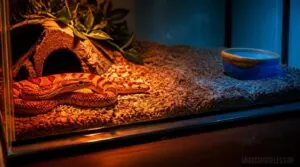
Slide the heat mat under one end, covering one-third of the floor — keep water dishes away to control moisture. That zone becomes your corn snake’s basking zone, a dedicated microhabitat for warming up.
| Zone | Temp | Role |
|---|---|---|
| Warm side | 85–90°F | Basking |
| Cool side | 75–80°F | Resting |
| Gradient | 10°F+ | Thermoregulation |
Keep substrate thickness to 1 inch or less. Thinner layers transfer heat faster and sharpen your thermal gradient. A thermostat holds the warm side steady.
Install Outside Glass Tanks
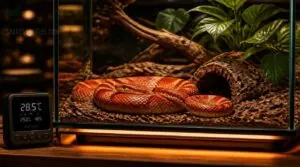
With a glass terrarium, the heat mat goes on the outside bottom — never inside. This keeps your corn snake from direct contact with the heating element.
Place the tank on a level, vibration-dampened surface to reduce glass stress, and position it away from sunlight to prevent temperature spikes. A thermostat ensures safe, steady warmth without guesswork.
Use Holders for Wood
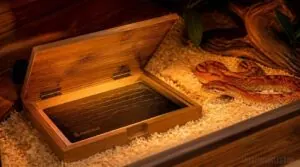
Wooden vivariums need the heat mat placed inside a heat mat holder — a tray or bracket that sits beneath a thin substrate layer.
A bamboo or solid hardwood holder keeps the mat stable, prevents shifting, and lets heat transfer upward evenly.
Some holders even feature a hinge lid for easy repositioning without disturbing your corn snake’s setup.
Keep Substrate Thin
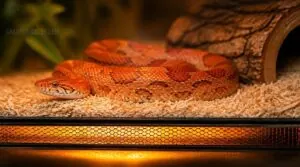
Thin is the goal. Your substrate layer above the heat mat should stay at 1 inch or less. Thick bedding blocks heat transfer efficiency and causes thermal lag — your corn snake waits longer to warm up properly.
Thin substrate also means:
- Faster drying, cutting mold risk from moisture retention
- Less substrate compaction trapping odors
- Better burn prevention through consistent temperatures
Add Warm Hide Above
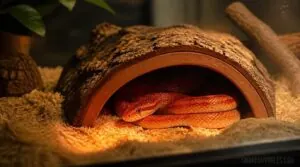
Your corn snake needs a warm hide placed directly over the heated end. This traps rising warmth into a thermal pocket, giving your snake a secure spot to regulate its temperature without stress.
Choose heat-resistant materials that won’t warp at 85–90°F. Size the opening generously — no scraping on entry. Keep substrate beneath it dry; moisture here undermines your thermal gradient fast.
Control and Monitor Temperatures
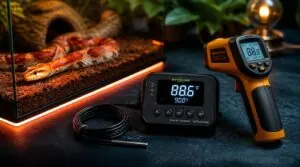
Getting the temperature right is where everything comes together. You’ll need a few tools working in sync — a thermostat, a probe, and a thermometer gun — and each one plays a specific role. Here’s how to set them up correctly.
Use a Reptile Thermostat
Without a thermostat, your heat mat runs unchecked — and that’s a burn risk your corn snake can’t escape.
A reptile thermostat reads the enclosure temperature through a probe and cuts power when the set point is reached. Digital models are far more reliable than analog dials, holding temperatures within ±1–2°F instead of swinging wildly.
Key reasons to use one:
- Prevents dangerous spikes above 95°F
- Automates on/off cycling without your input
- Protects your heat mat from burnout
- Keeps wiring dry and load-matched safely
Place Probe Correctly
Your thermostat is only as accurate as where you put the probe. Place it on the warm-end floor, in direct contact with the substrate — not floating above it. Tuck it at mid-depth, away from the water bowl. Moisture skews readings fast. Secure it with a clip so it doesn’t shift overnight and give you false data.
Target 85–90°F Warm Side
Once your probe is locked in place, set your thermostat to hold the warm side at 85–90°F. That range mimics a natural basking zone and keeps your corn snake’s digestion running smoothly.
Don’t let it creep above 90°F — that’s where stress begins. A good reptile thermostat keeps the heat mat steady even when room temperatures shift overnight.
Different snakes have very different thermal needs, so knowing your species matters — check this guide to common household snake types to dial in the right temperature range from the start.
Keep Cool Side 75–80°F
The warm side does its job — now the cool side needs to do its own. Aim for 75–80°F here, giving your corn snake a place to cool down between warm-side visits.
Watch for ambient room heat near windows or vents; it quietly pushes that number up. If it climbs past 80°F, open a vent or reposition the enclosure.
Check With Thermometer Gun
Grab your Etekcity Digital Laser Temperature Gun and hold it 6–12 inches from the surface — no closer, or readings drift. Take three shots across the warm end and average them. Don’t measure through glass; it distorts the reading. If the surface holds steady at 85–90°F, your heat mat is doing its job.
Top 5 Heat Mat Setup Items
Getting the right gear makes the whole setup much easier. These five products cover everything you need — from heating to monitoring to temperature control. Here’s what you’ll want to have on hand before you get started.
1. Exo Terra Digital Thermometer Probe
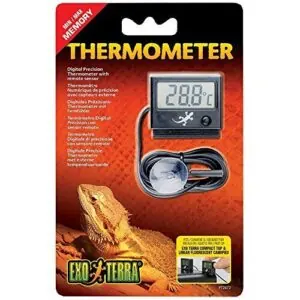
You can’t fix what you can’t measure. The Exo Terra Digital Thermometer gives you a real-time readout of your enclosure’s warm side, and the remote probe lets you place the sensor exactly where your snake rests — not guessing from outside the glass.
The min/max memory is genuinely useful here: one button press shows you overnight lows without you needing to wake up at 3 a.m.
It runs on a single AA battery and mounts cleanly on most rack systems.
| Best For | Reptile keepers who want accurate, at-a-glance temperature monitoring without fussing with complicated setups — especially those using Exo Terra rack systems. |
|---|---|
| Power Source | 1× AA battery |
| Reptile Compatible | Yes |
| Mounting Method | Velcro or clip |
| Temperature Display | Digital LCD |
| Thermostat Included | No |
| Operating Voltage | 1.5V (AA battery) |
| Additional Features |
|
- Real-time readings via a remote probe you can place exactly where your animal rests
- Min/max memory logs overnight highs and lows with a single button press
- Compact and battery-powered, so it mounts cleanly on rack systems without needing an outlet
- No power switch — you have to pull the battery to save power when not in use
- The probe can get chewed by curious animals like hermit crabs, so it may need a protective cover
- The mounting clip only fits Exo Terra horizontal fixtures, so it won’t work as neatly with other brands or non-standard setups
2. Etekcity Infrared Thermometer Gun
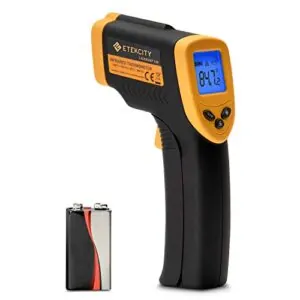
The infrared gun is your spot-check tool — fast, non-contact, and honest. Point the Etekcity at your substrate and pull the trigger; you get a surface reading in under 0.5 seconds.
That 12:1 distance-to-spot ratio means you can read temperatures accurately from about 14 inches away, without disturbing your snake or lifting any hides.
It won’t replace your probe thermostat, but catching a hot patch before your corn snake does? That’s worth keeping one nearby.
| Best For | Reptile keepers, grill masters, and hobbyists who need quick, no-touch surface temperature readings across a wide range of everyday tasks. |
|---|---|
| Power Source | AA battery (manual replace) |
| Reptile Compatible | Surface objects only |
| Mounting Method | Handheld |
| Temperature Display | Backlit LCD |
| Thermostat Included | No |
| Operating Voltage | 1.5V (AA battery) |
| Additional Features |
|
- Near-instant readings from 14 inches away means no disturbing your animals or getting too close to hot surfaces
- Wide temperature range (−58°F to 716°F) handles everything from freezer checks to grills and boiler pipes
- Simple F/C switching and a backlit display make it easy to use in any lighting condition
- Not accurate on shiny or reflective surfaces, so results can be misleading depending on your setup
- No rechargeable battery, and replacement batteries can be tricky to track down
- Surface-only readings mean it can’t replace a probe thermostat for monitoring ambient or subsurface temps
3. BN LINK Digital Heat Mat Thermostat
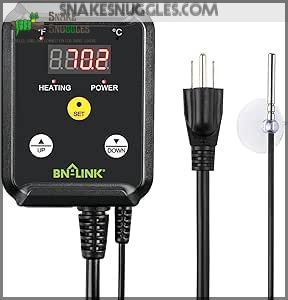
The BN LINK is the piece that ties your whole heat setup together. Without a thermostat, your heat mat runs unchecked — and temps can creep dangerously high.
This one keeps things simple: three-button control, a clear LCD display, and a probe cord long enough to reach the warm side without fuss. Set your target between 85–90°F, and it cuts power the moment that threshold is hit.
ETL-listed and rated for 1000W — it effortlessly controls any standard heat mat without breaking a sweat.
| Best For | Anyone using heat mats for reptile enclosures, seed germination, fermentation, or incubation who wants reliable, set-it-and-forget-it temperature control. |
|---|---|
| Power Source | 120V AC, 60Hz |
| Reptile Compatible | Yes |
| Mounting Method | Hanging tab |
| Temperature Display | LCD with LED indicators |
| Thermostat Included | Yes |
| Operating Voltage | 120V AC |
| Additional Features |
|
- Simple three-button setup makes dialing in your target temp quick and painless
- Long 4.92 ft probe cord gives you flexibility in where you place the sensor
- ETL-listed and handles up to 1000W, so it works with virtually any standard heat mat
- Tops out at 108°F, so it won’t work for applications that need higher heat
- Heating control only — it can’t cool or manage non-heating devices
- Requires a standard 120V outlet, which rules out international use or off-grid setups
4. iPower Reptile Heat Mat
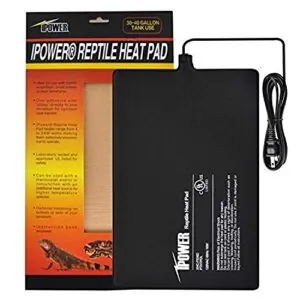
The iPower Heat Mat is a solid pick if you’re just starting out. It measures 8 × 12 inches at 16 watts — the right size for a 30–40 gallon enclosure, covering roughly one-third of the floor without overrunning the cool zone.
The 3M adhesive backing grips glass cleanly, and the rubber feet lift the tank just enough to let heat breathe underneath. One catch: it doesn’t include a thermostat, so pair it with the BN LINK you just set up.
| Best For | Beginner reptile keepers who need an affordable, easy-to-install heat mat for snakes, lizards, or small invertebrates in a 30–40 gallon enclosure. |
|---|---|
| Power Source | 120V AC, 16W |
| Reptile Compatible | Yes |
| Mounting Method | 3M adhesive backing |
| Temperature Display | None |
| Thermostat Included | No |
| Operating Voltage | 120V AC |
| Additional Features |
|
- PTC heating element distributes heat evenly across the surface, avoiding hot spots that can harm your animals
- 3M adhesive backing sticks securely to glass and the included rubber feet lift the tank to let heat circulate properly
- Energy-efficient at just 16 watts — it warms up fast without running up your electricity bill
- No thermostat included, so you’ll need to buy one separately to avoid dangerous temperature spikes
- The adhesive can weaken over time, especially if the glass surface isn’t thoroughly cleaned before application
- Bottom mounting isn’t safe without the rubber feet, which limits placement flexibility depending on your setup
5. Zilla Large Terrarium Heat Mat
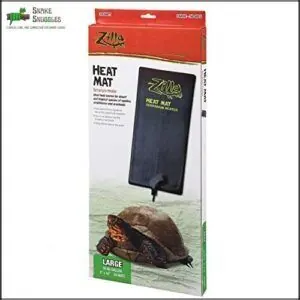
Step up to a 50–60 gallon tank and the Zilla Large Terrarium Heat Mat earns its place. At 8 × 18 inches and 24 watts, it covers roughly one-third of a larger enclosure without crowding the cool zone.
Carbon-fiber elements spread heat evenly — no hot patches, no guesswork. The self-adhesive backing mounts cleanly under glass. That said, you still need a thermostat; the mat’s capped at 113 °F, but don’t skip the backup regulation.
| Best For | Reptile and small animal owners with 50–60 gallon enclosures who want even, energy-efficient substrate heat without the bulk of traditional lamps. |
|---|---|
| Power Source | 120V AC, 24W |
| Reptile Compatible | Yes |
| Mounting Method | Self-adhesive backing |
| Temperature Display | None |
| Thermostat Included | No |
| Operating Voltage | 120V AC (low-voltage) |
| Additional Features |
|
- Carbon-fiber heating delivers consistent, even warmth across the mat — no hot spots to worry about
- At just 24 watts, it’s easy on your electricity bill compared to ceramic heaters or heat lamps
- Self-adhesive backing makes installation clean and straightforward — no drilling, no exposed cords
- The adhesive can weaken over time and may need reinforcing with heat-safe tape
- Doesn’t cover the full infrared spectrum reptiles benefit from, so you may still need an overhead heat source
- Requires a separate thermostat to stay safe — don’t run it unregulated in a confined space
Frequently Asked Questions (FAQs)
Where do you put the heat mat on a corn snake?
Place it under one end only — the warm end. That single choice gives your snake the whole floor to move between warmth and cool, covering roughly one-third of the floor space.
How to use a heat mat for a snake?
A heat mat gives your snake a warm zone to digest and regulate its body temperature. Place it under one-third of the enclosure, always paired with a thermostat to stay safe.
How often should I replace my corn snakes heat mat?
Replace your heat mat every 2–3 years. If you spot cracking, uneven heat, or frayed wiring before that, swap it out immediately — a failing mat is a burn risk.
Can I use a heat mat during summer months?
Yes, you can — but monitor carefully. If your room stays above 78°F, the mat may be unnecessary. Turn it off on hot days to prevent the warm side from exceeding 90°F.
What substrate works best over a heat mat?
Thin substrate — 5 to 75 inches — works best. Reptile carpet or ceramic tile transfers heat most evenly. Avoid loose, deep mixes; they insulate the mat and drop surface temps by up to 12°F.
Is a heat mat safe for baby corn snakes?
A heat mat is perfectly safe for baby corn snakes — as long as you pair it with a thermostat. Without one, temperatures can spike dangerously. With proper controls, it’s their ideal heat source.
Conclusion
Old reptile keepers used to say, "Warm the belly, keep the beast." That wisdom holds.
Now you know how to set up a heat mat for a corn snake the right way— a mat sized to one-third of the floor, thermostat locked in, probe sitting where your snake actually rests. The warm hide does the rest.
Get the gradient right, and your corn snake won’t just survive. It’ll thrive, quietly and steadily, for decades.