This site is supported by our readers. We may earn a commission, at no cost to you, if you purchase through links.
A reptile that can’t thermoregulate properly isn’t just uncomfortable—it stops eating, gets sick, and sometimes dies. When that reptile lives in your classroom, you’ve got thirty students watching it happen, and that’s a lesson nobody wants to teach.
The difference between a healthy bearded dragon and a lethargic one often comes down to a two-degree temperature swing that a cheap stick-on thermometer completely missed.
Accurate monitoring isn’t optional in an educational setting; it’s the foundation every responsible husbandry decision gets built on. The right reptile thermometers for classroom reptile habitats give you real data, reliable alerts, and the kind of consistent records that protect both your animals and your students.
Table Of Contents
Key Takeaways
- A two-degree temperature swing can mean the difference between a healthy reptile and a lethargic one, so accurate monitoring isn’t optional—it’s the foundation every care decision gets built on.
- Wi-Fi sensors like the Govee H5183 or SensorPush HT.w give you real remote access over weekends, while Bluetooth-only options leave you blind the moment you step out of range.
- Where you place your sensors matters just as much as which ones you buy—basking, cool-side, and center-habitat probes each tell a different part of the story, and missing any one of them gives you false confidence.
- Species-specific alert thresholds aren’t optional; a bearded dragon needs a basking zone of 95–110°F while a uromastyx needs 115–125°F, and generic defaults won’t protect either one.
Top 7 Classroom Reptile Thermometers
These seven thermometers cover everything a classroom habitat actually needs, from Wi‑Fi remote alerts to simple Bluetooth displays. Each one brings something different to the table, so the right pick depends on your setup, your budget, and how closely you need to monitor conditions.
For a closer look at how these options compare side by side, humidity gauges for classroom reptile habitats breaks down what to prioritize based on your specific setup.
Here’s what made the list.
1. Govee WiFi Temperature Sensor
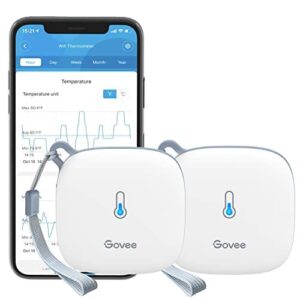
The Govee WiFi Temperature Sensor earns its place in a classroom setup by delivering ±0.54°F accuracy through a Swiss-made sensor that refreshes every two seconds — fast enough to catch a basking lamp failure before your reptile feels it.
It connects via 2.4 GHz WiFi to the Govee Home app, so you can check conditions over the weekend without setting foot in school.
You get 20 days of online data storage, exportable up to two years, and configurable alerts sent straight to your phone.
| Best For | Teachers, hobbyists, or anyone who needs to keep a close eye on temperature-sensitive spaces — like reptile tanks, greenhouses, or wine cellars — from their phone. |
|---|---|
| Connectivity | Wi-Fi + Bluetooth |
| Temp Accuracy | ±0.54°F |
| Humidity Sensing | ±3% RH |
| Power Source | 3× AA batteries |
| Data Logging | 20 days online / 2 yr export |
| Alert System | Push notifications |
| Additional Features |
|
- Super accurate Swiss-made sensor (±0.54°F) that updates every 2 seconds, so you catch problems fast
- Remote monitoring via the Govee Home app means you get instant alerts no matter where you are
- Stores up to 2 years of exportable data, great for spotting trends over time
- Only works on 2.4 GHz Wi-Fi — if your router is 5 GHz only, you’re out of luck
- You have to be physically near the device (Bluetooth range) to set or change alert thresholds
- Some users have run into intermittent Wi-Fi drops that need a Bluetooth reset to fix
2. Govee WiFi Thermometer Hygrometer
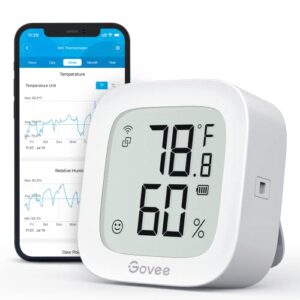
If you want humidity tracking on top of that temperature precision, the H5183 steps up. It pairs the same Swiss-made sensor with dual‑connectivity — 2.4 GHz Wi‑Fi and Bluetooth — so you’re not locked out if one drops.
Accuracy holds at ±0.54°F and ±3% RH, updating every two seconds.
The e-ink display stays readable across a dim classroom, and one AA battery runs it for roughly six months.
Customizable alerts let you set separate thresholds for temperature and humidity on every habitat.
| Best For | Anyone who needs to monitor both temperature and humidity remotely — think nurseries, server rooms, wine cellars, or greenhouses — and wants reliable alerts without constant manual checks. |
|---|---|
| Connectivity | Wi-Fi + Bluetooth |
| Temp Accuracy | ±0.54°F |
| Humidity Sensing | ±3% RH |
| Power Source | 1× AA battery |
| Data Logging | 13 days online / 2 yr export |
| Alert System | Push notifications |
| Additional Features |
|
- Swiss-made sensor keeps readings tight at ±0.54°F and ±3% RH, updating every two seconds
- Dual Wi-Fi and Bluetooth connectivity means you stay connected even if one signal hiccups
- E-ink display runs for about six months on a single AA battery — low maintenance, always on
- Only works on 2.4 GHz Wi-Fi, so it won’t play nicely with 5 GHz-only networks
- Full cloud features require the Govee Home app and an active internet connection
- No AC power option, so you’ll need to swap batteries roughly twice a year
3. SensorPush Smart Temperature and Humidity Sensor
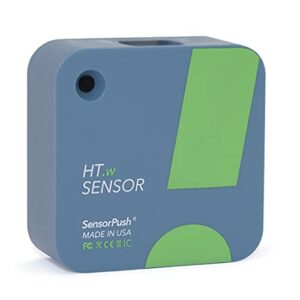
When lab-grade accuracy matters more than price, the SensorPush HT.w earns its spot. It reads temperature to ±0.3°C and humidity within ±2% RH — tighter tolerances than most competitors at this price point.
Bluetooth reaches up to 100 meters, and the sensor stores 45 days of readings on-board, so weekend data gaps aren’t a problem. Add the optional Wi-Fi gateway and you get remote alerts without being physically present.
For a classroom reptile habitat, that reliability is hard to argue with.
| Best For | Anyone who needs reliable, accurate environmental monitoring — from lab techs and greenhouse growers to reptile keepers and wine collectors. |
|---|---|
| Connectivity | Bluetooth only |
| Temp Accuracy | Not specified |
| Humidity Sensing | Yes |
| Power Source | Coin cell |
| Data Logging | 45 days on-device |
| Alert System | Push/email via gateway |
| Additional Features |
|
- Tracks temperature, humidity, heat index, dew point, and VPD all in one small device
- Stores 45 days of data on-board, so you won’t lose readings if your phone isn’t nearby
- Add the optional Wi-Fi gateway and you get remote alerts straight to your phone or email
- At $69.99, it costs noticeably more than budget alternatives
- Remote access requires buying the Wi-Fi gateway separately — it doesn’t come in the box
- The battery is a non-standard coin cell, which can be trickier to find and replace than everyday AA or AAA batteries
4. Inkbird Wireless Temperature Humidity Sensor
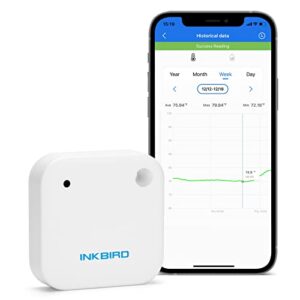
If SensorPush sits at the premium end, the Inkbird IBS-TH2 brings serious capability at a friendlier price.
It tracks temperature from −40°F to 140°F and humidity from 0–99% RH, storing up to 30,000 readings on‑board — that’s months of continuous classroom data.
The IPX4 waterproof rating means humid enclosures won’t damage it, and Bluetooth reaches up to 98 feet.
Pair it with an Inkbird gateway and you get remote access even over weekends, which matters when your bearded dragon can’t wait until Monday.
| Best For | Budget-conscious hobbyists, teachers, or reptile keepers who need solid temp and humidity logging without paying a premium price. |
|---|---|
| Connectivity | Bluetooth only |
| Temp Accuracy | Not specified |
| Humidity Sensing | 0–99% RH |
| Power Source | 2× AAA batteries |
| Data Logging | 30,000 data points |
| Alert System | App-based alarms |
| Additional Features |
|
- Stores up to 30,000 readings on-board, so you won’t lose data even when your phone isn’t nearby.
- IPX4 waterproofing makes it a safe pick for humid enclosures, fridges, or freezers.
- Pair it with an Inkbird gateway and you get remote monitoring without needing Wi-Fi on the sensor itself.
- Bluetooth-only alerts mean you won’t get notified if your phone is out of range and there’s no gateway.
- Connections can get flaky after a few days, which is frustrating if you’re relying on it around the clock.
- The app feels rough — no widgets, slow syncing, and a graph UI that leaves a lot to be desired.
5. UbiBot WS1 WiFi Environmental Sensor
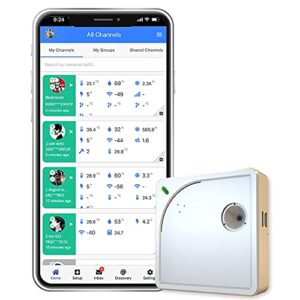
The UbiBot WS1 is built for classrooms that need more than basic monitoring. It measures temperature (−4°F to 140°F), humidity, and ambient light — all pushed to a cloud dashboard you can check from anywhere, including Sunday night before the week starts.
Set alerts via email, push notification, or SMS so you’re never caught off-guard by a habitat spike.
It also accommodates external probes for precise basking-zone data.
Two AA batteries keep it running through outages without missing a reading.
| Best For | Teachers and hobbyists who need hands-off environmental monitoring for classrooms, reptile habitats, or remote spaces where conditions can change fast. |
|---|---|
| Connectivity | Wi-Fi only |
| Temp Accuracy | Not specified |
| Humidity Sensing | 10–90% RH |
| Power Source | 2× AA or USB-C |
| Data Logging | ~300,000 points internal |
| Alert System | Email/push/SMS/voice |
| Additional Features |
|
- Tracks temperature, humidity, and light all in one device, with cloud access you can check from anywhere
- Battery backup keeps it logging through power outages so you never lose data
- Flexible alerts (email, push, SMS) mean you’ll know the moment something goes wrong
- Only works on 2.4 GHz Wi-Fi, so 5 GHz-only networks are a no-go
- External probes for basking zones cost extra and aren’t included out of the box
- The app feels cluttered, and SMS alerts can come with added fees depending on your plan
6. ThermoPro TP357 Digital Indoor Hygrometer
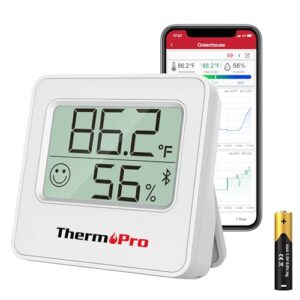
The ThermoPro TP357 is the no-fuss option when you don’t need cloud connectivity or a gateway device. It pairs via Bluetooth 5.0 up to 260 feet in open space, syncs with the ThermoPro app, and logs up to a year of data so you can spot temperature trends over time.
If you’re managing multiple enclosures, this kind of long-term logging pairs especially well with a solid setup guide for snake thermometers for multiple terrariums to keep every gradient dialed in.
Accuracy sits at ±1°F and ±2% RH — solid for classroom use.
The face-icon comfort indicator gives students a quick visual cue without reading numbers, and standard AAA batteries mean no hunting for specialty cells.
| Best For | Students, teachers, or anyone who wants simple wireless temp and humidity monitoring without dealing with hubs or cloud subscriptions. |
|---|---|
| Connectivity | Bluetooth only |
| Temp Accuracy | ±1°F |
| Humidity Sensing | ±2% RH |
| Power Source | 1× AAA battery |
| Data Logging | 1 year on-device |
| Alert System | App-based alerts |
| Additional Features |
|
- Logs a full year of data so you can actually track trends over time, not just check the current reading
- Standard AAA batteries mean no proprietary charging headaches — replacements are everywhere
- The face-icon comfort indicator makes it easy to read at a glance, even for kids
- Bluetooth range drops fast through walls, so don’t count on that 260 ft claim indoors
- Android users can’t export data, which is frustrating if you want to save or share readings
- Humidity accuracy gets shaky below 20% RH, rounding to the nearest 10% instead of giving you real numbers
7. AcuRite Wireless Temperature Humidity Sensor
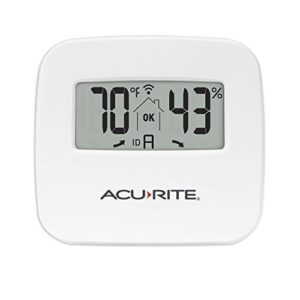
The AcuRite Wireless Sensor is the classroom workhorse that just works.
At $19.79, it transmits temperature and humidity every 16 seconds at 433 MHz — reliable enough that you’ll catch a heat lamp failure before your reptile does.
Accuracy lands at ±1°F and ±1–2% RH, which is perfectly adequate for daily habitat checks.
No Wi‑Fi required on its own, but pair it with an AcuRite smartHUB and you’ve got remote monitoring from your desk.
One real drawback: LCD has no backlight.
| Best For | Reptile keepers, plant growers, or anyone building a budget multi-room climate setup who already has (or wants) an AcuRite display or hub. |
|---|---|
| Connectivity | 433 MHz RF |
| Temp Accuracy | ±1°F |
| Humidity Sensing | ±1–2% RH |
| Power Source | 2× AAA batteries |
| Data Logging | None on-device |
| Alert System | None without hub |
| Additional Features |
|
- Updates every 16 seconds, so you’re never looking at stale data
- At $19.79, it’s easy to grab a few and cover multiple rooms without breaking the bank
- Works with a wide range of existing AcuRite gear, so no need to replace what you already have
- No backlight on the LCD — tough to read in a dim room or at night
- You’ll need a separate hub or base station for any remote monitoring; the sensor can’t connect on its own
- Display only shows whole numbers, so don’t expect decimal-level precision
Key Classroom Buying Factors
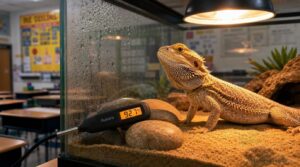
Not every thermometer built for home use translates well to a classroom setting.
When you’re picking one for a reptile habitat that students interact with daily, a few factors matter more than the rest.
Here’s what to look for before you buy.
Temperature and Humidity Accuracy
Not all temperature sensors are created equal—and in a reptile habitat, that gap matters. Sensor drift causes gradual accuracy loss, so build calibration frequency into your routine every one to three months.
Here’s what to verify:
- Temperature accuracy within ±0.5–1.0°C
- Humidity compensation techniques for correct RH readings
- Response time under five minutes after enclosure changes
Data logging against reference standards keeps your readings trustworthy. Meeting the fast response time requirement is essential for rapid enclosure adjustments.
Easy-to-read Classroom Displays
A display that students can read from across the room isn’t a luxury—it’s part of the lesson.
Look for large LCD or LED display screens with large font digits and high contrast text that hold up under fluorescent lighting and low-light readability conditions.
Color coded charts and laminated visuals reduce confusion at a glance, while QR code integration lets curious students dig deeper without disrupting care routines.
Wi-Fi, Bluetooth, and App Access
Wi-Fi sensors give you true remote monitoring—check enclosure conditions over the weekend without setting foot in school. Bluetooth works fine for in-classroom viewing but keeps you tethered within 10 meters.
Look for cross-platform compatibility, user role permissions, and a solid cloud logging platform for trend data. Secure pairing protocols, app notification settings, and network bandwidth management keep your setup school-network-friendly and student data protected.
Alert Settings for Unsafe Conditions
Remote monitoring only matters if your alert system actually wakes you up in time.
Look for these non-negotiables:
- Threshold Calibration — set temperature thresholds per species, not generic defaults
- Escalation Timing — unresolved alerts auto-escalate to admin after 60 seconds
- Audio Visual Cues — color-coded danger indicators plus tunable alarms up to 90 dB
- Alert Redundancy — failsafe alerts fire locally even when Wi-Fi drops
Battery Life Versus USB Power
Alerts keep you informed—but only if your thermometer stays powered. Battery powered sensors are convenient until they’re not; a dead cell on Friday means a cold enclosure by Monday. USB power option solves that for plugged-in setups, offering indefinite runtime.
Use this quick comparison to match your classroom’s setup:
| Factor | Battery vs. USB |
|---|---|
| Runtime | Battery life varies; USB runs indefinitely |
| Hybrid Power Options | Some units support both modes |
| USB PD Efficiency | Matches power draw to device needs |
| Battery Chemistry Degradation | Heat accelerates capacity loss over time |
| Charging Cycle Impact | Frequent cycling shortens overall lifespan |
low battery notification alerts so reptile habitat monitoring never lapses. Power Path Management matters more than most teachers expect.
Durability in Humid Enclosures
Power matters, but so does what keeps your humidity sensor running long-term. Enclosures get wet—that’s the job.
Look for impact resistant housing with gasket material selection that holds up through daily misting cycles.
Moisture proof wiring and corrosion resistant coatings extend device life considerably.
Seal integrity testing validates that water resistant build quality actually performs, protecting your durable materials investment where humidity control never lets up.
Student-safe Mounting Options
Durable sensors still need to stay where you put them.
Wall Mount Safety hardware, like reinforced steel backplates, keeps displays secure even when curious hands wander. Clamp Rail Security systems lock onto existing furniture without damaging it, while Floor Stand Stability bases resist tipping. Ceiling Hanger Protection shields overhead units from accidental bumps. Tray Mount Ergonomics, sticky pads, and suction cups make easy installation inside terrariums practical and safe.
Budget Versus Long-term Reliability
A cheap thermometer might save money upfront, but calibration drift kicks in after three to six months, throwing off your readings right when accuracy matters most.
When you factor in warranty coverage, sensor longevity, and the replacement cycle, budget-friendly Bluetooth thermometers for reptile owners rarely win on total cost of ownership.
Long-term battery life, product durability, and low power consumption make price versus performance in reptile climate tools a real calculation worth doing.
Wi-Fi Versus Bluetooth Monitoring
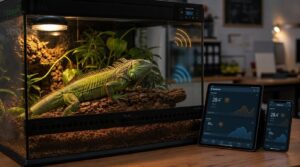
Choosing between Wi‑Fi and Bluetooth comes down to one simple question: how far away do you need to be when you’re checking on your reptile? Each connection type has real trade‑offs that matter specifically in a school setting, from weekend remote access to range limits inside thick‑walled buildings.
Here’s what you need to know before deciding which monitoring setup actually fits your classroom.
Best Option for Remote Weekend Checks
Wi-Fi sensors are your best bet when the classroom sits empty all weekend. Cloud-based alert systems flag unsafe conditions within 15 minutes, pushing smartphone notifications directly to you.
Offline data buffering stores readings locally if connectivity drops, then syncs automatically—so weekend alert latency stays minimal.
Battery life stretches up to 18 months, and a compliance-grade cloud logging platform keeps every reading backed up daily.
Best Option for In-classroom Viewing
When students gather around the habitat, clear displays make all the difference. large LCD or LED display with ambient light sensors auto-adjusts to your classroom’s changing light levels, ensuring lowlight readability during dim demonstrations.
High-resolution screens with multi-student touch and spill-resistant design support real-time annotation, while audio alert integration keeps everyone’s attention locked on critical habitat changes without disrupting your lesson flow.
Range Limits in School Buildings
School walls fight your signal harder than you’d think. Concrete attenuation from reinforced walls can slash wireless range by 20–40%, so that reliable 60-meter spec shrinks quickly.
Bluetooth tops out around 30 feet indoors, making it impractical across hallways.
Plan your AP density carefully, address interference sources like neighboring networks, and consider mesh node placement to maintain consistent sensor accuracy through temperature fluctuations across zones.
Cloud Logging for Husbandry Records
Cloud logging turns scattered temperature readings into a searchable reptile husbandry record that your administration will actually respect.
A solid cloud logging platform timestamps every entry automatically, provides real-time alerts when conditions drift, and lets you set access permissions so students view data without editing it.
Log retention spans 30 days to 12 months, and data export to CSV means your audit trail is always ready.
App Dashboards for Multiple Habitats
Managing multiple enclosures gets far simpler when your app dashboard pulls every habitat into one view. Habitat Overview Widgets display Real-Time Data Sync across all tanks simultaneously, while the Threshold Management Panel flags unsafe conditions instantly.
Multizone temperature monitoring and data visualization keep you ahead of problems before they escalate.
Multi-User Collaboration, Exportable Summary Reports, and cloud logging platform integration make remote monitoring genuinely practical for busy classroom setups.
Privacy and School Wi-Fi Considerations
Before connecting any sensor to your school’s WiFi, check your district’s network segmentation and data retention policies—these govern where your cloud logging platform stores readings and for how long.
Three things to confirm upfront:
- Encryption standards protect data in transit
- Access auditing logs who view remote monitoring feeds
- Parental consent requirements cover cloud-based alerts and data integrity
Backup Monitoring When Connectivity Fails
Even with solid school Wi-Fi policies in place, connectivity still fails—and that’s when local alarm thresholds become your safety net.
A good backup system stores readings in an EEPROM data buffer for at least 48 hours, switches power automatically via a redundant power switch, and keeps an offline trend display running.
Run your manual verification checklist after every outage to confirm data integrity and catch any temperature drift.
Sensor Placement in Reptile Habitats
Where you place your thermometer matters just as much as which one you buy. A sensor in the wrong spot gives you false confidence while your reptile quietly struggles to thermoregulate.
The wrong sensor placement gives false confidence while your reptile quietly struggles to thermoregulate
Here’s how to position your sensors correctly across every zone of the enclosure.
Basking-zone Thermometer Placement
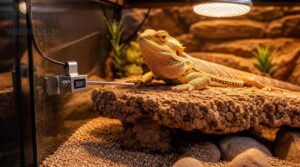
Where you place the basking probe determines whether your data actually means anything. Position it at the reptile’s resting height on the basking platform—not above, not below—for true Probe Height Alignment.
Checking probe placement regularly matters just as much as getting the initial height right, so keep an eye on how often you should check terrarium temperature readings to catch drift before it throws off your reptile’s basking data.
- Use Heat Resistant Mounting clips to fix the probe on a flat, non-porous surface for Surface Material Compatibility
- Leave Cable Slack Management in the wire so animal movement won’t dislodge it
- Practice Draft Shielding by keeping the probe away from vents or classroom airflow
- Align the sensor within the basking lamp’s central output zone—never at the edge, where radiant heat skews ambient temperature readings
Consistent temperature gradient monitoring starts here.
Cool-side Thermometer Placement
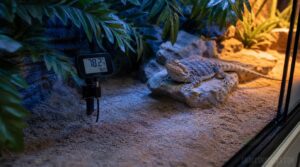
The cool side tells you whether your thermal gradient is actually working.
Position the probe in the shaded zone opposite your heat source—keep it 2–3 inches from walls using Wall Distance Guidelines to avoid heat retention artifacts.
Apply the Substrate Isolation Technique by elevating the sensor slightly above substrate level. Shadow Zone Positioning, Ventilation Airflow Consideration, and Mounting Clip Orientation all affect microclimate variations and temperature gradient analysis.
Center-habitat Ambient Readings
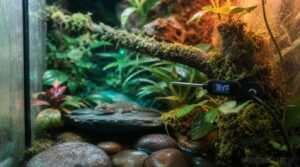
The center of your enclosure is where thermal gradient balance shows itself—or falls apart. Mounting a sensor at mid-height, away from glass panels and misting lines, gives you a true ambient temperature baseline for Microclimate Mapping and Temporal Trend Analysis across the habitat.
- Keep sensors 6 inches from water dishes to prevent skewed readings
- Log Data Export Formats that support Cross Habitat Comparison for Student Data Projects
- Review center logs after weekends to catch room temperature drift before it stresses your animals
Probe Placement for Heat Mats
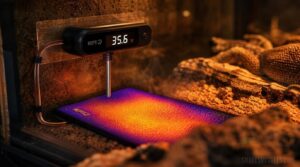
Getting probe placement wrong is how heat mat failure sneaks up on you. Position your external probe 1–2 cm above the mat surface for accurate temperature gradient validation without direct contact damage.
Use mounting tape to secure the cable along enclosure walls for clean cable routing, and keep the probe clear of substrate for reliable substrate isolation that allows consistent thermal gradient analysis.
Arboreal Enclosure Top-to-bottom Monitoring
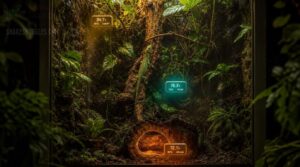
Arboreal species live vertically, so your monitoring strategy has to match.
Use dual sensors at canopy, trunk, and hollow levels to capture Trunk Heat Flux and Hollow Microclimate Tracking data that a single probe simply misses.
Vertical Gradient Mapping and Canopy Humidity Profiling reveal whether climbing zones stay within safe Temperature Gradient windows — Multi-level Data Visualization dashboards make those probe placement strategies for accurate thermal gradients easy to review at a glance.
Terrestrial Enclosure Floor-level Readings
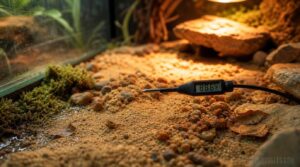
Terrestrial species live at ground level — so that’s exactly where your sensors need to be.
Place floor sensors 1–2 inches above the substrate for accurate Temperature and humidity measurements that reveal what ambient probes miss. Probe placement strategies for thermal gradients matter most here.
- Track Heat Mat Performance weekly to catch gradient drift early
- Monitor Substrate Moisture Impact — damp zones can exceed 5–8°F cooler than dry areas
- Run Floor Gradient Calibration against a handheld thermometer during setup
- Use Student Data Logging to document readings and catch Battery Voltage Drift before sensors fail
Avoiding Direct Water and Mist Exposure
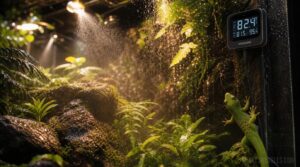
Mist hits sensors harder than most teachers expect.
Mount units at least 6 inches above substrate using sealant mounting on vertical surfaces, and choose IP65 enclosures to handle humidity without failure. Splash guard design and moisture-resistant cabling keep electronics safe through misting cycles.
Water resistance versus waterproofing in reptile devices isn’t the same thing — IP65 means splash-proof, not submersible. Prioritize accordingly.
Using Backup Sensors for Verification
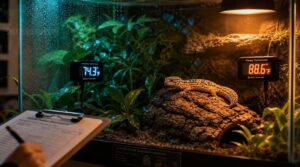
A single sensor isn’t a safety net — it’s a single point of failure.
Place backup thermometers in redundancy zones alongside your primary probes, then run a weekly teacher verification routine comparing readings within a ±1°C tolerance.
Your backup calibration protocol and drift monitoring practice catch sensor creep before it harms your animals.
Log everything: data reconciliation helps professional-grade husbandry records and keeps your classroom accountable.
Classroom Safety and Maintenance
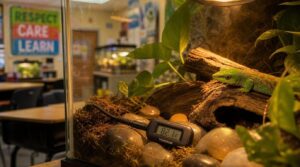
Keeping a classroom reptile healthy isn’t just about the right thermometer — it’s about building habits that protect both the animal and your students. A few straightforward routines can prevent most of the common problems teachers run into.
Here’s what your safety and maintenance checklist should cover.
Daily Temperature and Humidity Checks
Every morning before class, run your Calibration Routine and Reading Consistency Check against a backup device.
Your daily environmental checks should confirm:
- Temperature and humidity measurements fall within ±1 °C and ±5% RH
- Sensor Drift Detection flags any persistent deviation
- Data Log Review confirms consistent reading intervals
- Trend Analysis via your cloud logging platform reveals overnight shifts
Realtime monitoring keeps your reptile habitat monitoring reliable all day.
Weekly Device Inspection Routine
Once daily checks are routine, shift your focus to a weekly device inspection.
Cross-check readings against a reference thermometer for Calibration Confirmation, and run Connectivity Testing to catch any drops in transmission.
Validate alert thresholds, confirm Data Backup exports, and log battery life before voltage dips below 3.0V.
Firmware Verification ensures temperature drift detection and mitigation stay current and reliable.
Cleaning Around Sensors Safely
After your weekly inspection, cleaning becomes the next line of defense.
Always start with Power Isolation—power the sensor off before touching it.
Use a dry microfiber cloth for Microfiber Wiping on exterior surfaces, then follow Dust Blowing protocols with short compressed-air bursts through vents.
Apply any cleaner to the cloth, never directly onto water-resistant housings, and dry everything completely before restarting.
Replacing Batteries Before Failure
Don’t wait for a dead battery to remind you it existed. Preemptive Battery Swaps—replacing cells before capacity drops below 80 percent—keep your readings reliable without surprise gaps.
Use a Scheduled Replacement Calendar tied to non-instructional days, and maintain Battery Health Logging with install dates. Standardized Battery Types across sensors simplify your stock.
Enable Capacity Threshold Alerts so you’re never caught off guard.
Checking Readings Against Backup Tools
Your primary sensor isn’t infallible—temperature drift happens gradually, and you won’t catch it without a reference point.
Run a simple backup verification routine:
- Cross-check readings against a secondary thermometer for Log Correlation and Version Consistency.
- Perform a Restore Drill using calibration data to confirm Alert Threshold Auditing accuracy.
- Apply Checksum Validation principles by documenting baseline readings and flagging deviations.
Redundancy and backup thermometers in reptile care aren’t optional extras—they’re your data integrity guarantee.
Preventing Students From Moving Sensors
Curious hands are your biggest hardware threat.
Tamper-Resistant Mounts, reinforced sticky pads, and suction cup brackets stop accidental repositioning, while Cable Management Locks keep probes exactly where you set them. ABS resin construction absorbs the inevitable bump without drifting out of place.
Add Visual Indicator Lights so students recognize active sensors, and enforce Student Supervision Protocols with Locked Enclosure Lids as your final line of defense.
Keeping Reptile Equipment Away From Food
Sensor Food Separation isn’t optional — it’s a classroom non-negotiable.
Mount sensors on Dedicated Sensor Stands with compact size and safe, non-toxic Materials that keep probes well above feeding zones.
Use Color-coded Storage to separate monitoring gear from feeding tools, and post clear Feeding Area Signage as a daily reminder.
Design features that aid mounting in terrariums make this separation practical and permanent.
Handwashing After Habitat Contact
Every habitat interaction ends the same way — clean hands, no exceptions. Proper Handwashing Technique means wetting first, scrubbing for 20 seconds, and rinsing completely. Hand Hygiene Timing matters: wash before touching your face or food.
Apply Sanitizer Use Guidelines only when soap isn’t available. For Supervision for Kids, watch younger students closely. Cross Contamination Prevention protects everyone.
- Scrub between fingers and under nails thoroughly
- Rinse under running water until soap-free
- Dry completely with a clean paper towel
Species-Specific Temperature Planning
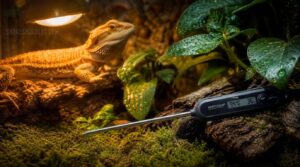
Every reptile species has its own rulebook regarding temperature and humidity, and getting those numbers right is what separates a thriving classroom animal from a struggling one.
Your thermometer setup only works if it’s calibrated to what your specific species actually needs. Here’s what you should know before adjusting a single alert or sensor placement.
Matching Readings to Each Reptile Species
Not all reptiles play by the same rules—species-specific temperature ranges matter more than most teachers expect. Your thermometer alerts won’t protect the animal if they’re set to the wrong thresholds. Match your Species Alert Settings and Basking Temperature Goals to each resident before the habitat goes live.
| Species | Basking Temperature Goals / Cool Side Ranges |
|---|---|
| Bearded Dragon | Basking: 95–110°F / Cool: 80–85°F |
| Leopard Gecko | Basking: 88–92°F / Cool: 75–82°F |
| Ball Python | Warm side: 88–92°F / Cool: 78–82°F |
| Red-Eyed Tree Frog | Ambient: 72–78°F / Humidity Targets: 70–90% |
| Uromastyx | Basking: 115–125°F / Cool: 85–90°F |
Configure temperature threshold settings for each species individually—thermoregulation failures look identical to behavioral laziness until reptile health deteriorates.
Creating Safe Thermal Gradients
A thermal gradient isn’t just a warm side and a cool side—it’s a continuous slope your reptile actively navigates to self-regulate. Probe placement strategies for accurate thermal gradients require sensors at the basking zone, midpoint, and cool side, with heat source zoning keeping lamps away from misting areas. Insulation barriers prevent heat mats from bleeding warmth into cool corners.
- Run gradient continuity checks twice daily during setup to catch invisible hot spots early
- Follow a probe calibration routine weekly to keep environmental monitoring accurate
- Use temperature threshold configuration for specific reptile species to trigger alerts before conditions turn dangerous
- Maintain gradient documentation and professional-grade data logging for reptile care to spot slow drift over weeks
Monitoring Humidity for Healthy Shedding
Humidity control matters just as much as temperature when your reptile enters a shedding cycle. Keep enclosure humidity between 60–80% during pre-shed phases, misting 2–3 times daily using consistent Misting Frequency to maintain skin pliability.
Humid Hide Design—a moist moss-filled chamber near the basking zone—helps considerably.
Hygrometer Calibration weekly, track Shedding Cycle Timing closely, and apply Mold Prevention Strategies by improving airflow to avoid over-saturation.
Adjusting Alerts by Species Needs
Not every species plays by the same rules—and your temperature alarm system shouldn’t either. Threshold Customization lets you configure Species Alert Tone, Gradient Alert Logic, and Photoperiod Alert Timing that fit each animal’s biology.
- Set species-specific temperature ranges per enclosure
- Enable cloud based alerts for weekend remote data access
- Configure Alert Channel Preferences by recipient role
- Apply temperature threshold configuration for specific reptile species
- Adjust Gradient Alert Logic for basking versus cool-side sensors
Tracking Day and Night Temperature Changes
Once your alerts are dialed in per species, the next layer is understanding the full Day/Night Cycle your enclosure actually produces. Data logging intervals of 15–30 minutes capture nighttime cooling curves and peak daytime spikes that manual checks miss entirely.
Diurnal trend analysis and temperature data visualization let you spot thermal gradient drift or temperature lag detection before it affects your animal’s health.
Spot-checking Basking Surfaces
Data logging tells you what happened overnight, but a quick hotspot verification routine tells you what’s happening right now.
Point an infrared thermometer directly at the basking surface — not the air above it — and confirm your species-specific target, like 105–110°F for bearded dragons.
Material heat conductivity varies across slate, ceramic, or rock, so surface probe calibration keeps your thermal gradient setup honest.
Responding to Abnormal Readings
When a sensor throws an unexpected number, don’t panic — work through your alarm verification steps before making any habitat changes. Run a manual pocket check with a calibrated thermometer to confirm the reading, then implement a feeding hold protocol until conditions stabilize.
- Cross-check with a second sensor at a different enclosure position
- Log the event for incident reporting with time, sensor ID, and exact value
- Initiate your sensor recalibration process if drift persists after environmental factors are ruled out
Documenting Habitat Conditions for Class Records
Your habitat condition logs become the backbone of responsible environmental monitoring when they follow a consistent format. Record every reading to the nearest 0.1 °C with timestamp consistency and student initials for accountability.
A cloudlogging platform with historical graphs makes temperature tracking and record auditing straightforward. Log standardization, data calibration checks, and regular cross-verification protect data integrity across all your enclosures.
Frequently Asked Questions (FAQs)
How often should thermometer sensors be calibrated?
Calibrate regularly every six months in stable conditions—sooner if drift detection flags suspect readings. Log each check with date, reference standards used, and results.
Environmental impact from humidity and heat accelerates sensor drift substantially.
Can reptile thermometers detect carbon monoxide levels?
No, reptile thermometers can’t detect carbon monoxide. CO detection limitation is real—these devices lack gas sensor integration entirely.
For classroom air quality, a separate CO monitor with a safety alarm is a non-negotiable addition.
What temperature range suits most classroom reptile species?
Most classroom species need a basking zone between 85–110°F and a cool zone around 75–85°F. Nighttime temperatures can safely drop to 65–75°F, supporting natural thermal regulation without stress.
Do thermometers interfere with school Wi-Fi networks?
Most Wi-Fi thermometers transmit tiny data packets, so network bandwidth impact is minimal.
Channel congestion only becomes an issue when dozens of IoT sensors compete simultaneously—proper device scheduling and an edge gateway prevent that entirely.
Conclusion
One wrong reading on a Friday afternoon can mean a sick animal by Monday morning—and thirty students learning the wrong lesson about what responsible care looks like.
The reptile thermometers for classroom reptile habitats covered here eliminate that risk by giving you verified data, reliable alerts, and records you can stand behind.
Choose the sensor that fits your setup, place it correctly, and your classroom animal stays healthy all year.