
This site is supported by our readers. We may earn a commission, at no cost to you, if you purchase through links.

A heat mat plugged straight into the wall runs wide open. No limits, no shutoff, no second chances. That’s how snakes end up with thermal burns, because a mat left unregulated can climb past 50°C and stay there while your snake coils right on top of it.
The fix costs less than one vet visit: a thermostat. This small box reads the temperature at your mat’s surface and cuts power the moment things get too hot, then ramps it back up when the surface cools. If you learn to use a thermostat with a reptile heat mat correctly, you control the one variable that shapes your snake’s digestion, immune health, and behavior.
Here’s the full setup, from choosing the right unit to reading your snake’s body language for trouble.
Table Of Contents
Key Takeaways
- An unregulated heat mat plugged straight into the wall can exceed 50°C and cause thermal burns, so always wire it through a thermostat that cuts power at your set temperature.
- Probe placement is the make-or-break detail: secure it flat against the warm surface, keep it 6 inches from water and clear of loose substrate, or the thermostat regulates false readings.
- Verify everything with a separate digital thermometer rather than trusting the display, comparing warm-side spots within 1°C and adjusting settings only in 0.5°C steps.
- Match your thermostat to your setup—species-specific targets (e.g., ball pythons 29–32°C, corn snakes 27–30°C), wattage limits, and proportional versus on-off control—and inspect cords and clean the probe every 30 days.
Choose a Compatible Heat Mat Thermostat
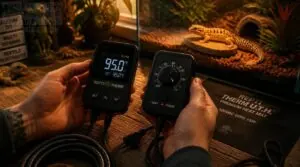
Not all thermostats are built the same, and picking the wrong one can put your reptile at real risk. Before you buy, there are a few key factors that’ll help you match the right thermostat to your specific setup. Here’s what to look for.
If you’re setting up a habitat in a shared space, it’s also worth checking out reptile thermostats safe for kids’ rooms to make sure your choice fits the whole household.
Species-specific Temperature Requirements
Every reptile has a thermal budget. Species-specific heating is the backbone of safe enclosure design, and a desert species may need a basking zone reaching 38°C, while tropical species thrive at 24-29°C.
Before choosing, list your requirements:
- Desert basking zone: 32-38°C
- Tropical ambient: 24-29°C
- Cool retreat: 22-26°C
- Nighttime minimum: 18°C
- Substrate surface: 32-34°C
Match your thermostat’s range to these numbers.
On-off Versus Proportional Control
Once you know your target temperatures, the next decision is control type. On-off versus proportional control shapes how your thermostat holds heat.
On-off units switch fully on or off, causing temperature cycling. A proportional thermostat adjusts output gradually, giving smoother thermal regulation for reptiles.
For sensitive species, that stability matters. Unlike on-off systems, proportional control achieves stable steady-state operation by continuously adjusting output based on how far the temperature deviates from the setpoint. Consistent temperature monitoring will confirm which type is working correctly.
Heat Mat Wattage Compatibility
Your thermostat type won’t matter if mat wattage overloads the controller’s rated capacity. Match them before setup.
Check these before buying:
- 8 to 16 watts fits most 20-gallon enclosures
- Proportional thermostats handle higher wattage more precisely
- On-off controllers risk thermal spikes above 20 watts
- Don’t exceed your thermostat’s maximum load rating
- Choose mats with UL or ETL certification
Temperature Range and Accuracy
Once wattage is sorted, check that your controller covers the full temperature range your species needs, usually 20 to 40 degrees Celsius.
Thermostat accuracy usually holds within ±0.5°C, but only if your thermostat probe sits flush on the warm surface. If readings drift, run a temperature calibration: hold a separate thermometer against the heat mat sensor and compare displays.
Alarm and Monitoring Features
A solid alarm system is your last defense against overheating. Look for a thermostat that sends high temperature warnings within 5 seconds of the sensor exceeding your threshold.
If the warm side drops 2 degrees below your species’ safe minimum, a low-temperature alert fires. Some models also flag probe displacement, so you’ll know immediately if something shifts inside the enclosure.
Install The Heat Mat Safely
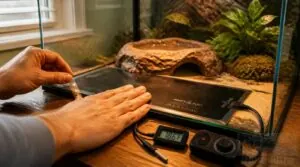
Installing your heat mat correctly is just as important as choosing the right one. A few key steps will keep your reptile safe and your equipment running the way it should. Here’s what you need to do before your heat mat ever gets plugged in.
Follow Manufacturer Placement Instructions
Every heat mat manufacturer includes placement instructions for a reason, and skipping them is where most setup mistakes begin.
Those instructions often specify where a thermostat probe should sit, and understanding how a heat mat thermostat works makes it much easier to see why placement matters so much.
Place the mat on a flat, non-porous surface like ceramic tile or concrete, which transfers heat evenly without trapping moisture. Avoid wood or fabric entirely.
These materials insulate rather than conduct, which skews your temperature probe readings and creates dangerous hotspots.
Unplug Equipment Before Setup
Before touching anything, unplug equipment before setup completely. Switching off at the power button isn’t enough, because internal capacitors stay energized through the electrical connection and can still shock you.
Pull the cord from the power outlet directly, or disconnect at the surge protector if that’s your setup. Electrical safety in vivariums means zero voltage is present, not just a powered-off switch.
Attach Mat to Approved Surface
Not every surface works with a heat mat equally. Stick yours only to nonporous approved surfaces like ceramic tile or acrylic sheeting, which won’t absorb moisture or degrade under sustained heat.
Clean with isopropyl alcohol and dry it fully before attaching. If you skip that step, adhesion fails fast. Use heat-resistant double-sided tape along the edges to keep the mat flat.
Allow Ventilation Beneath Enclosure
Heat trapped under your enclosure can scorch the mat and skew your thermostat probe readings. Raise the enclosure at least 1 inch using rubber feet or a rack to create a clear air gap beneath.
That ventilation prevents hot spots and keeps your temperature gradient stable. If the base stays sealed, heat builds unevenly and your control accuracy drops fast.
Plug Mat Into Thermostat
With the mat in place, plug it into the thermostat’s outlet socket, not directly into the wall. Your control unit needs to sit between the heat mat and your power source so the thermostat probe can regulate surface temperature accurately.
If you bypass the thermostat and plug the mat directly into the wall, you lose all temperature control.
Position and Secure The Thermostat Probe
Where you place the thermostat probe makes all the difference between a stable thermal environment and one that’s constantly off. A poorly positioned probe can fool the thermostat into reading the wrong temperature entirely, putting your reptile at risk without any obvious warning signs.
Here’s what you need to do to get the probe right the first time.
Follow Manufacturer Probe Guidance
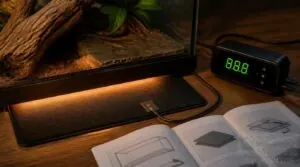
The manufacturer’s probe placement guide isn’t optional reading. It tells you exactly where to position the sensor for accurate temperature readings and which mounting method keeps both the probe and your reptile safe. Skipping this step risks false readings that could create dangerous heat levels.
Place the probe flat against the warm surface, using only the approved attachment method for your specific thermostat model.
Measure The Warm Surface
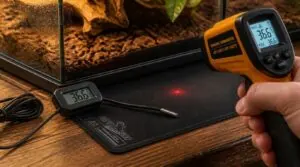
With probe placement confirmed, don’t rely only on your thermostat probe to verify heat levels. Place a digital thermometer probe directly on the heat mat’s surface and check the temperature range. Readings should fall within 0.5 to 1.0 degrees Celsius of your target. Use an infrared thermometer to cross-check, then record at multiple points for consistent reptile enclosure temperature control.
Secure Probe Against Movement
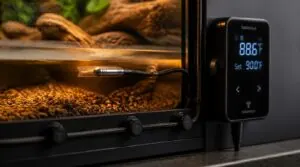
Once your readings are logged, lock the thermostat probe in place before finishing thermostat installation. A displaced sensor creates probe obstruction issues that feed false data to your heat mat thermostat.
Use thermal adhesive pads to anchor the probe base, or clip the cable with magnetic ties along the frame. Either way, your temperature probe stays exactly where calibration placed it.
Keep Probe Away From Water
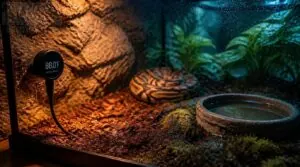
Water is the enemy of any temperature probe. Keep it at least 6 inches from water dishes, misters, or drainage points. A waterproof probe or moisture-resistant components still need smart placement.
Watch for these risks:
- Condensation near cool zones
- Spills during feeding
- Humidity creep from wet substrate
Probe obstruction issues from moisture send false data to your heat mat thermostat.
Avoid Loose Substrate Interference
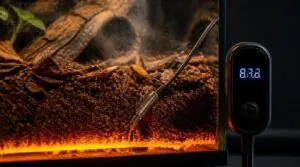
Loose substrate is a silent threat to accurate readings. Shifting material under the probe creates air gaps that degrade heat transfer and push your thermostat into overcorrecting.
| Substrate | Interference Risk | Fix |
|---|---|---|
| Loose sand | Probe drift | Use probe clips |
| Bark chips | Air pockets form | Pack substrate firmly |
| Coco fiber | Heat and moisture trap | Inspect and reposition weekly |
Check substrate alignment during every routine inspection.
Set and Calibrate The Temperature
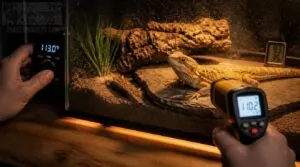
Getting the temperature right is where everything comes together — and where mistakes hit hardest. Before you can trust your thermostat, you need to set it accurately and confirm it’s actually delivering what your reptile needs. Here’s how to do that step by step.
Program Species-safe Target Temperatures
Every species runs on a different thermal clock. Program your thermostat to these species-safe warm-side targets first:
- Ball pythons: 29–32°C
- Corn snakes: 27–30°C
- King snakes: 28–32°C
- Reticulated pythons: 30–34°C
- Juvenile snakes: 1–2°C cooler than adult targets
Start conservative and adjust in 1°C steps only. If your snake consistently retreats to the cool side, your warm zone may be too hot.
Select The Correct Control Mode
Not all thermostat modes deliver the same results. For initial setup, manual override gives you direct control over your temperature setting. Once the mat is stable, switch to timer mode or schedule mode to automate day-night cycles.
| Mode | Best For |
|---|---|
| Manual | Initial setup and balance checks |
| Auto | Long-term daily stability |
| Timer/Schedule | Automated day-night cycles |
| PID | Precision with minimal overshoot |
Verify With Digital Thermometers
A thermostat display alone can’t guarantee safety. Verify it with a digital thermometer placed at the warm surface.
First, calibrate the probe using an ice bath to confirm its 0 C reference point.
Then compare readings at the same spot. If readings differ by more than 1 C, recalibrate before trusting either device.
Accurate verification is your first line of overheating prevention.
Compare Warm-side Surface Readings
A single spot reading can hide a problem. Compare multiple warm-side surface points to confirm consistency.
- Measure the mat center and edges; edge readings run 0.5 to 1.2 C higher
- Keep variation under 1 C across spots
- Recheck at identical ambient conditions
If spread exceeds 2 C, your probe contact is uneven. Fix contact before adjusting settings.
Adjust Settings in Small Increments
Big jumps in your temperature setting can overheat the substrate before you notice. Adjust by 0.5 C increments, then wait 5 minutes for the mat to respond. Only increase by 1 C after readings stay stable within 0.2 C across two checks. This protects your snake’s thermal gradient.
| Adjustment | Risk Level | Safe Practice |
|---|---|---|
| +2 C or more | High | Never attempt |
| +1 C | Moderate | Only when stable |
| +0.5 C | Low | Standard increment |
Record each change with its timestamp. If probe readings spike suddenly, return to your previous setting immediately.
Monitor Your Snake’s Thermal Gradient
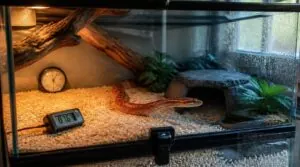
Setting the thermostat is only half the job—now you need to confirm it’s actually working for your snake. A thermal gradient means your enclosure offers a warm zone and a cool zone, so your snake can move between them as needed. Here’s what to check, from daily readings to your snake’s own behavior.
Proper warmth matters because snakes rely on it to break down prey, and you can see how snakes digest bones and fur to understand why a cool enclosure causes trouble.
Check Warm and Cool Zones
Because your snake can’t sweat, the thermal gradient it lives on is everything. Place one digital thermometer over the warm zone and one over the cool zone, then read both surfaces daily.
Since your snake can’t sweat, its thermal gradient is everything—so place digital thermometers over both warm and cool zones and read them daily
A healthy reptile temperature gradient setup shows roughly a 10°F difference between zones. If your readings match, then your reptile thermoregulation equipment needs adjustment before your snake overheats.
Track Daily Temperature Changes
Reading zones once isn’t enough. Warm-side temperatures swing 2 to 6°F across a 24-hour period, so log readings at the same times daily. Afternoon peaks between 1 PM and 4 PM can climb 4°F higher.
Use temperature logging with time stamps to spot drift or heater failure early. Consistent records beat memory every time.
Watch Overnight Temperature Drops
Overnight drops of 5 to 15°F are normal in temperate enclosures. Clear, calm nights cause the largest declines because heat escapes faster without cloud cover.
Your warm side cools 2 to 6°F slower than room air, thanks to substrate mass. If a thermostat alarm triggers below species targets, don’t panic; check readings, then verify probe placement.
Monitor Enclosure Humidity Separately
Temperature tells only half the story. Your heat mat also dries the air, which means humidity monitoring belongs beside your thermometer, never inside it.
Mount a digital hygrometer at mid-height, 2 inches from water dishes. Check it twice daily. If readings drift outside species targets, then adjust substrate or dish size, not thermostat settings.
Track these humidity habits:
- Log readings for two weeks to spot trends
- Compare enclosure RH against room humidity
- Use alarms set to species-safe thresholds
- Recheck after substrate changes
- Place sensors away from heat sources
Ball pythons need 50 to 60 percent RH; corn snakes tolerate 40 to 60. Heat mats won’t fix humidity problems, so treat reptile habitat humidity balance as its own task within your reptile environmental monitoring routine.
Observe Thermoregulation Behavior
Your snake’s behavior tells you what thermometers might miss. If it flattens against the warm zone constantly, then temperatures may sit too low.
Watch for behavioral signs of overheating: gaping, frantic pacing, or refusing to leave the cool side. Healthy reptile thermoregulation means moving between zones daily. Log these movements during thermal gradient mapping.
Persistent one-zone resting signals a thermostat adjustment, so verify probe placement first.
Troubleshoot and Maintain The System
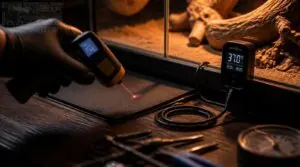
Even a well-installed thermostat system can develop problems over time, so regular checks matter. The good news is that most issues show clear warning signs you can catch early. Here’s what to look for and how to fix the most common problems before they put your snake at risk.
Mat Stays Continuously Heated
A heat mat that never cycles off is a warning sign, not a coincidence. Your thermostat should cut power when the surface reaches your temperature setting, usually every few minutes.
First, check that the mat is plugged into the control unit, not directly into the wall. If it’s in the outlet, the thermostat can’t regulate anything.
If wiring is correct, the probe may have shifted or failed. Re-secure it, and if the mat still runs continuously, replace the thermostat immediately.
Temperature Readings Fluctuate
If your readings swing up and down, don’t panic, small fluctuations are often normal. On-off thermostats cycle between set points, so expect a few degrees of drift.
If swings exceed 3°F, check sensor calibration against a reference thermometer. Poor temperature control accuracy usually means probe placement issues, not thermostat failure. Verify the unit’s temperature range matches your species needs.
Inspect Cords, Plugs, and Probe
Electrical faults cause more heat mat failures than thermostat errors do. Inspect every 30 days.
- Frayed insulation means replace immediately
- Cracked plug housing compromises safety
- Burn marks signal overheating
- Bent prongs need straightening
- Damaged probe tips give false readings
Check that your heat mat thermostat compatibility matches your wiring kit. Route cords away from water, secure them with clips, and confirm surge protection is in place. Log each inspection for traceability.
Clean The Probe Safely
A dirty probe lies to you. Substrate dust, urates, and dried humidity residue insulate the sensor, so your thermostat regulates a false temperature.
Clean the probe every 30 days, right after your cord inspection. Wipe the tip gently with a lint-free swab, apply cleaner to the swab never the probe, and air dry fully before reconnecting. Never immerse it.
Log each cleaning alongside your sensor calibration checks.
Replace Damaged Equipment Immediately
A frayed cord can kill a snake through shock or fire, so replace damaged equipment immediately. Unplug first, then swap in a matching-wattage thermostat within 24 hours. Inspect cord wear monthly. Log serial numbers and dates. If you can’t fix it today, unplug it.
Frequently Asked Questions (FAQs)
Can I use one thermostat for multiple heat mats?
Yes, one thermostat can run multiple heat mats, but only if the combined wattage stays within its rated load. Exceeding that limit risks overheating the thermostat and losing temperature control entirely.
How do I childproof my reptile heating setup?
Children are drawn to absolutely anything warm, glowing, or strictly off-limits. Install a metal mesh guard around all heat sources, mount your thermostat somewhere small hands can’t reach, and replace cracked enclosure panels right away.
What happens if power goes out unexpectedly?
A power outage cuts your heat mat instantly. The resulting temperature drop can seriously stress reptile health within minutes. Without a backup power source ready, reintroducing heat too quickly once power returns risks thermal shock.
Are smart home systems compatible with reptile thermostats?
Compatibility works like a bridge. Smart thermostats with Wi-Fi support enable remote monitoring, a programmable schedule, and temperature range control for your reptile habitat climate management, but only when they share a protocol like Zigbee.
How long do reptile heat mats typically last?
Most reptile heat mats last 3 to 5 years, though cheaper models may degrade in 2 to Proper installation, regular cord wear inspection, and thermostat use really extend component lifespan.
Conclusion
What separates a healthy snake from a burned one? One small box, wired correctly.
Once you truly understand how to use a thermostat with a reptile heat mat, you stop guessing and start controlling what matters most.
Check your probe placement carefully.
Verify your readings at least weekly.
Trust your thermometer over your hand every time.
Your snake can’t tell you when the floor is too hot, so your setup has to speak for it.
- https://www.reptiles.swelluk.com/help-guides/reptile-thermostat-setup-where-to-put-the-thermostat-probe-in-your-vivarium
- https://crabstreetjournal.org/blog/how-to-properly-use-a-thermostat-with-a-heat-mat-for-land-hermit-crabs
- https://reptichip.com/products/under-tank-carbon-film-heat-mat-with-digital-thermostat